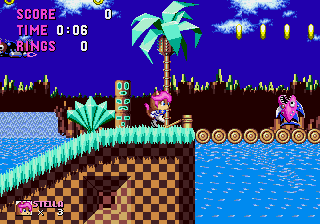
Stella the Cat
0 8 0
Step Into the World of Stella the Cat
Stella the Cat is a charming, pixel-art adventure that takes players into a cozy, whimsical universe. Originally from the Genesis era, this classic game offers a straightforward yet engaging experience that invites exploration of a quiet, colorful setting filled with small details and nostalgic appeal. Its visuals create a warm feeling, with bright backgrounds and simple sprite animations that capture the essence of 16-bit gaming.
The sound design complements the visuals with cheerful melodies and gentle sound effects that foster a calm, curious atmosphere. The music loops softly in the background, reinforcing a peaceful, almost meditative mood. As you move through the game’s environments, you’ll notice a focus on clarity and charm rather than flashy visual effects, making the game accessible and inviting for players of all ages. Playing in your browser, Stella the Cat runs smoothly, offering instant access without downloads or setup, making it great for quick sessions or longer explorations.
How the Gameplay Hooks You
This Genesis classic features simple, intuitive mechanics that keep the gameplay flowing at a gentle but engaging pace. The game centers on exploration and light puzzle-solving, encouraging interaction with the environment and discovery of small secrets. Progression is straightforward, with each new area offering a fresh visual and some new content, maintaining a steady rhythm that gently guides you forward.
The loop involves finding new paths or items that unlock subsequent sections, giving a satisfying sense of discovery without overwhelming complexity. It’s designed for short bursts or longer play sessions, feeling relaxed yet rewarding. The challenge is patience and observation, making it accessible while still providing a sense of achievement as you piece together the game’s quiet narrative and exploration goals.
Pro Tips for Stella the Cat
If you want to get the most out of your time with the game, here are some practical tips:
- Pay attention to visual cues; small changes often reveal secrets or new paths.
- Explore each area slowly—there’s no rush, and patience can uncover hidden details.
- Listen carefully to the sound effects; they sometimes hint at interactive objects or key transitions.
- If you get stuck, try different routes—backtracking can lead to new discoveries.
- Remember that progress is gentle; focus on enjoying the atmosphere rather than rushing through.
- If a puzzle feels tricky, taking a break can help you see solutions more clearly when you return.
Frequently Asked Questions
What kind of experience should I expect from Stella the Cat?
The game offers a calm, exploratory journey with an emphasis on atmosphere and simple puzzles. It’s perfect for players looking for a relaxed, nostalgic experience that doesn’t require fast reflexes or intense action.
Does Stella the Cat get repetitive or does it offer enough variety?
Although the core gameplay loop stays consistent, each new area introduces visual changes and slight variations in puzzles or interactions, keeping things fresh. Its pace and simplicity make it suitable for short, casual play sessions without feeling boring.
Is Stella the Cat good for quick plays or longer sessions?
Yes, this classic game is designed for both quick sessions and longer explorations. Its straightforward mechanics and charming visuals make it easy to pick up and pause without losing enjoyment or progress.
Stella the Cat offers a gentle, nostalgic glimpse of Genesis gaming that’s accessible, relaxing, and charming. Playing it in your browser means instant, hassle-free access to a quiet adventure perfect for relaxing or passing the time with a bit of pixel art warmth.
Related games: you can also try Granada (Japan, USA) (v1.1) and Mig-29 Fighter Pilot (Japan), or browse all other games in the Genesis category.
How to Play Stella the Cat?
Explore the colorful world, find hidden paths and items, and solve simple puzzles to progress through new areas at a relaxed pace.
Game Controls
Arrow keys move Stella; action buttons are mapped to on-screen keys for interaction and puzzle solving.
You may be interested in:
-
 Genesis
♥ 3
Zou! Zou! Zou! Rescue Daisakusen (Japan)
Genesis
♥ 3
Zou! Zou! Zou! Rescue Daisakusen (Japan) -
 Genesis
♥ 6
Zoom! (World)
Genesis
♥ 6
Zoom! (World) -
 Genesis
♥ 9
Zool – Ninja of the ‘Nth’ Dimension (USA)
Genesis
♥ 9
Zool – Ninja of the ‘Nth’ Dimension (USA) -
 Genesis
♥ 11
Zombies Ate My Neighbors (USA)
Genesis
♥ 11
Zombies Ate My Neighbors (USA) -
 Genesis
♥ 9
Zombies (Europe)
Genesis
♥ 9
Zombies (Europe) -
 Genesis
♥ 1
Zombie High (USA) (Proto)
Genesis
♥ 1
Zombie High (USA) (Proto) -
 Genesis
♥ 1
Zhuagui Dashi – Ghost Hunter (China) (Unl)
Genesis
♥ 1
Zhuagui Dashi – Ghost Hunter (China) (Unl) -
 Genesis
♥ 1
Zero Wing (Japan)
Genesis
♥ 1
Zero Wing (Japan)
Comments (0)
No comments yet. Be the first to comment!