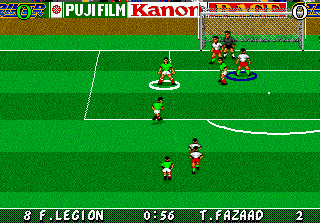
Striker (Europe) (Beta)
0 2 0
Striker (Europe) (Beta) is a classic Genesis sports game that puts you right into fast-paced arcade-style soccer. If you enjoy simple, quick matches from the 16-bit era, this game offers a nostalgic vibe with straightforward gameplay and controls. Designed with fans of the genre in mind, it’s easy to jump into on this browser emulator—no downloads or setup required.
Getting Into Striker
At its core, Striker is about quick, energetic soccer matches where the goal is to score more than the other team within a time limit. The game is simple: pick your team, start the match, and control your players to pass, shoot, and defend. It’s built for short sessions, often just a few minutes long, making it perfect for quick breaks or casual play. You can play alone or against a friend, with matches focusing on fast scoring and minimal fuss.
During a typical game, you’ll see a simplified pitch and a minimal interface. The controls are easy to pick up, relying on timing and positioning rather than complicated tactics. There aren’t many menus or management options—your main task is moving your players into scoring positions and stopping the opponent from doing the same. Because the gameplay is quick and mechanics simple, matches can change in an instant, rewarding fast reflexes and awareness.
Standout Features
This Genesis game stands out with its clean pixel art that captures the arcade style of the era. The sprites are bright and easy to follow, even on small screens. The fast pace encourages multiple plays, as players often want to improve their score or top a friend’s record. Its straightforward style and short matches make it easy to jump in and learn quickly, which keeps players coming back.
It doesn’t have complex progression or unlockables, but that simplicity is part of what makes it fun. Quick matches and easy gameplay mean you can enjoy a game anytime. Since it was released mainly in Europe, it’s mostly in English, and the retro soccer look appeals to fans of old-school sports titles. Playing here means instant access—no fuss—whether you’re on a PC or mobile device with touch controls.
Strategy and Tips
To get the most out of Striker, focus on quick decision-making and good positioning. Practice timing your shots when the goalie is vulnerable, and watch passing lanes to set up scoring chances.
- Control players near the goal to take advantage of scoring opportunities.
- Use quick passes to bypass defenders and set up shots.
- Position your players to block shots and intercept passes on defense.
- Stay balanced; avoid overcommitting so you can switch quickly from attack to defense.
- Anticipate your opponent’s moves to intercept passes or block shots.
- Play several quick rounds to get better at timing and reactions.
Quick Questions
How do I start a game?
Just load the game in your browser, pick your team, and start playing—no setup needed.
What’s a common mistake for beginners?
Many new players go all out on offense and leave gaps in defense. Focus on balanced positioning first.
Can I play Striker on a mobile device with touch controls?
Yes, it works in your browser on mobile, and controls are adapted for touchscreens, making it easy to enjoy anywhere.
Striker is a quick, easy way to enjoy soccer right in your browser. Its simple mechanics and lively pixel art make it a solid choice for retro sports fans looking for short, competitive matches.
Related games: you can also try Sonic 1 Mania Edition Green Hill Encore and Sonic Zeta Overdrive, or browse all other games in the Genesis category.
How to Play Striker (Europe) (Beta)?
Choose your team and score more goals than the opponent within a short match by passing, shooting, and defending using simple controls. Focus on quick reactions and positioning to win fast-paced soccer games.
Game Controls
Arrow keys move players; specific keys handle passing, shooting, and defending.
You may be interested in:
-
 Genesis
♥ 7
Super Smash TV (USA, Europe)
Genesis
♥ 7
Super Smash TV (USA, Europe) -
 Genesis
♥ 1
Super Skidmarks (Europe) (J-Cart)
Genesis
♥ 1
Super Skidmarks (Europe) (J-Cart) -
 Genesis
♥ 1
Super Skidmarks (Europe) (Beta)
Genesis
♥ 1
Super Skidmarks (Europe) (Beta) -
 Genesis
♥ 7
Super Shinobi, The (Japan)
Genesis
♥ 7
Super Shinobi, The (Japan) -
 Genesis
♥ 2
Super Shinobi II, The (Japan) (Beta) (Earlier)
Genesis
♥ 2
Super Shinobi II, The (Japan) (Beta) (Earlier) -
 Genesis
♥ 3
Super Shinobi II, The (Japan) (Beta)
Genesis
♥ 3
Super Shinobi II, The (Japan) (Beta) -
 Genesis
♥ 13
Super Shinobi II, The (Japan)
Genesis
♥ 13
Super Shinobi II, The (Japan) -
 Genesis
♥ 1
Super Real Basketball (Japan)
Genesis
♥ 1
Super Real Basketball (Japan)
Comments (0)
No comments yet. Be the first to comment!