Sudoku Gridmaster (USA)
0 1 0
Sudoku Gridmaster (USA) is a puzzle game originally made for the Nintendo DS that brings the familiar logic challenge of Sudoku to your browser. Its simple layout and focus on solving puzzles make it a good choice for fans of the game looking for something easy to pick up. Playing it directly in your browser gives you a nostalgic feel for early 2000s puzzle culture without needing to download anything or use additional hardware.
Sudoku Gridmaster: Gameplay Overview
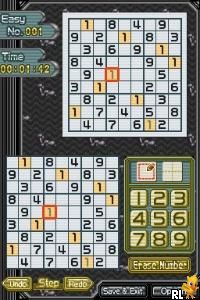
The main goal in Sudoku Gridmaster is to fill a 9×9 grid with numbers from 1 to 9, making sure each number appears only once in each row, column, and 3×3 box. The game relies on logical thinking, where you figure out which numbers go in each empty space based on the clues already in place. The display uses the DS’s dual screens, with the top showing the whole grid and the touchscreen below for input and notes, making it easy to keep track of possible options or cross out wrong choices.
This version sticks to the basic rules of Sudoku, but it does include helpful features like highlighting conflicts, quick note modes, and error signals to keep mistakes in check. The design encourages players to develop strategies and patterns that help solve puzzles more efficiently, which makes it a good pick for both casual players and serious Sudoku fans.
Modes, Levels and Progression
Sudoku Gridmaster offers puzzles at different difficulty levels, from easy to expert, so players of all skill levels can find a challenge. The game features multiple puzzle sets, each more complex than the last, requiring more advanced techniques to solve. As you complete puzzles, new challenges or modes become available, encouraging you to keep playing and improving.
While there isn’t a story or a traditional progression system, the variety of puzzles and the goal of improving your solving time or accuracy add depth. Some versions include timed modes or achievement tracking, giving you extra motivation to sharpen your skills and revisit puzzles for better results. This setup makes Sudoku Gridmaster appealing for those who want to practice their logic over time.
Winning Strategies
To do well in Sudoku Gridmaster, it’s best to stay organized and methodical. Here are some tips to help you along:
- Begin by filling in the clues that are obvious, where the answer is clear based on what’s already in the grid.
- Use the note feature to keep track of possible numbers for each cell, helping you avoid guesswork.
- Focus on rows, columns, or boxes that are nearly filled in; working on these can quickly narrow down your options.
- Look out for duplicate numbers in rows, columns, and boxes to eliminate incorrect choices.
- Practicing common Sudoku tricks like spotting hidden singles or pointing pairs can speed things up.
Common Questions About Sudoku Gridmaster
Does the difficulty change as I work through more puzzles?
Yes, puzzles are usually arranged from simple to tricky, with harder ones needing more advanced deduction skills.
Are there different modes or features to keep the game interesting?
The game generally offers various difficulty levels and might include timed modes or achievement options for more replay value.
How long does a typical puzzle take, and can I play quick sessions?
Most puzzles can be finished in a few minutes, making it perfect for short breaks or longer puzzle sessions as you get better at the game.
Overall, Sudoku Gridmaster stays true to the classic puzzle, emphasizing logical thinking and planning. Its simple layout and range of difficulty levels make it accessible, but still challenging enough to keep you coming back. Playing it in your browser means you can sharpen your Sudoku skills anytime without any fuss.
Related games: you can also try Fresh PreCure! – Asobi Collection (Japan) and Ice Age 2 – The Meltdown (Europe) (En,Fr,De,Es,It,Nl), or browse all other games in the Nintendo DS category.
How to Play Sudoku Gridmaster (USA)?
Fill the 9x9 grid with numbers 1-9 so that each appears only once in every row, column, and 3x3 box. Use logic and notes to solve puzzles of varying difficulty levels.
Game Controls
Arrow keys navigate; Enter or space select and input numbers; mouse clicks also work.
You may be interested in:
-
 Nintendo DS
♥ 1
Casper’s Scare School – Classroom Capers (USA)
Nintendo DS
♥ 1
Casper’s Scare School – Classroom Capers (USA) -
 Nintendo DS
♥ 1
Zunou Nouryoku Koujou Machine – Touch de Zunoo DS (Japan)
Nintendo DS
♥ 1
Zunou Nouryoku Koujou Machine – Touch de Zunoo DS (Japan) -
 Nintendo DS
♥ 1
Zunou ni Asekaku Game Series! Vol. 1 – Cool 104 Joker & Setline (Japan)
Nintendo DS
♥ 1
Zunou ni Asekaku Game Series! Vol. 1 – Cool 104 Joker & Setline (Japan) -
 Nintendo DS
♥ 9
Zuma’s Revenge (USA)
Nintendo DS
♥ 9
Zuma’s Revenge (USA) -
 Nintendo DS
♥ 1
Zubo (USA) (En,Fr,Es)
Nintendo DS
♥ 1
Zubo (USA) (En,Fr,Es) -
 Nintendo DS
♥ 1
Zubo (Europe) (En,Fr,De,Es,It,Nl,Sv)
Nintendo DS
♥ 1
Zubo (Europe) (En,Fr,De,Es,It,Nl,Sv) -
 Nintendo DS
♥ 1
Zorro – Quest for Justice (USA) (En,Fr,De,Es,It)
Nintendo DS
♥ 1
Zorro – Quest for Justice (USA) (En,Fr,De,Es,It) -
 Nintendo DS
♥ 1
Zorro – Quest for Justice (Europe) (En,Fr,De,Es,It)
Nintendo DS
♥ 1
Zorro – Quest for Justice (Europe) (En,Fr,De,Es,It)
Comments (0)
No comments yet. Be the first to comment!