Super Dany (France) (Beta)
0 1 0
Super Dany (France) (Beta) is a classic SNES game emulated directly in your browser, bringing a piece of 16-bit gaming history to modern players in a straightforward, accessible way. If you enjoy retro titles with simple mechanics and a nostalgic feel, this game offers a familiar experience reminiscent of the console’s heyday. It’s ideal for those wanting to revisit the SNES era or newcomers curious about vintage gameplay styles without the hassle of downloads or complex setups.
Getting Into Super Dany
The main idea of Super Dany is guiding the main character through various levels filled with obstacles and enemies. The gameplay is simple but engaging: move around, avoid hazards, and reach the end of each stage. As a classic SNES platformer, you’ll spend your time jumping over pits, dodging enemies, and collecting items that help you progress through the game’s stages.
The modes are straightforward—most of the game involves completing levels in order. Each stage presents its own set of challenges that test your timing and precision, with not much in the way of complicated mechanics or branching paths. It’s designed for single-player sessions that are quick to pick up; you can start and finish a level in just a few minutes, which makes it good for quick breaks or longer gaming sessions if you want to tackle multiple levels at once.
Standout Features
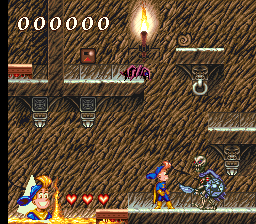
Super Dany’s visuals stay true to the SNES style, with pixel art featuring bright, colorful environments and simple character animations. The graphics evoke a nostalgic look, capturing the essence of 16-bit platformers from that era, and they run smoothly even in the browser emulator, thanks to optimized rendering. The game’s progression is linear, but each level offers its own set of challenges, encouraging players to improve their timing and reflexes with repeated tries.
Replay value comes from the difficulty curve and the desire to beat previous scores. As you go along, you might find yourself trying to finish stages faster or without losing lives. Since it’s a platformer with straightforward mechanics, players often return to refine their route or try different approaches to tricky sections. Its simple design makes it accessible but also offers enough challenge to keep you coming back for more.
Strategy and Tips
Getting the most out of Super Dany involves understanding the rhythm of each level and anticipating enemy movements. Here are some tips to help you succeed:
- Time your jumps carefully to avoid falling or hitting hazards.
- Learn enemy movement patterns to pass through tough sections more confidently.
- Pick up any available power-ups or items that can grant temporary invincibility or extra lives.
- Practice difficult sections multiple times to improve your reflexes and memorization.
- Be patient—rushing often leads to mistakes and losing lives.
- Some levels can be completed more efficiently by taking alternative routes if they exist.
Quick Questions
How do I get started with Super Dany?
Just load the game in your browser, and you’re ready to go with no setup needed.
What’s a common mistake for beginners?
Trying to rush through levels without paying attention to enemy patterns and hazards usually results in early mistakes and lost lives.
Does it work well on mobile or touch devices?
Since it runs in a browser, it might work on mobile devices, but precise controls could be tricky compared to using a keyboard or gamepad, depending on your device.
Super Dany gives a simple, fun taste of SNES platforming, perfect for quick plays or revisiting a classic style. Its straightforward design and nostalgic pixel art make it a good pick for fans of old-school games wanting a browser-based version of this SNES favorite.
Related games: you can also try Genocide 2 (Japan) and BS Marvelous Camp Arnold Course – Dai-1-shuu (Japan), or browse all other games in the SNES category.
How to Play Super Dany (France) (Beta)?
Guide Super Dany through levels by jumping over obstacles and avoiding enemies to reach the end. Collect items and improve your timing to complete stages quickly and with fewer lives lost.
Game Controls
Arrow keys for movement, action buttons mapped to keyboard keys for jumping and interacting.








Comments (0)
No comments yet. Be the first to comment!