Super Dodge Ball Advance (E)(Cezar)
0 1 0
Super Dodge Ball Advance (E)(Cezar) is a classic Game Boy Advance sports game that drops players into the fast-paced world of dodge ball competitions. Its simple gameplay and competitive vibe make it appealing to fans of old-school sports titles and arcade-style multiplayer fun. This game gives a nostalgic look at a popular sport, reimagined for portable play, and runs right in your browser, so you can jump into a quick match anytime.
Getting Into Super Dodge Ball Advance
The main gameplay features two teams facing off in quick, intense dodge ball matches. You control a team of characters, each with their own movement and throwing abilities, trying to hit opponents with the ball to eliminate them. Matches tend to be short, often just a few minutes, which encourages fast decisions and reflexes. You can play solo against AI or challenge friends in local multiplayer, which adds a lot of fun for multiplayer sessions.
Most games start with team selection and some setup for the match. Once it begins, your goal is to dodge incoming balls while aiming accurate throws at opponents. The game focuses on timing and positioning, trying to catch opponents off guard. Winning matches unlocks new teams and characters, giving a sense of progress. The controls are simple but need precision, especially when under pressure, making every game a test of quick reflexes and good positioning.
Standout Features
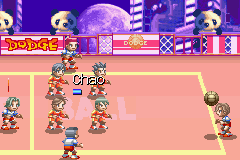
Visually, Super Dodge Ball Advance captures the pixel art style typical of its time, with colorful sprites that clearly show teams and characters. The animations are smooth enough to show movement and hits well, keeping a lively arcade feel. The design makes each match look energetic and easy to follow, even during hectic moments.
Progression is tied to winning matches and earning points, which unlocks new teams and characters, encouraging replay. The quick rounds make it perfect for short gaming sessions, but mastering its mechanics keeps players coming back for more competitive fun. Its multiplayer mode adds replay value, since no two games are exactly the same, especially when facing different opponents or trying out different team strategies.
Strategy and Tips
To do well in Super Dodge Ball Advance, focus on timing your throws and dodges. Position your characters for quick reactions and aim for weak spots in your opponent’s formation to gain an edge.
- Keep moving to avoid being an easy target.
- Watch opponents’ throwing patterns to anticipate their attacks.
- Use quick throws to catch enemies off guard, especially when they’re distracted.
- Coordinate your team to focus on weaker or isolated opponents.
- Practice catching to regain control and set up counterattacks.
- Balance aggressive throws with defensive dodging; overcommitting can leave you vulnerable.
Quick Questions
How do I start a game in Super Dodge Ball Advance?
Just select the game from the emulator interface and pick your team or multiplayer mode to jump right in.
What’s a common mistake beginners make?
Many new players overextend their attacks, leaving openings for counterattacks. Staying mobile and timing your throws carefully makes a big difference.
Can I play Super Dodge Ball Advance on mobile or touch devices?
Yes, since it runs directly in your browser, it works well on touchscreens, with controls adapted for mobile, making it easy to play on the go.
Super Dodge Ball Advance offers quick, competitive dodge ball action perfect for short gaming sessions or multiplayer fun. Its simple mechanics and lively visuals make it a good pick for fans of arcade sports games who want a challenge that’s straightforward to learn but hard to master.
Related games: you can also try Scan Hunter (J)(Evasion) and Kirby & the Amazing Mirror (Proto), or browse all other games in the Game Boy Advance category.
How to Play Super Dodge Ball Advance (E)(Cezar)?
Control a team to hit opponents with the ball while dodging incoming throws. Win matches to unlock new characters, focusing on quick reflexes and precise throws in fast-paced dodge ball battles.
Game Controls
Arrow keys move characters; action buttons throw or pass the ball; start/pause with designated keys.
You may be interested in:
-
 Game Boy Advance
♥ 2
Zooo (J)(Rising Sun)
Game Boy Advance
♥ 2
Zooo (J)(Rising Sun) -
 Game Boy Advance
♥ 4
Zooo (E)(Trashman)
Game Boy Advance
♥ 4
Zooo (E)(Trashman) -
 Game Boy Advance
♥ 2
ZooCube (U)(Mode7)
Game Boy Advance
♥ 2
ZooCube (U)(Mode7) -
 Game Boy Advance
♥ 1
ZooCube (E)(Blizzard)
Game Boy Advance
♥ 1
ZooCube (E)(Blizzard) -
 Game Boy Advance
♥ 1
Zone of the Enders – The Fist of Mars (U)(Mode7)
Game Boy Advance
♥ 1
Zone of the Enders – The Fist of Mars (U)(Mode7) -
 Game Boy Advance
♥ 1
Zone of the Enders – The Fist of Mars (E)(Cezar)
Game Boy Advance
♥ 1
Zone of the Enders – The Fist of Mars (E)(Cezar) -
 Game Boy Advance
♥ 1
Zoku Bokura no Taiyou – Taiyou Shounen Django (J)(Independent)
Game Boy Advance
♥ 1
Zoku Bokura no Taiyou – Taiyou Shounen Django (J)(Independent) -
 Game Boy Advance
♥ 7
Zoku Bokura no Taiyou – Taiyou Shounen Django (J)(Caravan)
Game Boy Advance
♥ 7
Zoku Bokura no Taiyou – Taiyou Shounen Django (J)(Caravan)
Comments (0)
No comments yet. Be the first to comment!