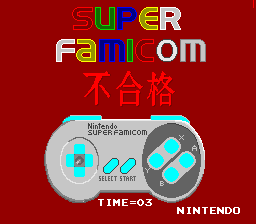
Super Famicom Controller Test Program (Japan)
0 4 1
The Super Famicom Controller Test Program (Japan) is a simple but useful piece of software from the SNES era. Its main goal is to help you check if your Super Famicom controller is working properly. This classic runs smoothly right in your browser, giving a nostalgic look at the hardware testing routines from back in the day. Its straightforward design and clear purpose make it perfect for confirming controller responsiveness or troubleshooting input issues without any fuss. As a piece of retro testing software, it reflects the practical approach of 16-bit hardware validation, and it’s free to use online.
Step Into the World of Super Famicom Controller Test Program
The interface is minimal, with a black-and-white display that feels like early diagnostic screens. There’s no fancy artwork or animations—just input feedback. When you press buttons or move the directional pad, indicators light up or change, showing that your controller signals are being received. The sound is either silent or consists of simple beeps, keeping the focus on function. This no-frills setup echoes the hardware testing routines of the past, giving you a sense of what maintenance was like during the heyday of gaming consoles.
The atmosphere is practical and straightforward, designed more as a tool than entertainment. Its clean presentation removes distractions, making it easy to verify controller inputs. If you’re familiar with vintage consoles, it feels like holding a piece of gaming history. Playing it in your browser offers a simple experience perfect for quick checks or satisfying curiosity about old hardware.
How the Gameplay Hooks You
The main idea is to test each button and directional control in real time. When you press a button, the display updates immediately, confirming whether the controller is working properly. There’s no scoring or levels—just instant feedback that shows your controller responds. The pace depends entirely on your inputs; you can quickly test a few buttons or go through everything more thoroughly. It’s flexible enough for quick troubleshooting or detailed checks.
Because the design is so straightforward, it’s great for short sessions focused on hardware testing. No complex mechanics or levels mean it stays simple and effective. It rewards patience and attention to detail, keeping you focused on the task without any distractions.
Pro Tips for Super Famicom Controller Test Program
Getting the most out of this tool doesn’t take much effort, but these tips might help:
- Test all buttons and directions in a logical order so you don’t miss anything.
- Use fresh batteries or a reliable power source to keep inputs consistent.
- If possible, try different controller ports to see if any issues are specific to one port.
- If some inputs aren’t registering, consider cleaning the contacts or inspecting for damage.
- Combine this test with other tools if you suspect hardware problems beyond input detection.
- Run the test regularly to make sure your controller stays responsive over time.
Frequently Asked Questions
Can I use this to test controllers for my SNES console?
Yes. The process it mimics is similar to how you’d check a controller on real hardware, so it works well for testing responsiveness when connected to a compatible device or emulator.
Does it get boring after a while?
Since it’s mainly a practical tool, it can feel repetitive if used only for fun. Still, it’s handy for quick checks and doesn’t require long play sessions.
Is it suitable for kids or beginners?
Absolutely. Its simple layout and clear task make it accessible for all ages—especially those interested in the technical side of retro gaming hardware.
This collection of routines is a small but important part of SNES history. The Super Famicom Controller Test Program offers a straightforward, browser-based way to check hardware, making it useful for collectors, restorers, or anyone curious about vintage software. Whether confirming a controller’s condition or just exploring retro tech, this tool gives a quick, authentic look at 16-bit testing in a clean, accessible package.
Related games: you can also try Pac-Man (USA) and So 2 Mice Walk Into a Bar… by S.N.N., idol, or browse all other games in the SNES category.
How to Play Super Famicom Controller Test Program (Japan)?
Press the controller buttons or move the D-pad to see if the indicators light up, confirming your controller is working properly. Use this to troubleshoot or verify input responses quickly.
Game Controls
Arrow keys act as the D-pad; other keys correspond to controller buttons.








Comments (0)
No comments yet. Be the first to comment!