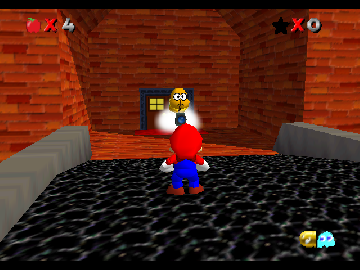
Super Mario 64 Project Crossing
0 1 0
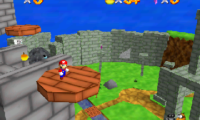
Super Mario 64 Project Crossing is a browser-based version of the Nintendo 64 favorite, giving you a simple way to play this classic platformer online. If you like exploring colorful worlds, collecting items, and timing your jumps just right, this version keeps the spirit of the original alive. Perfect for quick breaks or longer sessions, you won’t need to download anything to get started.
Getting Into Super Mario 64 Project Crossing
The gameplay revolves around guiding Mario through large 3D worlds filled with puzzles, enemies, and hidden secrets. Your main goal is to complete tasks in each level, often by collecting Power Stars to reach new areas. You explore a level, gather items, deal with enemies or solve puzzles, then move on. Each time you play, there’s a sense of progress as you unlock new levels and revisit familiar ones with fresh challenges.
Start by choosing a level or exploring the central hub—the castle—that connects to different worlds. The controls are straightforward, and the emulator runs smoothly. Since it’s from the Nintendo 64 era, precise jumping and timing are essential. You’ll spend time jumping across platforms, navigating obstacles, and trying different routes to gather stars and uncover secrets. The gameplay blends exploration, platforming skill, and puzzle-solving, encouraging replaying to improve your times and find hidden goodies.
Standout Features
The visuals stay true to the original Nintendo 64 look, with bright textures and polygonal models that remind you of early 3D gaming. It runs well in the browser, offering a nostalgic experience without sacrificing accessibility. The game’s simple goal is to gather stars, unlock new levels, and explore more complex areas. Its design invites repeated play, whether to beat your best times or uncover all the secrets hidden in each world.
Because levels are non-linear, you can revisit earlier stages with new abilities or strategies. The browser version makes it easy to jump in without setup or downloads, and while the gameplay can be challenging, it’s fair. Its mechanics are simple but deep enough to keep fans of platformers interested, especially those who want to relive a key moment in gaming history.
Strategy and Tips
If you’re new to Super Mario 64 Project Crossing, focus on mastering basic jumps and movement. Exploring thoroughly helps you find hidden stars and shortcuts.
- Gather coins and power-ups early to extend your play and survive tougher sections.
- Use the camera controls to get a better view of your surroundings and plan your jumps.
- Practice timing your jumps and attacks to avoid losing health or falling off ledges.
- Revisit levels after collecting stars to discover hidden areas or alternate routes.
- Pay attention to the specific goals for each level; some stars are hidden or require solving puzzles.
Quick Questions
How do I get started if I’ve never played the original game?
Start by exploring the castle hub and picking a level to get familiar with the controls and objectives.
What’s a common mistake beginners make?
Many new players overlook how important camera control is, which can make navigation tricky and cause falls or missed targets.
Can I play Super Mario 64 Project Crossing on phones or tablets?
Yes, since it runs in your browser, you can play it on mobile devices. Using a mouse or keyboard usually makes controlling easier than touch input.
Super Mario 64 Project Crossing makes it simple to enjoy a classic Nintendo 64 game right in your browser, so you can experience this iconic adventure whenever you want.
Related games: you can also try F1 Pole Position 64 (USA) (En,Fr,De) and Bomberman Hero (USA), or browse all other games in the Nintendo 64 category.
How to Play Super Mario 64 Project Crossing?
Guide Mario through 3D worlds, collect Power Stars, solve puzzles, and defeat enemies to unlock new levels. Explore, jump, and find secrets to progress and improve your times.
Game Controls
Arrow keys for movement; space or assigned keys for jumping and actions.
You may be interested in:
-
 Nintendo 64
♥ 6
Super Melee Adventure 64 – NESS
Nintendo 64
♥ 6
Super Melee Adventure 64 – NESS -
 Nintendo 64
♥ 43
Super Melee Adventure 64 – Luigi
Nintendo 64
♥ 43
Super Melee Adventure 64 – Luigi -
 Nintendo 64
♥ 8
Super Melee Adventure 64 – FOX
Nintendo 64
♥ 8
Super Melee Adventure 64 – FOX -
 Nintendo 64
♥ 7
Super Melee Adventure 64 – C.FALCON
Nintendo 64
♥ 7
Super Melee Adventure 64 – C.FALCON -
 Nintendo 64
♥ 1
Super Mario The Power Star (Christmas Special)
Nintendo 64
♥ 1
Super Mario The Power Star (Christmas Special) -
 Nintendo 64
♥ 18
Super Mario Star Road Multiplayer (v1.2.1)
Nintendo 64
♥ 18
Super Mario Star Road Multiplayer (v1.2.1) -
 Nintendo 64
♥ 7
Super Mario Star Road – Enhanced
Nintendo 64
♥ 7
Super Mario Star Road – Enhanced -
 Nintendo 64
♥ 6
Super Mario In Crash Bandicoot
Nintendo 64
♥ 6
Super Mario In Crash Bandicoot
Comments (0)
No comments yet. Be the first to comment!