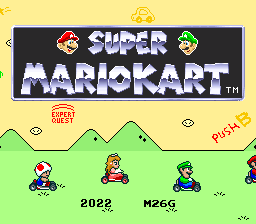
Super Mario Kart – Expert Quest
0 11 2
Super Mario Kart – Expert Quest is a classic SNES game that you can play directly in your browser. No downloads or setup needed, so you can easily revisit this fun racing game whenever you like. Its pixel art visuals and chiptune soundtrack bring a nostalgic feel, but the gameplay still offers enough challenge to keep even experienced players on their toes. As part of the SNES lineup, it provides a simple yet competitive racing experience that has stayed enjoyable over the years.
Step Into the World of Super Mario Kart – Expert Quest
This SNES game drops players into a lively, cartoonish universe where Mario and friends race along colorful tracks full of twists, turns, and obstacles. The graphics are intentionally pixelated with bright colors and simple animations that capture the charm of the early 90s. Cheerful tunes and familiar sound effects add to the lively Mario-themed racing atmosphere. The interface is clear, showing track layouts and character icons, keeping the focus on fast-paced racing.
Although it’s rooted in the limitations of its time, Super Mario Kart – Expert Quest’s visuals and sounds create a welcoming environment. The game’s energy comes from the thrill of racing, with each lap building anticipation. Playing through this browser-based emulator makes everything feel immediate, thanks to responsive controls that emphasize skill and timing over technical complexity. Its straightforward design makes it suitable for quick races or longer sessions depending on your mood.
How the Gameplay Hooks You
The core gameplay revolves around simple racing mechanics. Pick a character, each with their own strengths, then race on tracks featuring sharp corners, hazards, and shortcuts. The pace is lively, demanding quick reflexes and smart use of items. As you get better, the game introduces more challenging tracks, rewarding your mastery of controls and track memory.
The game encourages competition, with players trying to finish first while managing power-ups and avoiding shells or banana peels. While the mechanics are easy to pick up, they hide a layer of depth that rewards practice and precision. Races can be quick or extended, but each one keeps a sense of urgency and fun. Trying to improve your times and tactics keeps things fresh across multiple sessions.
Pro Tips for Super Mario Kart – Expert Quest
To get the most out of this game, try these tips:
- Learn the layout of each track to anticipate turns and hazards, giving you an advantage.
- Use power-ups strategically; saving shells for defense or attacks can change the race’s outcome.
- Practice drifting around corners to keep your speed up and avoid losing momentum.
- Collect coins whenever possible to boost your speed and unlock upgrades.
- Pay attention to item boxes; timing your use of items can disrupt opponents or help you stay in front.
Frequently Asked Questions
Is Super Mario Kart – Expert Quest good for short gaming sessions?
Absolutely. Races are quick, making it easy to jump in for a few minutes or keep playing to improve your skills.
Does it get repetitive after a while?
Not really. The mechanics are simple, but mastering each track and timing keeps things interesting. Different tracks and characters help keep the game fresh.
Can I play this game on mobile devices or only on desktop?
The in-browser emulator works on both desktop and mobile browsers, so you can enjoy it on many devices without extra downloads.
Super Mario Kart – Expert Quest offers a nostalgic racing challenge that fits well into quick sessions or longer play. Its straightforward gameplay and charming look make it a favorite for fans of retro SNES games.
Related games: you can also try SD Gundam G-Next (Japan) (Rev 0A) and Sonic the Hedgehog 2 (hack), or browse all other games in the SNES category.
How to Play Super Mario Kart – Expert Quest?
Choose a character and race on colorful tracks, using quick reflexes and items to finish first. Avoid hazards, use shortcuts, and improve your times through practice.
Game Controls
Arrow keys control movement; specific keys handle items and actions.








Comments (0)
No comments yet. Be the first to comment!