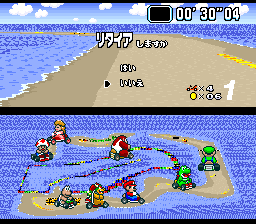
Super Mario Kart – Shelfall Series 1
0 1 1
Super Mario Kart – Shelfall Series 1 is a classic SNES racing game that helped shape the kart racing genre. Originally released for the Super Nintendo Entertainment System, this game combines tight controls, colorful tracks, and familiar characters to create a fun experience that still holds up many years later. Playing this SNES classic in your browser gives you a chance to enjoy its straightforward yet competitive gameplay without needing extra hardware or downloads.
Super Mario Kart – Shelfall Series 1: Gameplay Overview
The game centers around racing on a variety of vibrant tracks filled with sharp turns, obstacles, and occasional hazards. You steer, accelerate, and use items to get ahead of opponents. Unlike many modern racing games, it emphasizes skillful use of items and careful navigation rather than pure speed. The controls are simple to learn but mastering them takes practice, especially at higher levels of play.
There’s a multiplayer mode, so you can compete against friends or AI racers. Races are quick, usually just a few minutes long, making it good for short sessions or tournaments. The tracks have different themes and present unique challenges, like narrow pathways, jumps, or hazards. The physics encourage precise timing and strategic use of items, adding depth to its straightforward racing style.
Modes, Levels and Progression
Super Mario Kart – Shelfall Series 1 features many tracks, each with different layouts and difficulty levels. As you progress, the game gets tougher, with opponents becoming more aggressive and tracks adding more obstacles. It’s mainly about racing to the finish, but there’s also a basic tournament system that rewards consistent performance across races.
There aren’t elaborate story modes or unlockable characters, but the game encourages players to improve their times and learn each track. The variety of courses keeps things interesting, offering chances to refine your skills and item strategies. Progress is straightforward: do well in races to earn points or wins, which adds a sense of achievement and can motivate replaying tracks.
Winning Strategies
Pay attention to the track layout and manage your items wisely. Here are some tips:
- Learn to drift around corners to keep your speed up and stay in control.
- Save powerful items like shells or bananas for defense or to set up attacks.
- Memorize each track to better anticipate hazards and find shortcuts.
- Use speed boosts and jumps early in the race to gain an advantage.
- Disrupt opponents with well-timed item throws, especially when they’re close behind.
- Smooth steering helps avoid obstacles and keeps your momentum going throughout each lap.
Common Questions About Super Mario Kart – Shelfall Series 1
How does the difficulty increase as I play?
The game gets a bit tougher as AI opponents become more competitive and tracks introduce more complex features, making each race more challenging.
Are there different modes or just regular races?
The main focus is on standard races and tournaments. There aren’t story or time trial modes, but the variety of tracks keeps things interesting enough for multiple playthroughs.
How long does a typical game session last?
Most races are quick, just a few minutes long, which makes it easy to jump in for a quick race or try to improve your best times.
Super Mario Kart – Shelfall Series 1 remains a beloved example of early kart racing, offering accessible gameplay with enough depth to keep it interesting. Playing it through this browser emulation stays true to the original experience, letting you enjoy a timeless racing challenge without any fuss.
Related games: you can also try David Crane's Amazing Tennis (Japan) and Dynamic Stadium (Japan), or browse all other games in the SNES category.
How to Play Super Mario Kart – Shelfall Series 1?
Race through colorful tracks, avoid obstacles, use items wisely, and finish first. Practice drifting, shortcuts, and item management to improve your times and beat opponents.
Game Controls
Arrow keys act as the D-pad; Enter is Start; on-screen mapped keys handle the action buttons








Comments (0)
No comments yet. Be the first to comment!