Super Mario Kart – Sylvain Kart Custom Tracks
0 3 0
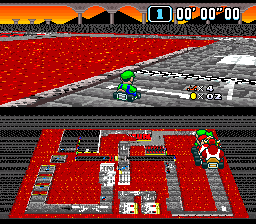
Super Mario Kart – Sylvain Kart Custom Tracks is a fan-made modification of the classic SNES racing game, adding new twists to the familiar kart racing experience. Originally released for the SNES, this game is known for its tight controls and memorable tracks. The custom tracks bring fresh challenges and creative designs, making it fun for players who want to revisit a favorite game with a new flavor—all playable right in your browser without any downloads.
This version keeps the core gameplay of Super Mario Kart but adds user-created tracks, blending nostalgia with new ideas. The pixel art still looks charming, with colorful environments and simple animations that evoke the playful atmosphere of the original. The racing mechanics are easy to pick up, but the custom tracks often include unexpected turns and hazards that test your reflexes and strategic thinking. It’s a game that rewards familiarity but also invites experimentation through its variety of tracks.
Why Super Mario Kart – Sylvain Kart Custom Tracks Is Worth Playing
The visuals stay true to the SNES pixel art style, with bright colors and clear designs that still hold up. Even as a browser game, the graphics remind players of the original’s warmth. The soundtrack, although limited by the hardware, closely matches the classic tunes, adding to the racing vibe. The custom tracks feature inventive layouts, often with shortcuts and hazards that aren’t in the original, encouraging players to learn each course well. Playing against AI or friends keeps things lively, with quick races that test your reflexes and decision-making.
What makes this version stand out is the community aspect—players can create and share their own tracks. This means the game is constantly evolving, with new courses to try. No two races are exactly the same, which keeps things fresh. The controls are tight and responsive, just like the SNES version, which is key for a good racing experience. Overall, it balances nostalgia with new ideas, offering fresh tracks while keeping the charm of the classic SNES game intact.
Tips to Get Ahead
Getting good at the custom tracks involves quick reflexes and knowing when to use shortcuts. Here are some tips to help you improve:
- Learn each track’s layout, especially any new shortcuts or hazards in the custom courses.
- Use power slides effectively to keep your speed through sharp turns without losing control.
- Watch where your opponents are to decide when to block or take risky shortcuts.
- Practice drifting early so you can get boosts at the right moments.
- Save items for key moments—they can really turn a race around.
- Play a few times on the same track to memorize tricky sections and avoid mistakes.
Things to Know Before You Start
How difficult is Super Mario Kart – Sylvain Kart Custom Tracks?
The game can be more challenging than the original SNES version, especially with the more complex custom tracks.
How long does a typical session last?
A race usually takes just a few minutes, making it easy to jump in for quick matches or longer sessions if you want to master multiple tracks.
Is Super Mario Kart – Sylvain Kart Custom Tracks suitable for casual players?
Absolutely. Its simple controls make it easy to pick up, but the custom tracks can add enough variety and difficulty to keep more experienced players engaged.
Is this game playable on mobile or only on desktop browsers?
You can play it directly in your browser on any device with internet access—no downloads needed.
Try out Super Mario Kart – Sylvain Kart Custom Tracks and see how your racing skills hold up across a variety of creative courses. Its mix of nostalgia and community-driven content makes it a fun choice for fans of the original or newcomers looking for a fun racing challenge.
Related games: you can also try Derby Stallion III (Japan) and Congo's Caper (Europe), or browse all other games in the SNES category.
How to Play Super Mario Kart – Sylvain Kart Custom Tracks?
Race through custom tracks, using shortcuts and avoiding hazards to finish first. Learn each course and master power slides to stay ahead of opponents.
Game Controls
Arrow keys control movement; action buttons are mapped to keyboard keys for using items and accelerating.








Comments (0)
No comments yet. Be the first to comment!