Super Sprint (Japan)
0 4 0
Super Sprint (Japan) is a classic NES racing game that’s easy to pick up and enjoy. Its simple controls and competitive gameplay make it accessible to players of all skill levels, even if they’re just starting out with racing games. As a vintage title from the NES era, it brings a nostalgic feel to the browser-based emulation platform, letting you experience a piece of gaming history directly in your browser without any downloads or installations.
What Is Super Sprint?
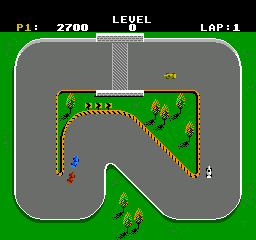
Super Sprint is a top-down racing game in the driving and racing genres. The goal is straightforward: race around a track as fast as you can, avoid obstacles, and beat your opponents or your best times. The game offers multiple tracks with different layouts, challenging players to navigate tight corners and sharp turns at high speeds. It calls for quick reflexes and smart use of acceleration and braking, making each race a test of skill and timing.
Gameplay moves quickly, with players controlling small, colorful cars zipping through increasingly difficult courses. It doesn’t have complex storylines or character customization; instead, it focuses on pure racing fun. The controls are intuitive, so newcomers can jump right in, but mastering it means learning each track’s quirks and finding the best driving lines to shave seconds off your times.
What Keeps You Coming Back
Super Sprint’s appeal comes from its competitive nature and replay value. Trying to beat your previous times is rewarding, and that feeling of improvement keeps players coming back. Its simple yet challenging tracks mean you can aim for better results each session, whether you’re playing casually or competing in longer battles against friends or AI.
Multiplayer features add to the game’s charm. Whether racing against a friend or trying to beat your own scores, the straightforward gameplay encourages repeated attempts. The short race lengths and easy mechanics make it suitable for casual players and those looking for a quick, competitive challenge. The design promotes friendly competition and quick resets, helping keep the gameplay fresh and engaging.
Handy Tips
Here are some tips to help you get better at Super Sprint:
- Get comfortable with sharp turns; braking early can help you stay in control at high speeds.
- Find the best route through each track by watching for obstacles and trying different paths during practice runs.
- Use the boost feature (if available) wisely to gain an edge or recover from mistakes.
- Keep an eye on your opponents’ positions to avoid collisions that can slow you down.
- Practice timing your acceleration and braking to improve your lap times.
- Try out different tracks to learn their unique challenges and develop strategies for each one.
Player FAQ
Is Super Sprint easy for beginners to pick up and play?
Yes. Its simple controls and gameplay make it accessible for players of all ages and skill levels.
Can younger players enjoy Super Sprint without difficulty?
Definitely. Its straightforward mechanics and short races make it suitable for younger players, especially with some guidance or as a casual game.
Do I need an internet connection to play Super Sprint on this site?
No. Since it runs directly in your browser as a NES emulator, an internet connection is only needed to load the page. Once it’s loaded, you can play offline whenever you like.
Super Sprint remains a fun, engaging racing game that’s easy to start but hard to master. Its simple yet competitive gameplay makes it a good choice for quick sessions or friendly competitions, all playable right in your browser.
Related games: you can also try F-15 Strike Eagle (France) (En,Fr,Nl) and Ferrari – Grand Prix Challenge (Japan), or browse all other games in the NES category.
How to Play Super Sprint (Japan)?
Race your car around various tracks as fast as possible, avoiding obstacles and sharp turns. Improve your times and compete against friends or yourself in quick, skill-based races.
Game Controls
Arrow keys control steering; other keys handle acceleration, braking, and boosting.
You may be interested in:
-
![Zombie Hunter (Japan) [En by KingMike v1.01]](https://www.playf2p.com/wp-content/uploads/zombie-hunter-japan-en-by-kingmike-v1-01-200x120.png) NES
♥ 2
Zombie Hunter (Japan) [En by KingMike v1.01]
NES
♥ 2
Zombie Hunter (Japan) [En by KingMike v1.01] -
 NES
♥ 1
Zombie Hunter (Japan)
NES
♥ 1
Zombie Hunter (Japan) -
 NES
♥ 1
Zoids Mokushiroku (Japan)
NES
♥ 1
Zoids Mokushiroku (Japan) -
 NES
♥ 2
Zoids 2 – Zenebas no Gyakushuu (Japan)
NES
♥ 2
Zoids 2 – Zenebas no Gyakushuu (Japan) -
 NES
♥ 1
Zoids – Chuuou Tairiku no Tatakai (Japan)
NES
♥ 1
Zoids – Chuuou Tairiku no Tatakai (Japan) -
 NES
♥ 11
Zippy Race (Japan)
NES
♥ 11
Zippy Race (Japan) -
 NES
♥ 1
Zhen Ben Xi You Ji (Asia) (Unl)
NES
♥ 1
Zhen Ben Xi You Ji (Asia) (Unl) -
 NES
♥ 1
Zenbei!! Pro Basket (Japan)
NES
♥ 1
Zenbei!! Pro Basket (Japan)
Comments (0)
No comments yet. Be the first to comment!