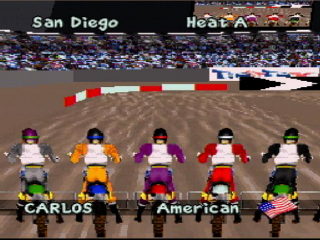
SuperCross 3D (World)
0 1 1
SuperCross 3D (World) is a classic Atari Jaguar game emulated here directly in the browser, bringing retro racing action to your screen without any downloads. If you like arcade-style motorcycle racing focused on speed and quick maneuvers, this game offers a straightforward experience that captures the excitement of supercross competitions from that time. It’s a good pick for players who enjoy vintage graphics and racing gameplay that rewards skill and timing over complex stories.
Getting Into SuperCross 3D
The main idea of SuperCross 3D involves racing through tracks filled with jumps, turns, and obstacles. You control a motorcycle and aim to finish in the best position possible, often competing against computer-controlled opponents. The game features a typical race setup, where you pick a track and race to beat the clock or opponents on each lap. Races last a few minutes, so it’s easy to jump in for quick sessions or practice runs.
Most players will find themselves navigating tight corners and timing jumps carefully to avoid crashes or losing speed. The controls are simple, focusing on acceleration, braking, and steering, making it accessible for newcomers. Progression involves unlocking new tracks and trying to beat your best times, encouraging repeated plays to master each course. Since it runs right in your browser, there’s no setup needed—just start racing and see how fast you can go.
Standout Features
Visually, SuperCross 3D captures the simple 3D style typical of its time, with blocky motorcycles and environments. Tracks are straightforward, emphasizing gameplay over detailed scenery, but they still give a good sense of space and speed. The graphics are nostalgic of early 3D racing titles on the Atari Jaguar, which makes it familiar for fans of the console and genre.
Progress in the game depends on finishing races and improving your times, which adds replay value. Although it doesn’t have a complicated career mode or unlockables, replaying tracks to beat your best scores or trying different racing lines keeps things interesting. Its straightforward approach makes SuperCross 3D a test of skill rather than complexity, perfect for players who enjoy sharpening their racing instincts without extra features getting in the way.
Strategy and Tips
Getting better at the game involves mastering timing and controlling your motorcycle through different track layouts. Here are some helpful tips:
- Learn the racing lines to keep your speed up through corners.
- Practice jumps to land smoothly and avoid losing momentum or crashing.
- Use braking wisely—slowing down too much can cost time, but not braking enough can cause you to overshoot turns.
- Try different approaches on each track to find the most efficient route.
- Watch your opponents’ positions to anticipate their moves and adjust your strategy.
- Regular practice helps improve your control and reaction times during races.
Quick Questions
How do I start a race in SuperCross 3D?
Just pick a track from the menu and hit start—everything loads instantly in your browser, ready to go.
What’s a common mistake for beginners?
Many new players tend to brake too late or overshoot turns, which can cause crashes or slow you down. Practice controlling your speed through corners.
Can I play SuperCross 3D on mobile or touch devices?
Since it runs in your browser, you can play it on mobile devices with a touchscreen, though the controls may feel different from using a keyboard or controller.
SuperCross 3D offers a straightforward racing experience inspired by its era’s style. Playing this classic in your browser gives you a quick, fun way to test your skills and enjoy vintage supercross racing anytime.
Related games: you can also try Iron Soldier 2 (World) and Pinball Fantasies (World), or browse all other games in the Atari Jaguar category.
How to Play SuperCross 3D (World)?
Race through tracks, avoiding obstacles and jumps to finish in the best time, competing against computer opponents in quick, skill-based motorcycle races.
Game Controls
Arrow keys control steering, acceleration, and braking; other keys handle actions like jumps and resets.
You may be interested in:
-
 Atari Jaguar
♥ 1
Syndicate (World)
Atari Jaguar
♥ 1
Syndicate (World) -
 Atari Jaguar
♥ 2
Super Burnout (World)
Atari Jaguar
♥ 2
Super Burnout (World) -
 Atari Jaguar
♥ 1
Space War 2000 (World)
Atari Jaguar
♥ 1
Space War 2000 (World) -
 Atari Jaguar
♥ 4
Soccer Kid (World)
Atari Jaguar
♥ 4
Soccer Kid (World) -
 Atari Jaguar
♥ 1
Skyhammer (World)
Atari Jaguar
♥ 1
Skyhammer (World) -
 Atari Jaguar
♥ 1
Sensible Soccer – International Edition (World)
Atari Jaguar
♥ 1
Sensible Soccer – International Edition (World) -
 Atari Jaguar
♥ 3
Ruiner Pinball (World)
Atari Jaguar
♥ 3
Ruiner Pinball (World) -
 Atari Jaguar
♥ 29
Rayman (World)
Atari Jaguar
♥ 29
Rayman (World)
Comments (0)
No comments yet. Be the first to comment!