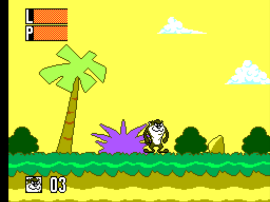
Taz-Mania (Europe) (Beta)
0 1 0
Taz-Mania (Europe) (Beta) is a classic Master System action-platformer that captures the playful chaos of the popular cartoon. Designed for fans of retro gaming, it offers a straightforward yet engaging experience rooted in the platforming genre. As a browser-based emulation, it lets players enjoy this vintage title without any downloads or setup, making it accessible for quick sessions or casual exploration.
Getting Into Taz-Mania
The game centers on guiding Taz through a series of side-scrolling levels filled with obstacles, enemies, and collectibles. The main idea is running, jumping, and avoiding hazards while moving from one stage to the next. Each environment presents its own challenges, requiring good timing for jumps and attacks to stay safe and reach the finish line. The progression is linear, with stages that get trickier as you go along.
Most sessions involve completing individual levels, aiming for high scores or quick times. The game doesn’t have complex mechanics or multiple modes but focuses on skillful platforming and quick reflexes. Players get a straightforward experience: learn enemy patterns, memorize level layouts, and refine timing to improve. Since it’s a classic from the Master System era, it’s suited for short, focused play sessions rather than long campaigns.
Standout Features
The visuals carry the charm of 8-bit graphics from the Master System, with bright sprite work and simple animated backgrounds that give off a cartoon vibe. Though not highly detailed, the graphics are clear enough to distinguish enemies and hazards easily. Progression involves moving through various themed levels, each presenting new challenges and encouraging players to sharpen their skills and beat personal bests.
Replay value comes from mastering each level’s layout, beating high scores, and finishing levels without losing lives. The game’s simplicity makes it easy to pick up but tough to master, especially as the difficulty increases. Its short play sessions and focus on quick reflexes suit players who enjoy instant gameplay loops. As a browser emulation, it maintains a nostalgic feel while being accessible for casual gamers or newcomers to retro titles.
Strategy and Tips
Getting the most out of Taz-Mania involves paying attention to timing and awareness. Here are some helpful tips:
- Observe enemy movements before jumping or attacking — patience often wins over rushing.
- Learn hazard patterns in each level to avoid unnecessary hits.
- Use jumps wisely to clear gaps and dodge ground-based enemies.
- Collect power-ups or items when they appear to help you last longer or boost your score.
- Don’t rush through levels; cautious play improves your chances of finishing successfully.
- If you get stuck, take a short break and return with fresh eyes to spot safer routes.
Quick Questions
How do I get started with Taz-Mania?
Simply click to start playing; the game loads instantly in your browser, no setup needed. Try to familiarize yourself with the first level’s layout and enemy patterns as you go.
What’s a common mistake beginners make?
Many players rush through levels without paying attention to enemy patterns, leading to avoidable losses. Taking your time to learn enemy movements can really improve your chances of success.
Can I play Taz-Mania on mobile or touch devices?
Yes, the game runs directly in your browser, so it works on touchscreens. Still, using a keyboard on a desktop might make timing easier.
Playing Taz-Mania on this platform offers a straightforward way to enjoy a classic action-platformer. Its simple design and nostalgic visuals make it a fun pick for those interested in old-school gaming. Jump in, practice your reflexes, and see how far you can go in this timeless Master System adventure.
Related games: you can also try Out Run Europa (Europe) and Great Ice Hockey (Japan, USA), or browse all other games in the Master System category.
How to Play Taz-Mania (Europe) (Beta)?
Guide Taz through side-scrolling levels by running, jumping, and avoiding enemies and hazards to reach the end. Focus on timing and pattern recognition to improve your score and complete levels quickly.
Game Controls
Arrow keys control movement; action buttons are mapped to on-screen keys for jumping and attacking.
You may be interested in:
-
 Master System
♥ 6
Zool – Ninja of the ‘Nth’ Dimension (Europe)
Master System
♥ 6
Zool – Ninja of the ‘Nth’ Dimension (Europe) -
 Master System
♥ 2
Zillion II – The Tri Formation (World)
Master System
♥ 2
Zillion II – The Tri Formation (World) -
 Master System
♥ 3
Zillion (USA) (v1.1)
Master System
♥ 3
Zillion (USA) (v1.1) -
 Master System
♥ 1
Zillion (Japan, Europe) (En,Ja)
Master System
♥ 1
Zillion (Japan, Europe) (En,Ja) -
 Master System
♥ 1
Zillion (Europe) (v1.2)
Master System
♥ 1
Zillion (Europe) (v1.2) -
 Master System
♥ 1
Zaxxon 3-D (World) (Beta)
Master System
♥ 1
Zaxxon 3-D (World) (Beta) -
 Master System
♥ 1
Zaxxon 3-D (World)
Master System
♥ 1
Zaxxon 3-D (World) -
 Master System
♥ 1
Xenon 2 – Megablast (Europe) (Virgin)
Master System
♥ 1
Xenon 2 – Megablast (Europe) (Virgin)
Comments (0)
No comments yet. Be the first to comment!