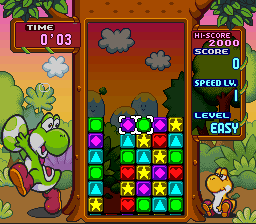
Tetris Attack (Europe) (En,Ja)
0 3 0
Tetris Attack (Europe) (En,Ja) is a puzzle game originally released on the SNES. It’s known for its match-three gameplay that mixes fast reactions with strategic moves. As a title from the SNES era, it takes the classic Tetris idea and turns it into a color-matching puzzle where players clear blocks by lining up three or more of the same color. The game’s excitement comes from the quick pace and the challenge of clearing screens before the situation gets out of control, making it a good pick for puzzle fans who enjoy a mix of reflexes and planning.
Tetris Attack: Gameplay Overview
At its core, Tetris Attack has players swapping adjacent blocks to form horizontal or vertical lines of three or more matching colors, which then vanish. Instead of falling tetrominoes, blocks rise from the bottom, and the goal is to keep them from reaching the top. The game rewards chain reactions with combo points, encouraging players to think ahead and set up multiple clears. As you move through levels, the speed picks up, demanding quicker reactions and sharper focus. Success depends on managing the rising blocks, creating chains for higher scores, and clearing the grid efficiently. Good players learn to anticipate how the flow of incoming blocks will go and plan their swaps accordingly, developing a rhythm over time.
Modes, Levels and Progression
This version offers a straightforward single-player mode that gets more intense as you go along, with the pace speeding up and the challenge increasing. There aren’t complicated levels or branching paths, but the rising difficulty keeps each session engaging. The main goal is to rack up high scores and last as long as possible. Many players enjoy trying to beat their own best scores or improve their strategies. The simplicity of the game makes it accessible but still offers enough challenge to hold your interest over repeated plays.
Winning Strategies
To do well in Tetris Attack, quick recognition of possible matches and setting up combos early are key. Here are some tips:
- Work on creating multi-line clears by setting up matches that can cause cascades.
- Watch the top of the grid to see when rising blocks are about to threaten your space.
- Clear cluttered areas to open more options for future moves.
- Find a rhythm for swapping blocks so you can trigger chain reactions more easily during fast moments.
- Stay calm under pressure; rushing can lead to mistakes and fill the screen faster.
- Use the edges of the grid for safer planning spots.
Common Questions About Tetris Attack
How does the difficulty change as I play?
The speed of the rising blocks gradually increases, demanding faster reactions and sharper planning. Improving your score depends on how well you adapt to these faster challenges.
Are there different modes or levels to pick from?
This version mainly offers a single-player mode focused on survival and high scores. It doesn’t have multiple levels or modes, but the challenge ramps up as you go, keeping things interesting.
How much replay value does the game have?
Without story or unlockables, the game keeps players coming back to improve scores, refine strategies, and compete with friends or personal bests. Its simple but demanding gameplay makes it fun for repeated tries and mastering over time.
Playing Tetris Attack here offers a straightforward, browser-based way to enjoy this classic puzzle game. Its focus on quick thinking and pattern recognition still makes it a popular choice for puzzle fans looking for a challenge that works well in both short sessions and longer play.
Related games: you can also try Skyblazer (USA) and Dirt Trax FX (USA), or browse all other games in the SNES category.
How to Play Tetris Attack (Europe) (En,Ja)?
Swap adjacent blocks to match three or more of the same color vertically or horizontally. Clear the blocks before they reach the top, creating chains for higher scores and longer gameplay.
Game Controls
Arrow keys move the cursor; a button swaps the selected blocks.








Comments (0)
No comments yet. Be the first to comment!