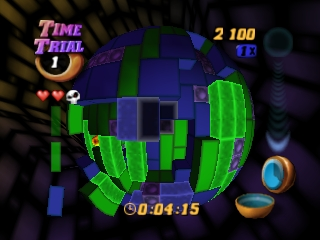
Tetrisphere (USA)
0 3 1
Tetrisphere (USA) is a puzzle game that captures the charm of a classic Nintendo 64 title. It invites players into a brain-teasing challenge set within a sleek, futuristic environment. Its twist on the usual block-matching gameplay offers a new kind of experience that emphasizes strategy and spatial thinking. Coming from the N64 era, it combines smooth visuals with atmospheric sound, creating an engaging space for puzzle lovers eager to test their mental agility. This browser-based emulator lets you enjoy this vintage game without any hassle, straight from your device, making it easy to pick up for quick sessions or longer play.
Step Into the World of Tetrisphere
Picture a glowing, floating sphere in the dark of space, covered with layers of colorful, holographic blocks. Tetrisphere’s visuals have a sleek, high-tech feel, with glowing geometric shapes and a simple background that keeps your focus on the puzzle. The sound design works well with the visuals, mixing subtle electronic melodies with satisfying sound effects as you move blocks around. The atmosphere is calming but intense, encouraging focused concentration while maintaining a steady rhythm that keeps you engaged. The interface is clean and easy to navigate, guiding you into the main challenge: clearing layers of blocks by matching and removing them before time runs out.
How the Gameplay Hooks You
The main loop involves rotating and placing blocks on the surface of a spherical puzzle. Instead of flat-tile matching, Tetrisphere asks players to think in three dimensions, planning moves that ripple across the sphere’s curves. The pace is quick, with each cleared layer introducing new obstacles and raising the difficulty. As you go further, layers get denser, requiring sharper focus and smarter placement. The game rewards patience and foresight, helping you develop a sense of spatial awareness while managing the ticking clock. Short play sessions work well since each game feels like a compact puzzle challenge you can finish in minutes or spend more time on for a tougher session.
Pro Tips for Tetrisphere
Getting the most out of Tetrisphere involves strategic thinking and quick reactions. Here are some tips:
- Try to create chains by clearing multiple layers with one move — this scores more points and clears space faster.
- Focus on removing the top layers first to uncover hidden blocks and plan your next steps more easily.
- Use rotations to visualize possible matches before making a move; this helps prevent mistakes and speeds up your play.
- Keep an eye on the timer but don’t rush. Well-thought-out, deliberate moves usually perform better than frantic button presses.
- Practice recognizing common block patterns to anticipate future moves and avoid getting stuck.
Frequently Asked Questions
Does Tetrisphere get repetitive after a while?
The game offers ongoing challenges through its layered difficulty and varied puzzle layouts, keeping things interesting for puzzle fans. Short sessions help prevent fatigue, and each layout feels fresh enough to keep it engaging.
Is Tetrisphere good for quick gaming breaks?
Definitely. Its compact puzzle format makes it perfect for quick sessions, giving satisfying moments of mental focus without taking up too much time.
Can I play Tetrisphere on any device through this browser emulator?
Yes, it runs smoothly in your browser on any device that supports web content, providing an authentic N64 experience without needing downloads or installations.
Trying out Tetrisphere reveals a puzzle game that combines clever mechanics with atmospheric design, making it a lasting favorite for puzzle lovers. Its unique spherical gameplay and strategic depth mean each session offers something new, fitting nicely into a collection of classic Nintendo 64 titles to enjoy today in your browser.
Related games: you can also try Super Spooky Mario 666 [2019 Demo] and Pro Mahjong Kiwame 64 (Japan) (Rev A), or browse all other games in the Nintendo 64 category.
How to Play Tetrisphere (USA)?
Rotate and place blocks on a sphere to match and clear layers before time runs out, using strategy and quick reactions to manage increasing difficulty.
Game Controls
Arrow keys for movement and rotation; other keys for actions, depending on the emulator setup.
You may be interested in:
-
 Nintendo 64
♥ 3
Zool – Majuu Tsukai Densetsu (Japan)
Nintendo 64
♥ 3
Zool – Majuu Tsukai Densetsu (Japan) -
 Nintendo 64
♥ 3
Zero The Jackal 64
Nintendo 64
♥ 3
Zero The Jackal 64 -
 Nintendo 64
♥ 5
Zelda’s Birthday
Nintendo 64
♥ 5
Zelda’s Birthday -
 Nintendo 64
♥ 5
Zelda: The Sealed Palace 1.3
Nintendo 64
♥ 5
Zelda: The Sealed Palace 1.3 -
 Nintendo 64
♥ 6
Zelda Revival
Nintendo 64
♥ 6
Zelda Revival -
 Nintendo 64
♥ 3
Zelda Ocarina Of Time Indigo v0.1.10
Nintendo 64
♥ 3
Zelda Ocarina Of Time Indigo v0.1.10 -
 Nintendo 64
♥ 17
Zelda Ocarina Of Time Indigo v0.1.0
Nintendo 64
♥ 17
Zelda Ocarina Of Time Indigo v0.1.0 -
 Nintendo 64
♥ 10
Zelda Ocarina Of Time Indigo Chapter 2
Nintendo 64
♥ 10
Zelda Ocarina Of Time Indigo Chapter 2
Comments (0)
No comments yet. Be the first to comment!