Texas Hold ‘Em Poker (U)(Rising Sun)
0 2 0
Texas Hold ‘Em Poker (U)(Rising Sun) is a classic Game Boy Advance card game that captures the essence of poker for players who enjoy strategic gambling. This version offers a straightforward, digital take on the popular poker variant, perfect for practicing skills or enjoying casual play anywhere. Being browser-based means you can jump right in without needing downloads or installations, making it a handy option for fans of handheld gaming from the past.
Getting Into Texas Hold ‘Em Poker
The gameplay sticks closely to the familiar mechanics of Texas Hold ‘Em, where players get two hole cards and share five community cards to make the best five-card hand. Rounds of betting follow, with options to check, bet, call, raise, or fold. The goal is to outsmart opponents through your hand strength or strategic betting, which can push others out or increase your winnings.
This version focuses on the standard game mode, allowing a single player to sit at virtual tables or practice against AI opponents. Each round involves betting, with the aim of building chips or winning the pot. It’s accessible for newcomers but also offers enough depth to keep more experienced players interested. The pacing encourages thoughtful decisions over quick reflexes.
Standout Features
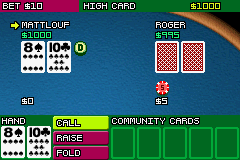
The visuals are simple but clear, typical of the Game Boy Advance era. Card designs are easy to read, and the interface neatly displays betting options and chips, helping you follow the action without fuss. While it doesn’t have flashy animations, the straightforward look keeps the focus on playing.
Progression centers around winning chips and beating virtual opponents, which motivates repeated play to sharpen your skills and climb through different difficulty levels. As a classic title, it offers decent replay value thanks to varied opponents and betting strategies. Whether you’re aiming to improve or just passing the time, it offers enough depth for multiple sessions, especially if you like fine-tuning your poker tactics.
Strategy and Tips
Knowing the basics of poker helps you make smarter moves. Here are some pointers to help you get started:
- Stick to tight play early on; bet strongly only with premium hands to avoid unnecessary losses.
- Observe opponents’ betting habits to estimate their hand strength.
- Use bluffing sparingly; overdoing it can backfire if opponents catch on.
- Keep an eye on your chips, especially during longer sessions, to prevent going all-in too soon.
- Adjust your aggression based on your position at the table; be more cautious when out of position.
- Practice patience; sometimes folding a weak hand is the right move to conserve chips for better opportunities.
Quick Questions
How do I get started playing Texas Hold ‘Em Poker on this site?
Just load the game in your browser, and it starts right away—no downloads needed. Use your mouse to navigate menus and place bets.
What is a common mistake beginners make in this game?
Many tend to play too many hands early on and chase losses, quickly running out of chips. Being selective with starting hands can make a difference.
Can I play this game on a mobile device or touchscreen?
Yes, since it runs directly in your browser, it works on mobile devices with touchscreens, so you can enjoy it anywhere.
Playing Texas Hold ‘Em Poker on this site offers a faithful digital version of the classic game, suitable for both new players and those more experienced. Its simple mechanics and familiar gameplay make it a solid choice for anyone interested in poker in a straightforward format.
Related games: you can also try James Bond 007 – Nightfire (U)(Eurasia) and FIFA World Cup 2006 (U)(Trashman), or browse all other games in the Game Boy Advance category.
How to Play Texas Hold ‘Em Poker (U)(Rising Sun)?
Deal two hole cards, then share five community cards to make the best five-card hand. Bet, check, raise, or fold each round to outsmart opponents and win chips.
Game Controls
Arrow keys or WASD for navigation; Enter or space to select actions.
You may be interested in:
-
 Game Boy Advance
♥ 2
Zooo (J)(Rising Sun)
Game Boy Advance
♥ 2
Zooo (J)(Rising Sun) -
 Game Boy Advance
♥ 4
Zooo (E)(Trashman)
Game Boy Advance
♥ 4
Zooo (E)(Trashman) -
 Game Boy Advance
♥ 2
ZooCube (U)(Mode7)
Game Boy Advance
♥ 2
ZooCube (U)(Mode7) -
 Game Boy Advance
♥ 1
ZooCube (E)(Blizzard)
Game Boy Advance
♥ 1
ZooCube (E)(Blizzard) -
 Game Boy Advance
♥ 1
Zone of the Enders – The Fist of Mars (U)(Mode7)
Game Boy Advance
♥ 1
Zone of the Enders – The Fist of Mars (U)(Mode7) -
 Game Boy Advance
♥ 1
Zone of the Enders – The Fist of Mars (E)(Cezar)
Game Boy Advance
♥ 1
Zone of the Enders – The Fist of Mars (E)(Cezar) -
 Game Boy Advance
♥ 1
Zoku Bokura no Taiyou – Taiyou Shounen Django (J)(Independent)
Game Boy Advance
♥ 1
Zoku Bokura no Taiyou – Taiyou Shounen Django (J)(Independent) -
 Game Boy Advance
♥ 5
Zoku Bokura no Taiyou – Taiyou Shounen Django (J)(Caravan)
Game Boy Advance
♥ 5
Zoku Bokura no Taiyou – Taiyou Shounen Django (J)(Caravan)
Comments (0)
No comments yet. Be the first to comment!