The Mummy (U)(Independent)
0 2 1
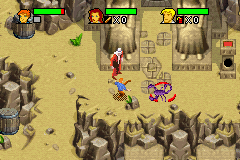
The Mummy (U)(Independent) is a classic Game Boy Advance adventure that immerses players in a world filled with ancient secrets and dangers. This action-platformer tasks players with navigating dangerous environments, dealing with enemies and solving puzzles set in an Egyptian archaeological theme. Its pixel art visuals and chiptune soundtrack create a nostalgic feel, recalling the GBA era while offering gameplay focused on exploration and quick reactions.
Step Into the World of The Mummy
Set against a mysterious, sand-covered landscape, the visuals lean into detailed pixel art that captures the dusty grandeur of Egyptian ruins and hidden tombs. The color palette is muted, featuring earthy browns, sandy beiges, and bright highlights to mark points of interest or danger. The sound design matches this with sharp effects and a rhythmic, haunting soundtrack that pulls players into an atmosphere of ancient mystery and suspense.
The environment plays a big role in the experience, feeling both vast and claustrophobic, encouraging careful exploration and fast reflexes. Encounters with enemies and hazards are designed to keep players alert, while the minimalist visuals help keep the focus on gameplay rather than overwhelming sights. The overall tone balances tension with adventure, making each step into the tombs feel like uncovering a forgotten story.
How the Gameplay Hooks You
The main gameplay loop involves jumping across platforms, avoiding traps, and fighting enemies in quick, skill-based fights. Moving through levels and overcoming obstacles that become more complex encourages players to improve their timing and movement. The pacing mixes tense platforming moments with combat and puzzles, creating a rhythm that keeps the game engaging without feeling too overwhelming.
The simple design lets players focus on learning each level’s layout and enemy behaviors. While there’s a clear sense of progress, exploring hidden paths or safe spots adds extra layers. Short sessions work well here, as each level is a contained challenge that can be finished in a few minutes, making it suitable for quick gaming sessions or casual play.
Pro Tips for The Mummy
Begin each level by exploring to spot hazards and enemy positions.
- Timing your jumps and attacks carefully is essential for tougher parts.
- Watch for visual clues that hint at traps or enemy patterns.
- Use the environment—hide behind objects or trigger switches from a safe spot.
- If you get stuck, taking a break can help you see things differently or find new paths.
- Keep an eye on your health and avoid taking unnecessary risks early on.
Frequently Asked Questions
Does the game have a story or is it mainly action?
The focus is on gameplay and atmosphere, with visuals and level design creating a mysterious Egyptian setting rather than a detailed story.
Is The Mummy good for short gaming sessions?
Yes, the levels are short, making it easy to play in quick bursts. Replaying levels to improve or discover secrets can be satisfying.
Does the gameplay become repetitive?
The mechanics are simple, but increasing difficulty and varied level designs help keep things fresh, though some might find the core loop repetitive after a while.
The Mummy offers a compact, atmospheric platformer that captures the spirit of classic adventure titles. Its pixel art and tense gameplay make for a memorable journey through ancient tombs, demanding focus and quick reactions. Designed to be fun in short sessions, it’s accessible for both nostalgic fans and newcomers who want a challenge rooted in exploration and skill.
Related games: you can also try Jimmy Neutron – L'Attaque des Twonkies (F)(Independent) and Pokemon Emerald ReSprited Plus, or browse all other games in the Game Boy Advance category.
How to Play The Mummy (U)(Independent)?
Navigate through Egyptian tombs by jumping, fighting enemies, and solving puzzles. Explore levels, avoid traps, and reach the end while managing quick reactions and careful timing.
Game Controls
Arrow keys control movement; other keys handle jumping, attacking, and interacting.
You may be interested in:
-
 Game Boy Advance
♥ 2
Zooo (J)(Rising Sun)
Game Boy Advance
♥ 2
Zooo (J)(Rising Sun) -
 Game Boy Advance
♥ 4
Zooo (E)(Trashman)
Game Boy Advance
♥ 4
Zooo (E)(Trashman) -
 Game Boy Advance
♥ 2
ZooCube (U)(Mode7)
Game Boy Advance
♥ 2
ZooCube (U)(Mode7) -
 Game Boy Advance
♥ 1
ZooCube (E)(Blizzard)
Game Boy Advance
♥ 1
ZooCube (E)(Blizzard) -
 Game Boy Advance
♥ 1
Zone of the Enders – The Fist of Mars (U)(Mode7)
Game Boy Advance
♥ 1
Zone of the Enders – The Fist of Mars (U)(Mode7) -
 Game Boy Advance
♥ 1
Zone of the Enders – The Fist of Mars (E)(Cezar)
Game Boy Advance
♥ 1
Zone of the Enders – The Fist of Mars (E)(Cezar) -
 Game Boy Advance
♥ 1
Zoku Bokura no Taiyou – Taiyou Shounen Django (J)(Independent)
Game Boy Advance
♥ 1
Zoku Bokura no Taiyou – Taiyou Shounen Django (J)(Independent) -
 Game Boy Advance
♥ 7
Zoku Bokura no Taiyou – Taiyou Shounen Django (J)(Caravan)
Game Boy Advance
♥ 7
Zoku Bokura no Taiyou – Taiyou Shounen Django (J)(Caravan)
Comments (0)
No comments yet. Be the first to comment!