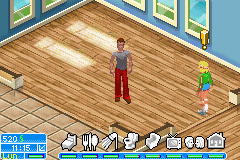
The Sims 2 – Pets (E)(Lightforce)
0 20 1
The Sims 2 – Pets (E)(Lightforce) is a classic Game Boy Advance game that brings the popular simulation series to a portable console in a simplified form. It centers on managing household life with pets, making it a good choice for fans of strategy and simulation games who enjoy casual gameplay on the move. As a portable version, it offers the familiar Sims experience but condensed for shorter play sessions, perfect for quick breaks or portable gaming.
Getting Into The Sims 2 – Pets
In The Sims 2 – Pets, players control a household with pets, focusing on their care, happiness, and routines. The gameplay involves managing relationships, fulfilling pet needs, and keeping the household running smoothly. Your choices affect the well-being of your virtual family and their furry friends. Playing usually involves selecting actions for your Sims, like feeding pets, playing, or cleaning, alongside household chores.
The game doesn’t have complex storylines or extensive customization; instead, it emphasizes routine management and decision-making. As you play, you unlock new interactions and ways to keep your pets happy. The core of the game is balancing pet needs with household priorities, making each session a mix of planning and casual management. Since it’s a handheld game, sessions are designed to be manageable within short periods, ideal for quick play or longer casual sessions.
Standout Features
The visuals of The Sims 2 – Pets are simple but colorful, capturing the playful spirit of the series with cartoonish characters and straightforward environments. While it doesn’t push the graphical limits of the Game Boy Advance, it remains clear and easy to follow during gameplay. Progression depends on keeping the household stable and completing small objectives, encouraging players to return and work on their household’s happiness and minor rewards.
Replayability comes from the variety of pet types and household scenarios you can try out. Since managing routines is a key part of the game, experimenting with different pet care strategies and household setups keeps things fresh. It’s designed for quick, casual play, but also invites trying out different approaches for longer-term fun.
Strategy and Tips
If you’re starting out, try to balance pet needs with household chores to avoid neglecting either. Managing your time well is essential for keeping everyone happy. Here are some tips:
- Feed and clean your pets early to prevent health issues and mood drops.
- Use the fastest actions to keep the household running smoothly during busy times.
- Experiment with different pet types to see which needs are easier to handle for your style.
- Watch the mood indicators; addressing needs early can prevent bigger problems later.
- Complete small goals regularly—they help unlock rewards and new interactions.
- If possible, save often, especially before trying riskier routines or decisions.
Quick Questions
How do I start a new household in this game?
Just pick the option to start a new game from the main menu, then choose your household and pets to begin.
What’s a common mistake for beginners?
Ignoring pet needs early on can lead to unhappy pets and household tension. Focus on basic needs before trying more complicated routines.
Does it work well on mobile or touch devices?
This version is designed for the Game Boy Advance and runs in your browser, offering a simple experience without specialized controls, making it easy to play on various devices with a browser.
Playing The Sims 2 – Pets in your browser gives a nostalgic look at the handheld simulation genre. Its manageable scope and focus on pet care make it a fun, light-hearted game for fans or newcomers interested in casual simulation gameplay.
Related games: you can also try Classic Nes – Excite Bike (U)(Psychosis) and Ghost Trap (J)(Cezar), or browse all other games in the Game Boy Advance category.
How to Play The Sims 2 – Pets (E)(Lightforce)?
Manage household chores and care for your pets by selecting actions like feeding, cleaning, and playing to keep everyone happy and the household running smoothly.
Game Controls
Arrow keys control movement and selection; action buttons perform tasks and confirm choices.
You may be interested in:
-
 Game Boy Advance
♥ 2
Zooo (J)(Rising Sun)
Game Boy Advance
♥ 2
Zooo (J)(Rising Sun) -
 Game Boy Advance
♥ 4
Zooo (E)(Trashman)
Game Boy Advance
♥ 4
Zooo (E)(Trashman) -
 Game Boy Advance
♥ 2
ZooCube (U)(Mode7)
Game Boy Advance
♥ 2
ZooCube (U)(Mode7) -
 Game Boy Advance
♥ 1
ZooCube (E)(Blizzard)
Game Boy Advance
♥ 1
ZooCube (E)(Blizzard) -
 Game Boy Advance
♥ 1
Zone of the Enders – The Fist of Mars (U)(Mode7)
Game Boy Advance
♥ 1
Zone of the Enders – The Fist of Mars (U)(Mode7) -
 Game Boy Advance
♥ 1
Zone of the Enders – The Fist of Mars (E)(Cezar)
Game Boy Advance
♥ 1
Zone of the Enders – The Fist of Mars (E)(Cezar) -
 Game Boy Advance
♥ 1
Zoku Bokura no Taiyou – Taiyou Shounen Django (J)(Independent)
Game Boy Advance
♥ 1
Zoku Bokura no Taiyou – Taiyou Shounen Django (J)(Independent) -
 Game Boy Advance
♥ 7
Zoku Bokura no Taiyou – Taiyou Shounen Django (J)(Caravan)
Game Boy Advance
♥ 7
Zoku Bokura no Taiyou – Taiyou Shounen Django (J)(Caravan)
Comments (0)
No comments yet. Be the first to comment!