TOEIC Test DS Training (Korea)
0 1 0
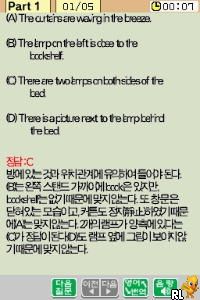
TOEIC Test DS Training (Korea) is a classic Nintendo DS game that offers a straightforward way to improve English skills aimed at the TOEIC exam. Its simple presentation and educational design recall the days when handheld consoles were used not just for playing but for learning, making it a nostalgic yet practical choice for language practice. Running directly in your browser, this emulated version brings this vintage title back into view without the need for downloads or installations.
Step Into the World of TOEIC Test DS Training
From the moment you start, you’re met with a clean, uncomplicated interface reminiscent of early 2000s educational software on the Nintendo DS. The visuals are minimal—bright backgrounds, clear fonts, and easy menus that help you focus on the task. The sound is simple too, with basic beeps and voice prompts that guide you without overwhelming. This no-frills setup emphasizes practicality, making it feel like a structured classroom session rather than a flashy game.
The environment is calm and organized, minimizing distractions. It’s designed to mimic a testing setting, encouraging concentration on questions and answers, just as in a real TOEIC exam. Its simplicity means players of all ages can easily engage, whether for quick practice or longer study periods.
How the Gameplay Hooks You
The main activity involves answering multiple-choice questions that match the TOEIC style. The pace is steady, with immediate feedback after each question to help reinforce what you’ve learned. Scores are clearly displayed, motivating you to improve with each session. The structure encourages repeated practice, with different question sets to keep things fresh and prevent just memorizing answers.
The gameplay is straightforward: answer questions, review responses, then move on. Designed for short sessions, it’s easy to fit into busy schedules. Without complicated mechanics, the focus stays on language comprehension and vocabulary, with the difficulty gradually increasing as you progress. This helps build confidence while challenging your skills gradually.
Pro Tips for TOEIC Test DS Training
To get the most from this classic, try these approaches:
- Understand why each answer is right or wrong to strengthen your grasp of the material.
- Practice consistently in short bursts to build familiarity without feeling overwhelmed.
- Review questions you got wrong to find weak spots and focus on them later.
- Use the feedback to improve your listening and reading skills step by step.
- Combine this with actual TOEIC practice tests for a well-rounded prep.
Frequently Asked Questions
Does TOEIC Test DS Training get repetitive after a while?
The variety of questions and straightforward format help keep it engaging, especially with regular practice. Its repetitive nature is intentional, helping reinforce what you learn, but it’s manageable in short daily sessions.
Can I use this game for quick practice during lunch?
Yes. The game is made for brief, focused practice, fitting easily into a busy day without feeling overwhelming.
Is TOEIC Test DS Training suitable for all ages?
Absolutely. Its clear interface and simple mechanics make it accessible for teenagers and adults, especially those preparing for the TOEIC or wanting to improve their English in a structured way.
Trying out TOEIC Test DS Training gives a practical way to sharpen English skills within a familiar handheld gaming style, now easily playable in your browser. Its straightforward approach makes it a useful tool for daily practice or exam prep. This classic from the Nintendo DS era still offers a helpful method for anyone aiming to boost their TOEIC scores through consistent effort.
Related games: you can also try Dorabase – Doraemon Super Baseball Gaiden – Dramatic Stadium (Japan) and Pokemon DarkDiamond Beta 2.1, or browse all other games in the Nintendo DS category.
How to Play TOEIC Test DS Training (Korea)?
Answer multiple-choice questions to practice TOEIC skills. Review your answers, see your score, and try again to improve gradually.
Game Controls
Arrow keys move, Enter selects, and other keys correspond to game actions.
You may be interested in:
-
 Nintendo DS
♥ 1
Casper’s Scare School – Classroom Capers (USA)
Nintendo DS
♥ 1
Casper’s Scare School – Classroom Capers (USA) -
 Nintendo DS
♥ 1
Zunou Nouryoku Koujou Machine – Touch de Zunoo DS (Japan)
Nintendo DS
♥ 1
Zunou Nouryoku Koujou Machine – Touch de Zunoo DS (Japan) -
 Nintendo DS
♥ 1
Zunou ni Asekaku Game Series! Vol. 1 – Cool 104 Joker & Setline (Japan)
Nintendo DS
♥ 1
Zunou ni Asekaku Game Series! Vol. 1 – Cool 104 Joker & Setline (Japan) -
 Nintendo DS
♥ 9
Zuma’s Revenge (USA)
Nintendo DS
♥ 9
Zuma’s Revenge (USA) -
 Nintendo DS
♥ 1
Zubo (USA) (En,Fr,Es)
Nintendo DS
♥ 1
Zubo (USA) (En,Fr,Es) -
 Nintendo DS
♥ 1
Zubo (Europe) (En,Fr,De,Es,It,Nl,Sv)
Nintendo DS
♥ 1
Zubo (Europe) (En,Fr,De,Es,It,Nl,Sv) -
 Nintendo DS
♥ 1
Zorro – Quest for Justice (USA) (En,Fr,De,Es,It)
Nintendo DS
♥ 1
Zorro – Quest for Justice (USA) (En,Fr,De,Es,It) -
 Nintendo DS
♥ 1
Zorro – Quest for Justice (Europe) (En,Fr,De,Es,It)
Nintendo DS
♥ 1
Zorro – Quest for Justice (Europe) (En,Fr,De,Es,It)
Comments (0)
No comments yet. Be the first to comment!