Toon-Doku – Sudoku with Pictures! (USA)
0 1 0
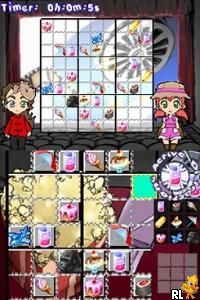
Toon-Doku – Sudoku with Pictures! (USA) is a puzzle game for the Nintendo DS that puts a new spin on the classic Sudoku format by adding pictures into the mix. It creates a visually interesting experience that blends logical reasoning with colorful images, appealing to players of all ages. Since it’s from the era of handheld gaming, it makes good use of the dual screens and stylus input, and you can play it directly in your browser without any downloads or setups.
Toon-Doku – Sudoku with Pictures!: Gameplay Overview
The main idea in Toon-Doku is to fill a grid with pictures instead of numbers, following the usual Sudoku rules. You see a partly completed grid on the top screen, while the bottom touch screen lets you pick and place picture tiles easily. The goal is to make sure each row, column, and section has only one of each picture, similar to the original Sudoku constraints but with visual symbols instead.
The game relies on recognizing patterns and using logical thinking. With a stylus or your finger, you tap on images to place them and use the tools on the screen to remove duplicates or highlight possible moves. The interface responds smoothly, making it easy to mark options or fix mistakes. As puzzles get harder, they challenge you to think quickly and plan carefully to finish them successfully.
Modes, Levels and Progression
Toon-Doku features different puzzle levels that suit various skill levels. Starting with simpler grids for beginners, it gradually introduces more complex puzzles, often with bigger grids or more image options. This setup allows players to improve at their own pace and sharpen their deduction skills. There are also different modes, like timed challenges or relaxed play, giving options for casual players and those who want a tougher experience.
The variety comes from different puzzle layouts and increasing image complexity. It encourages playing again by offering new puzzles regularly, and players can try to beat their best times or finish all puzzles at each level. Overall, Toon-Doku offers a good balance of challenge and accessibility, whether you want quick sessions or longer puzzle marathons.
Winning Strategies
To do well in Toon-Doku, focus on ruling out options step-by-step and rely on logic instead of guessing. Here are some tips:
- Start with the easiest clues to fill in obvious images, which reduces options for the remaining cells.
- Use highlighting or candidate markers to keep track of potential placements, especially in tougher puzzles.
- Spot unique images in rows, columns, or sections early to avoid duplicates.
- Cross-check images in overlapping areas to narrow down choices for tricky spots.
- If you get stuck, taking a break can help you see patterns or errors more clearly.
- Pay attention to the color and shape of the images; visual cues can speed up recognition and placement.
Common Questions About Toon-Doku – Sudoku with Pictures!
How does the difficulty change in Toon-Doku?
The game gets tougher as the grids grow larger and images become more complex. The early puzzles are straightforward, but later ones require careful reasoning and pattern recognition to solve.
Are there different game modes or just puzzles to finish?
The main focus is completing puzzles at various difficulty levels. Some versions might include timed challenges or relaxed modes, but mostly, it’s about solving individual puzzles.
How much replay value does Toon-Doku have?
With many puzzles and rising difficulty, it encourages replaying. Finishing all levels and beating your best scores keeps the game interesting for puzzle fans who enjoy a visual twist on Sudoku.
For anyone looking for a puzzle experience with eye-catching visuals, Toon-Doku – Sudoku with Pictures! offers a clear, engaging challenge that you can play directly in your browser. Its simple mechanics and gradually increasing difficulty make it accessible and satisfying to keep coming back to.
Related games: you can also try GoldenEye – Rogue Agent (Europe) and Kodomo no Tame no Yomi Kikase – Ehon de Asobou 3-kan (Japan), or browse all other games in the Nintendo DS category.
How to Play Toon-Doku – Sudoku with Pictures! (USA)?
Fill the grid with pictures so each row, column, and section has only one of each. Use your mouse or finger to select and place images, following Sudoku rules to complete the puzzles.
Game Controls
Arrow keys move the cursor; Enter or click to select and place images.
You may be interested in:
-
 Nintendo DS
♥ 1
Casper’s Scare School – Classroom Capers (USA)
Nintendo DS
♥ 1
Casper’s Scare School – Classroom Capers (USA) -
 Nintendo DS
♥ 1
Zunou Nouryoku Koujou Machine – Touch de Zunoo DS (Japan)
Nintendo DS
♥ 1
Zunou Nouryoku Koujou Machine – Touch de Zunoo DS (Japan) -
 Nintendo DS
♥ 1
Zunou ni Asekaku Game Series! Vol. 1 – Cool 104 Joker & Setline (Japan)
Nintendo DS
♥ 1
Zunou ni Asekaku Game Series! Vol. 1 – Cool 104 Joker & Setline (Japan) -
 Nintendo DS
♥ 9
Zuma’s Revenge (USA)
Nintendo DS
♥ 9
Zuma’s Revenge (USA) -
 Nintendo DS
♥ 1
Zubo (USA) (En,Fr,Es)
Nintendo DS
♥ 1
Zubo (USA) (En,Fr,Es) -
 Nintendo DS
♥ 1
Zubo (Europe) (En,Fr,De,Es,It,Nl,Sv)
Nintendo DS
♥ 1
Zubo (Europe) (En,Fr,De,Es,It,Nl,Sv) -
 Nintendo DS
♥ 1
Zorro – Quest for Justice (USA) (En,Fr,De,Es,It)
Nintendo DS
♥ 1
Zorro – Quest for Justice (USA) (En,Fr,De,Es,It) -
 Nintendo DS
♥ 1
Zorro – Quest for Justice (Europe) (En,Fr,De,Es,It)
Nintendo DS
♥ 1
Zorro – Quest for Justice (Europe) (En,Fr,De,Es,It)
Comments (0)
No comments yet. Be the first to comment!