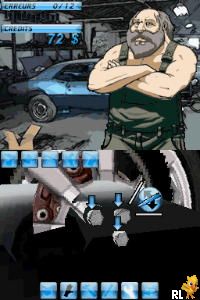
Touch Mechanic (France)
0 1 0
Touch Mechanic (France) is a Nintendo DS game that blends puzzle-solving with touch controls, a common feature in many titles for the handheld. Its gameplay relies on precise finger gestures to move objects and tackle spatial challenges, making it stand out among the platform’s various genres. Designed to take advantage of the DS’s dual screens and stylus, the game features a straightforward mechanic that encourages experimentation and logical thinking.
Touch Mechanic: Gameplay Overview
The main idea behind Touch Mechanic is using the Nintendo DS’s stylus to interact directly with on-screen elements. Players complete puzzles by touching, dragging, and rearranging objects on each level. The controls are simple, but timing and placement are key to solving more complex puzzles. The process involves analyzing each puzzle, choosing the right touch action, and trying different approaches until the solution clicks. This encourages a trial-and-error style that sharpens spatial awareness and hand-eye coordination.
Because it depends on accurate touch inputs, the game prompts players to develop a tactile sense of the puzzles. The interface responds instantly to stylus movements, giving feedback that helps players see how their actions change the puzzle’s state. While suitable for all ages, later levels get trickier, requiring patience and attention to detail as puzzles grow more intricate and involve multiple steps. Each level builds on the last, gradually increasing in difficulty but sticking to the core mechanic of touch interaction.
The visuals are minimal but clear, with clean screens that focus on the objects to be manipulated. Sounds are subtle but helpful, confirming successful actions or errors without overwhelming. Playing directly in a browser means no downloads or external setup, making it quick and easy to enjoy this classic touch-based puzzle game.
Modes, Levels and Progression
Touch Mechanic features a series of puzzles arranged in levels, each offering a new challenge that tests different aspects of spatial reasoning. The difficulty ramps up gradually, starting with simple object placements and moving toward more complex arrangements that need careful planning. There are no traditional modes like timed or endless play; instead, the game encourages steady progress through its puzzle sequence.
Players will find enough variety across levels to stay engaged over multiple sessions. Each puzzle presents a unique scenario, often requiring creative thinking about how to manipulate objects to reach the goal. As you progress, puzzles demand more precise touches and more complex sequences, which can test patience and control. Since the game doesn’t rely on timers or scores, replaying puzzles to improve solutions or explore different approaches adds to its appeal.
The straightforward progression system means you can play at your own pace. Without a timer, problem-solving feels relaxed, making it accessible to younger players or those new to touch puzzles. The set of puzzles is finite but varied enough to justify several playthroughs, especially if you want to perfect your solutions or try alternative methods.
Winning Strategies
Playing Touch Mechanic well involves paying close attention and being deliberate with your touches. Patience is crucial, especially as puzzles get tougher—sometimes trial and error is the best approach. Here are a few tips:
- Take your time to analyze each puzzle before acting; rushing can cause mistakes that may set you back.
- Use the edges of objects to guide your touches for more accurate placement.
- If a puzzle seems stuck, try different touch sequences—sometimes changing the order makes all the difference.
- Listen to visual and sound cues to confirm successful actions and avoid unnecessary retries.
- Look for patterns or mechanics within each puzzle, such as how objects interact when moved or touched.
- If you’re stuck, revisit earlier puzzles to improve your touch control and get better at handling the more difficult ones.
Common Questions About Touch Mechanic
How does the difficulty change across levels?
Levels start with simple object manipulation but gradually introduce more complex setups that need multiple steps and precise touches, making later puzzles more challenging.
Are there different modes, or just a single sequence?
The game mainly follows a linear puzzle progression without separate modes. Its replay value comes from revisiting levels to improve solutions or try different methods.
How long does it usually take to finish?
Depending on your familiarity with touch puzzles, it can take anywhere from half an hour to a few hours to complete all levels. The relaxed pace makes it easy to enjoy in short sessions without pressure.
This game shows how touch-based mechanics can create engaging, brain-teasing experiences on the Nintendo DS. Playing it directly in your browser offers a smooth way to explore a well-made puzzle game rooted in simple, effective controls.
Related games: you can also try High School Musical 3 – Senior Year (Europe) (En,Fr,De,Es,It,Nl) and Quest Braintainment (Netherlands), or browse all other games in the Nintendo DS category.
How to Play Touch Mechanic (France)?
Use the keyboard to select, drag, and move objects on the screen to solve spatial puzzles. Complete each level by arranging items correctly through trial and error, progressing to more complex challenges.
Game Controls
Arrow keys for navigation; Enter or space to select and interact.
You may be interested in:
-
 Nintendo DS
♥ 1
Casper’s Scare School – Classroom Capers (USA)
Nintendo DS
♥ 1
Casper’s Scare School – Classroom Capers (USA) -
 Nintendo DS
♥ 1
Zunou Nouryoku Koujou Machine – Touch de Zunoo DS (Japan)
Nintendo DS
♥ 1
Zunou Nouryoku Koujou Machine – Touch de Zunoo DS (Japan) -
 Nintendo DS
♥ 1
Zunou ni Asekaku Game Series! Vol. 1 – Cool 104 Joker & Setline (Japan)
Nintendo DS
♥ 1
Zunou ni Asekaku Game Series! Vol. 1 – Cool 104 Joker & Setline (Japan) -
 Nintendo DS
♥ 9
Zuma’s Revenge (USA)
Nintendo DS
♥ 9
Zuma’s Revenge (USA) -
 Nintendo DS
♥ 1
Zubo (USA) (En,Fr,Es)
Nintendo DS
♥ 1
Zubo (USA) (En,Fr,Es) -
 Nintendo DS
♥ 1
Zubo (Europe) (En,Fr,De,Es,It,Nl,Sv)
Nintendo DS
♥ 1
Zubo (Europe) (En,Fr,De,Es,It,Nl,Sv) -
 Nintendo DS
♥ 1
Zorro – Quest for Justice (USA) (En,Fr,De,Es,It)
Nintendo DS
♥ 1
Zorro – Quest for Justice (USA) (En,Fr,De,Es,It) -
 Nintendo DS
♥ 1
Zorro – Quest for Justice (Europe) (En,Fr,De,Es,It)
Nintendo DS
♥ 1
Zorro – Quest for Justice (Europe) (En,Fr,De,Es,It)
Comments (0)
No comments yet. Be the first to comment!