Tout Savoir CM2 – L’Essentiel du Programme (France)
0 1 0
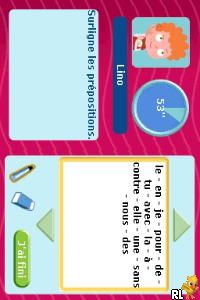
Tout Savoir CM2 – L’Essentiel du Programme (France) is a straightforward educational game originally made for the Nintendo DS, now playable in your browser. It’s designed to help students review and strengthen their knowledge from the CM2 level of primary school. Whether you’re preparing for exams or looking for a structured way to practice key subjects with a child, this game offers a simple, quiz-based method to revisit school topics without any fuss. It’s familiar, accessible, and easy to use on any device.
Getting Into Tout Savoir CM2 – L’Essentiel du Programme
The game works as a quiz and revision tool. Players pick a subject and answer questions to move forward. You choose from categories like math, French, science, or history, then respond to multiple-choice or short-answer prompts. Each session is short, making it easy to fit into a quick break or focus on a specific topic. There are no complicated mechanics or storylines—just a focus on reinforcing what you know through repetition and immediate feedback.
Starting a session involves selecting a subject, then answering questions that test your understanding of key concepts. Correct answers might earn points or unlock harder questions, while wrong ones offer explanations or hints. The design encourages frequent practice without feeling overwhelming. It suits students who want a straightforward way to review several subjects in a single sitting or across multiple short sessions.
Since the game runs directly in your browser, there’s no need to install anything. It’s quick to access and easy to get started. The interface is simple, geared toward all ages in primary school, and because there are no timers or penalties, players can learn at their own pace. It’s handy for parents and teachers looking for a reliable supplementary tool for classroom or homework routines.
Standout Features
The visuals are minimal but clear, with simple menus and readable text that keep your attention on the questions. The interface is designed for easy use on the Nintendo DS and works smoothly with browser controls, making it adaptable across devices. The game keeps things simple, avoiding distracting animations or unnecessary features, which helps you stay focused on learning.
Progression is organized by subjects and difficulty levels, so you can focus on areas where you want more practice. Repeating questions or revisiting topics adds to its usefulness over time. It doesn’t have badges or unlockables, but the straightforward setup encourages regular use for mastery. Its simplicity makes it a dependable way to review curriculum content without extra fluff.
The design supports gradual learning. As you improve, you can try more challenging questions, which naturally pushes your progress forward. Since it covers the core of the CM2 curriculum, it stays relevant whether you’re preparing for exams or just brushing up on key concepts. Being browser-based means you can practice anywhere, fitting quick revision into busy days easily.
Strategy and Tips
To get the most out of this game, try practicing regularly in short sessions rather than long, infrequent ones. Repetition helps reinforce what you learn, especially on topics that are tougher. Use the explanations after wrong answers to understand your mistakes and avoid repeating them.
Identify which subjects or topics give you trouble and dedicate extra time to those. Switching between subjects can keep things fresh and prevent fatigue. Take your time reading questions carefully so you absorb the material properly. Remember, the goal is understanding, not just scoring points.
Use the different difficulty levels—starting easy helps build confidence before moving to harder questions. Keep track of which areas need more review, then revisit those periodically. Consistent, focused practice with this game can help improve your memory and prepare you for schoolwork or exams.
Quick Questions
How do I start a new session?
Answer: Just pick a subject from the main menu, and the game will load questions for you to answer.
What if I get stuck on a question?
Answer: You can look at hints or explanations after answering, which can clarify concepts and help you learn.
Can I play this game on my mobile or touch device?
Answer: Yes, since it works in your browser, it adapts well to touchscreen controls and mobile browsers, making studying on the go easy.
This classic Nintendo DS game, now available as a browser emulator, offers a simple way to review the essentials of the CM2 curriculum. Its clean interface, organized progression, and focus on core subjects make it a practical tool for students and parents alike. Whether revisiting your school days or helping a young learner, tout savoir cm2 – l’essentiel du programme provides an accessible, straightforward approach to revising school topics.
Related games: you can also try Naruto – Ninja Council – European Version (Europe) (En,Fr,De,Es,It) and Bejeweled 3 (Europe) (En,Fr,De), or browse all other games in the Nintendo DS category.
How to Play Tout Savoir CM2 – L’Essentiel du Programme (France)?
Choose a subject, answer multiple-choice or short questions to test your knowledge, and learn as you go. Correct answers earn points and unlock harder questions, helping you review key school topics.
Game Controls
Arrow keys for navigation; Enter to select or confirm.
You may be interested in:
-
 Nintendo DS
♥ 1
Casper’s Scare School – Classroom Capers (USA)
Nintendo DS
♥ 1
Casper’s Scare School – Classroom Capers (USA) -
 Nintendo DS
♥ 1
Zunou Nouryoku Koujou Machine – Touch de Zunoo DS (Japan)
Nintendo DS
♥ 1
Zunou Nouryoku Koujou Machine – Touch de Zunoo DS (Japan) -
 Nintendo DS
♥ 1
Zunou ni Asekaku Game Series! Vol. 1 – Cool 104 Joker & Setline (Japan)
Nintendo DS
♥ 1
Zunou ni Asekaku Game Series! Vol. 1 – Cool 104 Joker & Setline (Japan) -
 Nintendo DS
♥ 9
Zuma’s Revenge (USA)
Nintendo DS
♥ 9
Zuma’s Revenge (USA) -
 Nintendo DS
♥ 1
Zubo (USA) (En,Fr,Es)
Nintendo DS
♥ 1
Zubo (USA) (En,Fr,Es) -
 Nintendo DS
♥ 1
Zubo (Europe) (En,Fr,De,Es,It,Nl,Sv)
Nintendo DS
♥ 1
Zubo (Europe) (En,Fr,De,Es,It,Nl,Sv) -
 Nintendo DS
♥ 1
Zorro – Quest for Justice (USA) (En,Fr,De,Es,It)
Nintendo DS
♥ 1
Zorro – Quest for Justice (USA) (En,Fr,De,Es,It) -
 Nintendo DS
♥ 1
Zorro – Quest for Justice (Europe) (En,Fr,De,Es,It)
Nintendo DS
♥ 1
Zorro – Quest for Justice (Europe) (En,Fr,De,Es,It)
Comments (0)
No comments yet. Be the first to comment!