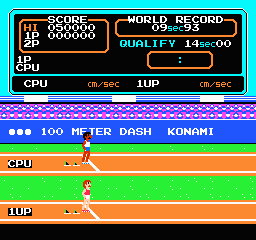
Track & Field (USA)
0 8 0
Track & Field (USA) is a classic NES sports game that captures the essence of competitive track and field events from the console’s era. As part of the NES’s rich lineup of arcade-style sports titles, it offers quick, straightforward gameplay centered around timing and precision. Its pixelated visuals and simple sound design evoke a nostalgic vibe, reminding players of the early 80s arcade and home console scene. The game features a series of athletic events, each demanding quick reflexes and good timing, making it great for short bursts of fun or friendly competition.
Why Track & Field Is Worth Playing
This NES classic stands out with its tight, no-frills gameplay that emphasizes timing and coordination. The controls are simple but require focus; players need to press buttons at the right moments to do well. The graphics are minimal, but they effectively convey the speed and effort needed in each event. The soundtrack, while sparse, adds a sense of urgency that keeps players engaged during each race or jump. Its straightforward mechanics make it easy for newcomers to pick up, yet mastering the timing and rhythm offers a satisfying challenge for experienced players.
Playing Track & Field is about more than just button mashing; it’s about rhythm and patience. The variety of events, from sprints to long jump and javelin throw, keeps things interesting, especially if you enjoy competing for high scores. The short, intense rounds make it perfect for quick sessions, and getting good at each event can give a real sense of achievement. The pixel art and sound effects give it an authentic 8-bit feel that fans of retro gaming will enjoy, making it a staple for anyone looking for a nostalgic sports experience.
Tips to Get Ahead
Focus on timing your button presses precisely at the peak of each motion to improve your results in every event.
- Practice each event’s rhythm—being consistent helps raise your scores.
- Watch for on-screen cues indicating when to press the button for best results.
- Stay calm and avoid rushing, as mistimed presses will hurt your performance.
- Use the same timing pattern across rounds to develop muscle memory and boost your scores.
- Challenge friends or aim for personal bests to stay motivated and sharpen your skills.
Things to Know Before You Start
Question?
Is Track & Field tough for casual players?
Answer.
The challenge comes from mastering the timing, which can be tricky at first. Still, the short events make it easy to pick up quickly and see progress. Casual players might find it a bit frustrating early on but can enjoy the game by focusing on simple goals in each event.
Question?
How long does a session of Track & Field last?
Answer.
Most events are quick, lasting just a few seconds to a minute. You could finish all of them in about 10 to 15 minutes if you’re aiming for high scores or personal bests.
Question?
Is Track & Field suitable for all ages?
Answer.
Yes, its simple controls and straightforward gameplay make it accessible for players of all ages. Younger children might need some practice to get the timing right, but it’s a good option for family fun or solo arcade action.
Try out this in-browser emulation of Track & Field to get a taste of NES sports history. Its focus on timing, quick rounds, and friendly competition makes it a fun challenge for anyone interested in classic track & field events. Whether you’re trying to beat your high scores or just enjoy a quick athletic challenge, this game offers a genuine slice of 8-bit sports action.
Related games: you can also try Shanghai 2 (Japan) and Rockman 5 – Blues no Wana! (Japan) [Hack by Rock5easily v20081215] (~Rockman 5 Endless), or browse all other games in the NES category.
How to Play Track & Field (USA)?
Press buttons at the right moments to compete in track and field events like sprints, jumps, and throws. Timing and rhythm are key to achieving high scores and beating your best times.
Game Controls
Arrow keys or keyboard buttons control actions; use them to time your presses during each event.
You may be interested in:
-
![Zombie Hunter (Japan) [En by KingMike v1.01]](https://www.playf2p.com/wp-content/uploads/zombie-hunter-japan-en-by-kingmike-v1-01-200x120.png) NES
♥ 2
Zombie Hunter (Japan) [En by KingMike v1.01]
NES
♥ 2
Zombie Hunter (Japan) [En by KingMike v1.01] -
 NES
♥ 1
Zombie Hunter (Japan)
NES
♥ 1
Zombie Hunter (Japan) -
 NES
♥ 1
Zoids Mokushiroku (Japan)
NES
♥ 1
Zoids Mokushiroku (Japan) -
 NES
♥ 2
Zoids 2 – Zenebas no Gyakushuu (Japan)
NES
♥ 2
Zoids 2 – Zenebas no Gyakushuu (Japan) -
 NES
♥ 1
Zoids – Chuuou Tairiku no Tatakai (Japan)
NES
♥ 1
Zoids – Chuuou Tairiku no Tatakai (Japan) -
 NES
♥ 11
Zippy Race (Japan)
NES
♥ 11
Zippy Race (Japan) -
 NES
♥ 1
Zhen Ben Xi You Ji (Asia) (Unl)
NES
♥ 1
Zhen Ben Xi You Ji (Asia) (Unl) -
 NES
♥ 1
Zenbei!! Pro Basket (Japan)
NES
♥ 1
Zenbei!! Pro Basket (Japan)
Comments (0)
No comments yet. Be the first to comment!