Transformers – Revenge of the Fallen – Autobots Version (USA) (En,Fr)
0 12 8
Transformers – Revenge of the Fallen – Autobots Version (USA) (En,Fr) is a Nintendo DS game that combines action with strategic elements, set in the familiar Transformers universe. It captures the feel of the film, focusing on the Autobots trying to stop the Decepticons. The game uses the dual-screen setup of the Nintendo DS, offering a mix of combat and puzzle-like challenges that work well on the portable device. It’s a nostalgic title that’s accessible for both longtime fans and newcomers.
Transformers – Revenge of the Fallen – Autobots Version: Gameplay Overview
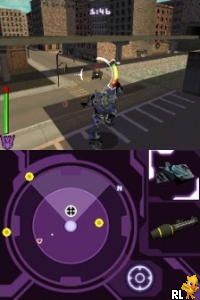
You control Autobot characters from a third-person view, completing missions and fighting enemies. The game’s combat is real-time, requiring good timing and positioning, and it also includes puzzle elements that need quick thinking. The top screen shows the main action, while the bottom screen displays menus or weapon choices, making it easy to switch between fighting and managing your gear.
You can use different attacks and special moves, often linked to specific characters or vehicles. The goal in each level is to defeat enemies, navigate through obstacles, and gather upgrades to boost your attack or defense. There aren’t many long cutscenes here; instead, the focus is on fast-paced action and tactical decisions, which was typical for Nintendo DS games of that time.
Modes, Levels and Progression
The game features various levels with different environments, like cityscapes and open fields. Each stage has specific goals, such as destroying enemies, guarding locations, or rescuing allies. Advancing through levels unlocks new characters, vehicles, and skills, giving a sense of progression. The variety keeps things interesting, with some levels focused on combat and others on puzzles or strategic positioning.
While it doesn’t have vast open worlds, it offers enough content to keep you busy through multiple sessions. You can replay levels to beat higher difficulty settings, try different characters, or develop your own strategies to complete objectives more efficiently. The mix of action and tactical play fits well with the portable nature of the Nintendo DS.
Winning Strategies
Get familiar with each character’s abilities to deal more damage and stay alive longer. Timing your attacks and blocks is key to avoiding damage. Use cover and environmental features to your advantage, and try to lead enemies into traps. Focus on the most dangerous foes first to avoid being overwhelmed. Collect upgrades whenever possible to improve your attack and defense. Don’t hesitate to try different characters to see which ones work best for each mission.
Common Questions About Transformers – Revenge of the Fallen – Autobots Version
How does the game’s difficulty change as you go?
It gets tougher as you proceed. Early levels serve as tutorials, but enemies become more aggressive and smarter, demanding better timing and resource use.
Are there different modes or ways to replay?
While the game mostly follows a linear path, replaying on higher difficulty or trying different characters can add to the challenge and enjoyment.
How long to finish the game?
The main story usually takes a few hours, but replaying with different characters or on harder settings can stretch out the experience for those who want more.
Transformers – Revenge of the Fallen – Autobots Version stands out among Nintendo DS action games, offering straightforward mechanics with enough depth to keep players interested. Its mix of combat, varied levels, and strategic choices makes it a solid pick for portable gaming on the classic handheld.
Related games: you can also try Diabolik – The Original Sin (Europe) (En,Fr,De,Es,It,Nl) and Shrek the Third (Europe), or browse all other games in the Nintendo DS category.
How to Play Transformers – Revenge of the Fallen – Autobots Version (USA) (En,Fr)?
Control Autobot characters to complete levels by fighting enemies, solving puzzles, and collecting upgrades. Switch between combat and menu screens using the keyboard to progress through various missions.
Game Controls
Arrow keys act as the D-pad; other keys handle actions and menu navigation.
You may be interested in:
-
 Nintendo DS
♥ 1
Casper’s Scare School – Classroom Capers (USA)
Nintendo DS
♥ 1
Casper’s Scare School – Classroom Capers (USA) -
 Nintendo DS
♥ 1
Zunou Nouryoku Koujou Machine – Touch de Zunoo DS (Japan)
Nintendo DS
♥ 1
Zunou Nouryoku Koujou Machine – Touch de Zunoo DS (Japan) -
 Nintendo DS
♥ 1
Zunou ni Asekaku Game Series! Vol. 1 – Cool 104 Joker & Setline (Japan)
Nintendo DS
♥ 1
Zunou ni Asekaku Game Series! Vol. 1 – Cool 104 Joker & Setline (Japan) -
 Nintendo DS
♥ 9
Zuma’s Revenge (USA)
Nintendo DS
♥ 9
Zuma’s Revenge (USA) -
 Nintendo DS
♥ 1
Zubo (USA) (En,Fr,Es)
Nintendo DS
♥ 1
Zubo (USA) (En,Fr,Es) -
 Nintendo DS
♥ 1
Zubo (Europe) (En,Fr,De,Es,It,Nl,Sv)
Nintendo DS
♥ 1
Zubo (Europe) (En,Fr,De,Es,It,Nl,Sv) -
 Nintendo DS
♥ 1
Zorro – Quest for Justice (USA) (En,Fr,De,Es,It)
Nintendo DS
♥ 1
Zorro – Quest for Justice (USA) (En,Fr,De,Es,It) -
 Nintendo DS
♥ 1
Zorro – Quest for Justice (Europe) (En,Fr,De,Es,It)
Nintendo DS
♥ 1
Zorro – Quest for Justice (Europe) (En,Fr,De,Es,It)
Comments (0)
No comments yet. Be the first to comment!