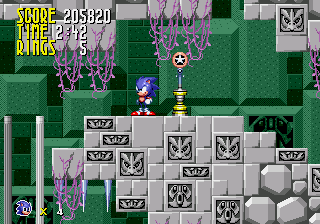
Tyson Hesse Sonic in Sonic 1
0 6 0
Tyson Hesse Sonic in Sonic 1 is a fan-made tribute that turns a classic Genesis platformer into a new experience you can play right in your browser. It offers a nostalgic nod to the Sega Genesis era, with a modern touch that makes it easy for newcomers to pick up and enjoy. The controls are simple, and the gameplay is familiar, making it accessible for all ages, whether you’re a longtime Sonic fan or just starting out with the blue blur.
What Is Tyson Hesse Sonic in Sonic 1?
This is a retro-style platformer based on the gameplay of the original Genesis Sonic titles. Your main goal is to race through levels, collect rings, dodge enemies, and reach the end before time runs out. The game keeps the fast, side-scrolling action from the early Sonic games, emphasizing speed, agility, and quick reflexes. It’s designed to be easy to get into, with controls that let you focus on mastering the levels without complicated mechanics.
What makes Tyson Hesse Sonic in Sonic 1 stand out is how closely it sticks to the feel of the original gameplay, plus the fact that you can play it directly in your browser. No downloads or installations are needed — just click and go. The game strikes a good balance for casual players and those looking for a bit of nostalgia. Expect short, engaging sessions that encourage trying again to beat your best time or high score.
What Keeps You Coming Back
The game’s appeal comes from its tight controls and familiar level design, which bring back memories of the original Sonic games. With multiple levels to explore, each with its own challenges, replay value stays high. There are hidden routes and secrets to discover, encouraging exploration and experimentation to find the fastest paths through each stage.
On top of that, Tyson Hesse Sonic in Sonic 1 provides instant feedback on your performance, pushing you to improve your previous attempts. Its straightforward setup makes each run feel fresh, whether you’re chasing a new high score or just enjoying quick bursts of action. Since it runs in your browser, you can jump in whenever you have a few free minutes without any fuss.
Handy Tips
To get the most out of this game, keep a few tips in mind:
- Maintain your speed — rushing can lead to mistakes, but slowing down a little can help you avoid obstacles.
- Look for alternate paths or hidden routes to finish levels faster and find extra rings or power-ups.
- Practice your timing to jump over enemies and gaps efficiently, especially in tricky spots.
- If available, use the pause feature to plan your moves during difficult sections.
- Replaying levels helps memorize layouts and improve your times.
- Don’t get discouraged by setbacks — each attempt teaches you something new about the level.
Player FAQ
Is Tyson Hesse Sonic in Sonic 1 beginner-friendly?
Yes, the controls are simple, and the gameplay is straightforward, making it easy for players of all skill levels, including newcomers.
Can I play Tyson Hesse Sonic in Sonic 1 offline or on any device?
Since it runs in your browser, it works on any device with an internet connection and a compatible browser — no downloads needed.
Is Tyson Hesse Sonic in Sonic 1 suitable for children?
Definitely. The mechanics are easy to understand, and the short levels make it suitable for kids and new players, with no complicated content involved.
This game offers a quick, accessible way to enjoy a familiar platforming experience. Its straightforward gameplay and browser-based format make it a good choice for both longtime fans and newcomers, ready whenever you want to jump into a Sonic adventure with a nostalgic feel.
Related games: you can also try Second Samurai (Europe) and Sonic 1 – CC Remake, or browse all other games in the Genesis category.
How to Play Tyson Hesse Sonic in Sonic 1?
Run through levels, collect rings, avoid enemies, and reach the end before time runs out. Use quick reflexes and explore hidden routes to beat your best scores.
Game Controls
Arrow keys act as the D-pad; Enter is Start; on-screen mapped keys handle the action buttons.
You may be interested in:
-
 Genesis
♥ 1
Unnecessary Roughness 95 (USA)
Genesis
♥ 1
Unnecessary Roughness 95 (USA) -
![Undead Line (Japan) [En by MIJET v20070903]](https://www.playf2p.com/wp-content/uploads/undead-line-japan-en-by-mijet-v20070903-200x120.jpg) Genesis
♥ 1
Undead Line (Japan) [En by MIJET v20070903]
Genesis
♥ 1
Undead Line (Japan) [En by MIJET v20070903] -
 Genesis
♥ 1
Undead Line (Japan)
Genesis
♥ 1
Undead Line (Japan) -
 Genesis
♥ 4
Ultra Instinct Sonic The Hedgehog
Genesis
♥ 4
Ultra Instinct Sonic The Hedgehog -
 Genesis
♥ 2
Ultimate Soccer (Europe)
Genesis
♥ 2
Ultimate Soccer (Europe) -
 Genesis
♥ 5
Ultimate Qix (USA)
Genesis
♥ 5
Ultimate Qix (USA) -
 Genesis
♥ 25
Ultimate Mortal Kombat Trilogy
Genesis
♥ 25
Ultimate Mortal Kombat Trilogy -
 Genesis
♥ 7
Ultimate Mortal Kombat 3 God Mode
Genesis
♥ 7
Ultimate Mortal Kombat 3 God Mode
Comments (0)
No comments yet. Be the first to comment!