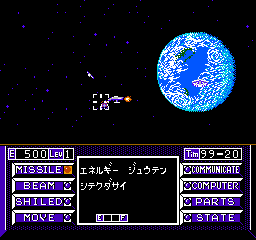
Uchuusen – Cosmo Carrier (Japan)
0 1 0
Getting Into Uchuusen – Cosmo Carrier
Uchuusen – Cosmo Carrier is a classic NES game that combines simulation and shooter elements, offering a unique experience for fans of space-themed gameplay. As a Japanese release, it’s primarily in Japanese, so some familiarity with the language might help, but the core mechanics are simple enough for most players to pick up quickly. The game runs directly in your browser, so you can start playing without needing any downloads or installations.
The game is about managing and piloting a spaceship through different missions in space. You control a carrier responsible for transporting cargo or personnel across various sectors, all while defending against enemy ships and obstacles. During a session, you’ll plan routes, engage in shooting sequences, and manage resources. The gameplay mixes strategic planning on the map with real-time combat, which calls for quick reflexes and careful decisions.
As you complete missions, you unlock new routes and upgrade your ship, encouraging continued play. The design encourages trying different strategies to improve your score and efficiency, especially since NES-era titles tend to be quite challenging. It’s a game that rewards patience and strategic thinking, making each session both tough and satisfying.
Standout Features
Visually, Uchuusen – Cosmo Carrier features pixel art typical of the NES, with simple but effective spaceship sprites and space backgrounds that evoke a nostalgic 8-bit space adventure. The interface is clear, so players can easily see their health, resources, and mission goals. While the visuals are modest compared to modern games, they capture the spirit of early space simulation and shooter titles well.
Progression gives a sense of achievement as you unlock new routes and upgrade your ship, making the game feel rewarding. Replay value is high because each run can change based on route choices and how well you handle combat. The difficulty also pushes players to sharpen their skills, since failure often means starting over, which keeps the challenge fresh.
Strategy and Tips
Having a clear plan for route management helps a lot. Try to balance cargo and combat preparedness to avoid running out of resources during a mission.
- After each mission, upgrade your ship’s defenses and weapons to better handle tougher enemies.
- Watch enemy patterns to improve your shooting during combat sequences.
- Use the map to find the most efficient routes, steering clear of heavily defended sectors when possible.
- Manage your resources carefully; running out of fuel or supplies can end your run early.
- Practice quick decision-making in combat to improve your chances of survival.
Quick Questions
How do I get started if I don’t understand Japanese?
The core gameplay is pretty straightforward, involving route planning and shooting. Focus on visual cues like ship movements and enemy signals to guide your choices. You’ll also learn the controls through some trial and error.
What’s a common mistake beginners make?
Many players tend to overextend their routes or underestimate enemy strength, which can drain resources or destroy the ship early on. Starting with safer routes and upgrading defenses can help avoid this.
Can I play Uchuusen – Cosmo Carrier on mobile or touch devices?
Since the game runs in the browser, it’s playable on mobile devices with a compatible browser. Controls might feel less precise on touch screens, but it’s still fun for casual play.
Uchuusen – Cosmo Carrier offers a solid mix of simulation and shooter gameplay rooted in the NES era. Its simple controls and challenging gameplay make it a rewarding pick for fans of retro space games, and you can play it directly in your browser for free.
Related games: you can also try Championship Bowling (USA) and Great Tank (Japan), or browse all other games in the NES category.
How to Play Uchuusen – Cosmo Carrier (Japan)?
Pilot your spaceship to complete space missions by managing routes, fighting enemies, and upgrading your ship, balancing resource use and combat skills to progress through challenging levels.
Game Controls
Arrow keys control movement; action buttons are mapped to keyboard keys for shooting and menu navigation.
You may be interested in:
-
![Zombie Hunter (Japan) [En by KingMike v1.01]](https://www.playf2p.com/wp-content/uploads/zombie-hunter-japan-en-by-kingmike-v1-01-200x120.png) NES
♥ 2
Zombie Hunter (Japan) [En by KingMike v1.01]
NES
♥ 2
Zombie Hunter (Japan) [En by KingMike v1.01] -
 NES
♥ 1
Zombie Hunter (Japan)
NES
♥ 1
Zombie Hunter (Japan) -
 NES
♥ 1
Zoids Mokushiroku (Japan)
NES
♥ 1
Zoids Mokushiroku (Japan) -
 NES
♥ 2
Zoids 2 – Zenebas no Gyakushuu (Japan)
NES
♥ 2
Zoids 2 – Zenebas no Gyakushuu (Japan) -
 NES
♥ 1
Zoids – Chuuou Tairiku no Tatakai (Japan)
NES
♥ 1
Zoids – Chuuou Tairiku no Tatakai (Japan) -
 NES
♥ 11
Zippy Race (Japan)
NES
♥ 11
Zippy Race (Japan) -
 NES
♥ 1
Zhen Ben Xi You Ji (Asia) (Unl)
NES
♥ 1
Zhen Ben Xi You Ji (Asia) (Unl) -
 NES
♥ 1
Zenbei!! Pro Basket (Japan)
NES
♥ 1
Zenbei!! Pro Basket (Japan)
Comments (0)
No comments yet. Be the first to comment!