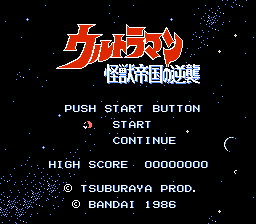
Ultraman – Kaijuu Teikoku no Gyakushuu (Japan)
0 2 0
Ultraman – Kaijuu Teikoku no Gyakushuu (Japan) is a classic FDS game that puts players into the monster-filled universe of the well-known Japanese hero. Since it’s playable directly in your browser, you don’t need to download anything—just start playing and enjoy this vintage adventure. The game is easy to pick up, making it accessible whether you’re familiar with the series or just exploring for the first time.
What Is Ultraman – Kaijuu Teikoku no Gyakushuu?
This game falls into the action genre, with players controlling Ultraman as he battles against enormous monsters. The goal is to defeat these kaiju to keep the world safe from destruction. Quick reflexes, precise timing, and managing your resources are key. The gameplay is side-scrolling and straightforward, typical of FDS-era titles, focusing on fast combat and recognizing attack patterns.
As you progress, the difficulty ramps up gradually, requiring both accuracy and some strategic thinking. The design favors short bursts of gameplay, making each session feel like a quick dose of nostalgic action. Despite its simple mechanics, it captures the essence of classic monster-battle games and offers a satisfying sense of achievement each time you conquer a kaiju.
What Keeps You Coming Back
What draws players in is how straightforward but engaging the mechanics are. The level design encourages improving timing and reflexes as you face tougher enemies. The quick restart options make trying again quick and rewarding, ideal for brief gaming sessions or moments of fun. You can aim to beat your previous scores or simply enjoy the familiar feeling of a classic FDS game.
The simplicity means you can focus on perfecting your timing or enjoying the challenge of different monster attack patterns. Each run feels fresh, especially when you’re looking to improve or test your skills against different foes.
Handy Tips
Here are a few tips to get the most out of Ultraman – Kaijuu Teikoku no Gyakushuu:
- Learn each kaiju’s attack pattern so you can dodge effectively and land your own hits.
- Use short, well-timed attacks instead of spamming, which can leave you open.
- Keep an eye on your health meter and plan your attacks to conserve energy for the tougher enemies.
- Patience goes a long way—sometimes a slow, steady approach wins the fight against the bigger monsters.
- Experiment with different timing strategies to see what works best against each monster’s attack rhythm.
- If you’re getting frustrated, take a break—clearing your mind helps improve your reaction time and timing.
Player FAQ
Is Ultraman – Kaijuu Teikoku no Gyakushuu suitable for beginners?
Yes. The controls are simple, and the mechanics are easy to pick up, though mastering the timing takes some practice.
Can younger players enjoy Ultraman – Kaijuu Teikoku no Gyakushuu?
Absolutely. Its straightforward gameplay and familiar monster battles make it fun for players of all ages, especially fans of Japanese monsters.
Do I need an internet connection to play Ultraman – Kaijuu Teikoku no Gyakushuu?
No, it runs right in your browser without needing extra downloads. Once loaded, you can play offline whenever you want.
Playing Ultraman – Kaijuu Teikoku no Gyakushuu offers quick, nostalgic fun for fans of classic FDS titles and monster battles. Its simple mechanics and charming style make it a game you might find yourself returning to whenever you’re craving straightforward, monster-fighting action.
Related games: you can also try Cocona World (Japan) and Tama & Friends – Sanchoume Daibouken (Japan), or browse all other games in the FDS category.
How to Play Ultraman – Kaijuu Teikoku no Gyakushuu (Japan)?
Control Ultraman to defeat giant monsters by dodging their attacks and striking back. Focus on timing your attacks and learning each kaiju’s attack pattern to clear levels and improve your score.
Game Controls
Arrow keys move Ultraman; attack and action keys are mapped to keyboard buttons.
You may be interested in:
-
 FDS
♥ 2
Zelda no Densetsu – The Hyrule Fantasy (Japan) (Virtual Console)
FDS
♥ 2
Zelda no Densetsu – The Hyrule Fantasy (Japan) (Virtual Console) -
 FDS
♥ 2
Zelda no Densetsu – The Hyrule Fantasy (Japan) (Rev 1)
FDS
♥ 2
Zelda no Densetsu – The Hyrule Fantasy (Japan) (Rev 1) -
 FDS
♥ 1
Zelda no Densetsu – The Hyrule Fantasy (Japan) (GameCube)
FDS
♥ 1
Zelda no Densetsu – The Hyrule Fantasy (Japan) (GameCube) -
 FDS
♥ 1
Zelda no Densetsu – The Hyrule Fantasy (Japan) (Collector’s Edition)
FDS
♥ 1
Zelda no Densetsu – The Hyrule Fantasy (Japan) (Collector’s Edition) -
 FDS
♥ 2
Zelda no Densetsu – The Hyrule Fantasy (Japan) (Beta) (1985-12-28)
FDS
♥ 2
Zelda no Densetsu – The Hyrule Fantasy (Japan) (Beta) (1985-12-28) -
 FDS
♥ 2
Zelda no Densetsu – The Hyrule Fantasy (Japan)
FDS
♥ 2
Zelda no Densetsu – The Hyrule Fantasy (Japan) -
 FDS
♥ 1
Zatsugaku Olympic Quiz Part II (Japan) (Unl)
FDS
♥ 1
Zatsugaku Olympic Quiz Part II (Japan) (Unl) -
 FDS
♥ 1
Zatsugaku Olympic Quiz – Watanabe Wataru Hen (Japan) (Unl)
FDS
♥ 1
Zatsugaku Olympic Quiz – Watanabe Wataru Hen (Japan) (Unl)
Comments (0)
No comments yet. Be the first to comment!