Vegas Dream (USA)
0 2 3
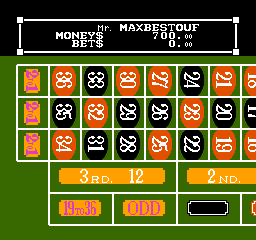
Vegas Dream (USA) is a classic NES game that brings the thrill of casino-style gambling and strategy right into your browser. This vintage title is easy to pick up, with simple controls and familiar mechanics that make it accessible for players of all experience levels. Its nostalgic charm comes from its straightforward gameplay, making it a good choice for quick gaming sessions or casual fun without any extra downloads.
What Is Vegas Dream?
This NES classic falls into the genres of strategy, simulation, and gambling, blending elements of chance with decision-making. The main goal is to manage your virtual bankroll by choosing different gambling options, like slot machines, poker, or other casino games, each with its own risk and reward. The game offers a simulated environment where you can test your luck and strategic skills in a setting that feels like a real casino.
Vegas Dream focuses on resource management and risk assessment. You start with a set amount of virtual money, trying to increase your winnings while avoiding going broke. The gameplay encourages quick thinking and strategic betting, so each session can be different depending on your choices and luck. It’s suitable for players who enjoy gambling simulations with a bit of strategy rather than pure chance.
What Keeps You Coming Back
The game’s replay value comes from the variety of gambling options and the unpredictability of outcomes. Each session can end differently based on your decisions and luck, encouraging experimentation with different strategies and bankroll sizes. The different gambling modes keep things interesting, as you figure out how to balance risk and reward across various casino games.
Vegas Dream also offers a simple but satisfying challenge: try to beat your previous high score or stretch your bankroll as far as it can go. Its short play sessions make it easy to jump in and out, but the excitement of managing your virtual casino funds keeps players returning. The nostalgic NES graphics add a layer of charm that enhances the feeling of being in a vintage casino, even in a browser-based game.
Handy Tips
Start with small bets to get a feel for each game’s risk level before going bigger. Keep an eye on your bankroll and avoid reckless betting. Spread out your bets across different gambling options to manage risk better. Remember, luck plays a big role, so don’t get discouraged if you lose repeatedly—try different tactics. When your funds are low, be conservative with your bets to extend gameplay and increase your chances of hitting a big win.
Player FAQ
Is Vegas Dream easy for beginners to learn?
Yes, its simple mechanics and controls make Vegas Dream accessible for new players, especially those familiar with basic gambling concepts.
Can younger players enjoy Vegas Dream or is it only for adults?
While the game simulates gambling, it doesn’t involve real money or real gambling mechanics, so it can be suitable for older children or teens interested in casino-style gameplay, with parental guidance.
Does Vegas Dream require an internet connection to play?
No, you can play Vegas Dream directly in your browser on this site, with no internet connection needed after the initial load. It’s convenient for quick sessions whenever you want.
Vegas Dream is a charming piece of NES history, offering simple yet engaging gambling simulation fun. Its mix of strategy and chance, wrapped in nostalgic graphics, provides a quick, satisfying experience for casual players. Playing this classic in your browser makes it easy to enjoy a vintage Vegas-style casino whenever the mood strikes.
Related games: you can also try Ginga Eiyuu Densetsu (Japan) and Ice Hockey (USA), or browse all other games in the NES category.
How to Play Vegas Dream (USA)?
Manage your virtual bankroll by choosing different casino games, placing bets, and trying to increase your winnings without going broke. Make strategic decisions based on your luck and risk to beat your high score.
Game Controls
Arrow keys act as the D-pad; Enter is Start; other keys handle game actions.
You may be interested in:
-
![Zombie Hunter (Japan) [En by KingMike v1.01]](https://www.playf2p.com/wp-content/uploads/zombie-hunter-japan-en-by-kingmike-v1-01-200x120.png) NES
♥ 2
Zombie Hunter (Japan) [En by KingMike v1.01]
NES
♥ 2
Zombie Hunter (Japan) [En by KingMike v1.01] -
 NES
♥ 1
Zombie Hunter (Japan)
NES
♥ 1
Zombie Hunter (Japan) -
 NES
♥ 1
Zoids Mokushiroku (Japan)
NES
♥ 1
Zoids Mokushiroku (Japan) -
 NES
♥ 2
Zoids 2 – Zenebas no Gyakushuu (Japan)
NES
♥ 2
Zoids 2 – Zenebas no Gyakushuu (Japan) -
 NES
♥ 1
Zoids – Chuuou Tairiku no Tatakai (Japan)
NES
♥ 1
Zoids – Chuuou Tairiku no Tatakai (Japan) -
 NES
♥ 11
Zippy Race (Japan)
NES
♥ 11
Zippy Race (Japan) -
 NES
♥ 1
Zhen Ben Xi You Ji (Asia) (Unl)
NES
♥ 1
Zhen Ben Xi You Ji (Asia) (Unl) -
 NES
♥ 1
Zenbei!! Pro Basket (Japan)
NES
♥ 1
Zenbei!! Pro Basket (Japan)
Comments (0)
No comments yet. Be the first to comment!