Vegas Stakes (Europe)
0 1 0
Vegas Stakes (Europe) is a classic SNES game that takes players into the lively, neon-lit world of casino gambling. With its authentic feel and simple gameplay, it captures the excitement of Las Vegas on a pixelated screen. It’s a nostalgic favorite that lets players try their luck at various gambling venues right in their browser, giving the chance to experience casino action whenever they like.
Step Into the World of Vegas Stakes
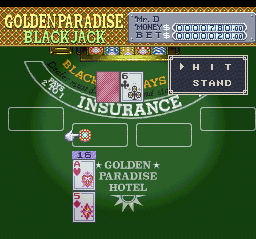
This SNES game features bright, colorful visuals reminiscent of the 16-bit era, with detailed depictions of poker tables, slot machines, and roulette wheels. The sound design captures the ambient noises of a busy casino—coins clinking, chips stacking, and the jingling of slot machines—creating an energetic, immersive environment. The game feels like being inside a real casino, with a touch of retro charm that adds to its appeal.
The colors are vibrant but not overwhelming, and the interface is straightforward, making it easy for players to focus on the gambling. The game runs smoothly in your browser, giving instant access to classic casino mechanics without needing downloads or installations. Its simple design keeps everything clear and easy to navigate, whether you’re a seasoned gambler or new to casino games.
How the Gameplay Hooks You
Vegas Stakes revolves around a simple cycle: pick a game, place your bets, and see if luck is on your side. The pace stays steady, letting players jump from poker to blackjack, slots, or roulette, testing their fortunes across different games. It rewards patience and strategic betting, with each session offering a mix of wins and losses that keep things interesting.
Progress isn’t about storylines or levels but about mastering the different gambling styles and managing your chips. It’s great for quick sessions, with each round giving immediate results—win or lose. That makes it perfect for short bursts of play or longer gambling sessions. The mechanics are easy to understand, encouraging repeated play without feeling complicated or overwhelming.
Pro Tips for Vegas Stakes
Getting the most from the game involves understanding each gambling style and managing your chips wisely.
- Start small to test your luck and save chips for riskier rounds later.
- Learn basic strategies for blackjack and poker to improve your chances.
- Switch between games to keep things fresh and avoid predictability.
- Keep track of your chips; don’t chase losses by betting more than you can afford.
- Use quick-play options to jump right into action.
- Sometimes, taking a moment to observe can help you make smarter bets later.
Frequently Asked Questions
Can I play Vegas Stakes in short sessions without losing progress?
Yes. Since it runs in your browser and doesn’t save progress, you can start and stop whenever you like, making it perfect for brief gambling sessions.
Does the game feel repetitive after multiple plays?
While the core gameplay stays the same, switching between different casino games and changing your bets keeps things interesting. The visual cues and atmosphere also add variety, so it doesn’t get dull.
Is Vegas Stakes suitable for players of all ages or only adults?
The game simulates gambling purely for entertainment and doesn’t involve real money. It’s designed for those interested in casino mechanics and atmosphere, though its gambling theme is better suited for mature players.
Vegas Stakes offers a faithful digital take on the casino vibe, with straightforward gameplay that runs smoothly in your browser. Whether you’re after quick thrills or just want to try your luck, this classic continues to be a fun piece of SNES history.
Related games: you can also try GP-1 (Japan) and Jikkyou Powerful Pro Yakyuu '96 – Kaimaku Ban (Japan) (Rev A), or browse all other games in the SNES category.
How to Play Vegas Stakes (Europe)?
Choose a casino game, place your bets, and try to win chips. Switch between poker, blackjack, slots, and roulette, aiming to maximize your winnings through strategic play and luck.
Game Controls
Arrow keys for navigation; Enter or space to select and confirm actions.








Comments (0)
No comments yet. Be the first to comment!