Virtual Bart (USA)
0 9 1
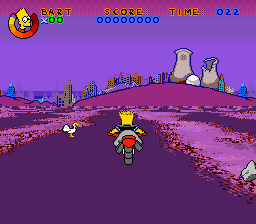
Virtual Bart (USA) is a classic SNES game that puts you in control of the Simpsons’ mischievous son in a lively, action-packed setting. As a game from the 16-bit era, it’s simple enough for newcomers but still offers enough challenge to keep experienced players interested. The best part is, it runs right in your browser, so you can jump into the fun without needing any downloads or setup. Just click and start playing—perfect for quick gaming sessions or casual fun.
What Is Virtual Bart?
This game is an action platformer where your main goal is guiding Bart through levels filled with obstacles and enemies. It calls for quick reflexes, precise timing, and recognizing patterns as you move through each stage. The controls are intuitive, making it easy to pick up, but mastering the levels can be satisfying. Its colorful, cartoon-style visuals draw inspiration from the Simpsons universe, giving it a familiar, nostalgic look.
Throughout the game, you’ll be jumping over hazards, collecting items, and avoiding enemies. It encourages players to improve by trying again and again, aiming for higher scores or faster times. While it’s primarily about action, the focus on timing makes each attempt rewarding. The game moves quickly, making it perfect for short bursts of play and appealing to fans of retro platformers.
Why Keep Playing?
One of the reasons players return to Virtual Bart is its simple yet addictive gameplay. Each level offers a familiar challenge, but with enough variation to stay interesting. The scoring encourages trying to finish levels efficiently and avoid taking damage, pushing you to beat your best runs. The cheerful visuals and soundtrack add a lively, fun atmosphere that keeps things engaging.
The game also invites experimentation. Different routes or timing strategies can lead to better results. Its straightforward design means new players can enjoy it right away, but the challenge of perfecting your runs keeps seasoned players coming back. Short levels make it easy to play in quick sessions, and the desire to improve scores adds to its replay value. Overall, it’s a fun, accessible game that holds up over time.
Helpful Tips
Here are some tips to get the most out of Virtual Bart:
- Time your jumps carefully to avoid enemies and obstacles; rushing often causes mistakes.
- Watch enemy patterns before rushing through sections; patience helps you earn higher scores.
- Pick up power-ups and bonuses—they can give you an edge during tricky parts.
- Practice levels to find faster routes and improve your completion times.
- Keep an eye on the timer, but stay calm; clear-headed decisions work better.
- If you get stuck, try approaching the problem from a different angle or waiting for enemies to pass.
Player FAQ
Is Virtual Bart suitable for younger players or beginners?
Yes, its controls and objectives are straightforward, making it accessible for newcomers or younger gamers.
Can I play Virtual Bart offline or on any device?
This version runs directly in your browser, so an internet connection isn’t needed after it loads. It works well on most desktop browsers and devices that support Flash or HTML5.
How long does a typical session last, and is it good for quick play?
Levels usually take just a few minutes, so it’s easy to fit into short gaming breaks or quick play sessions. The simple gameplay makes it easy to start and stop whenever you like.
Virtual Bart offers a straightforward way to enjoy classic SNES action, with enough challenge to keep players coming back. Its instant browser play makes it easy to enjoy retro gaming whenever you want, no matter where you are. It’s a fun reminder of the SNES era that you can jump into right from your browser tab.
Related games: you can also try Dragon Ball Z – Super Butouden 2 (Japan) (Rev A) and Super Metroid (Japan, USA) (En,Ja) [Hack by Black Telomeres v1.87] (~Super Metroid – Dependence), or browse all other games in the SNES category.
How to Play Virtual Bart (USA)?
Guide Bart through levels by jumping over obstacles, avoiding enemies, and collecting items to earn points and beat your best times.
Game Controls
Arrow keys for movement; action buttons mapped to keyboard keys for jumping and actions.








Comments (0)
No comments yet. Be the first to comment!