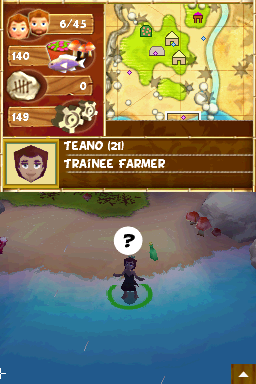
Virtual Villagers – A New Home (USA) (En,Fr,Es)
0 1 0
Virtual Villagers – A New Home (USA) (En,Fr,Es) is a classic Nintendo DS game that takes players to a remote island where a small community of villagers begins again. The visuals are simple pixel art and the soundscape is soothing, creating a calm atmosphere that encourages observing and guiding a young society. It’s a game that values patience and thoughtful planning, offering a relaxed but engaging experience for those who enjoy simulation and management games on their handheld device.
Step Into the World of Virtual Villagers – A New Home
The setting is an untouched island, where a few villagers start with basic needs and a desire to rebuild. The visuals are colorful pixel art that emphasizes clarity and charm, making it easy to see what each villager is doing. Ambient nature sounds and gentle melodies add to the peaceful, isolated feel. The quiet atmosphere invites players to watch villagers work, explore, and develop their community at a comfortable pace. The game is available in English, French, and Spanish, making it accessible to many players. Playing on the Nintendo DS, it benefits from the device’s portability, so you can enjoy short or longer sessions without losing track of your village’s progress.
How the Gameplay Hooks You
This game from the Nintendo DS era draws players in through its subtle cycle of discovery and growth. You start with a small group of villagers, each with their own skills and roles, and your goal is to guide them as they gather resources, build structures, and solve problems. Progress is steady but deliberate, rewarding careful planning and observation. Over time, your village expands, unlocking new areas and options, but the pace stays relaxed enough to enjoy at your own speed. The design encourages a sense of quiet achievement, where patience and strategic thinking help with survival and growth. It’s a game that can be played in short bursts or longer sessions, always offering something new to focus on or challenge yourself with.
Pro Tips for Virtual Villagers – A New Home
Getting the most out of the game means understanding its gentle mechanics and making smart choices.
- Assign villagers to tasks based on their skills to speed up gathering and building.
- Watch your villagers’ needs—hunger, health, and happiness—to avoid setbacks.
- Explore new areas early, as they often have important resources or story points.
- Balance resource collection with construction; rushing one can slow you down.
- Save often and plan ahead for upcoming events or challenges.
- Be patient—allow your villagers to grow naturally without rushing them.
Frequently Asked Questions
Can I play Virtual Villagers – A New Home in short sessions?
Yes, the relaxed pace makes it easy to pause and pick up again without losing progress.
Does the game become repetitive over time?
While it follows a familiar pattern of gathering, building, and expanding, the variety of tasks and gradual story development help keep it interesting.
Is the game suitable for all ages?
Its calming atmosphere and straightforward mechanics make it accessible for most players, especially those who enjoy management simulations and patience-based gameplay.
The game runs smoothly on this browser-based emulator, letting you enjoy the peaceful task of cultivating a thriving village without any downloads. Virtual Villagers – A New Home offers a gentle, strategic experience that rewards attentive play and careful planning.
Related games: you can also try Play 'Josei no Hinkaku' Juku DS – Tsuyoku, Yasashiku, Utsukushiku – Bando Mariko Shinsho (Japan) and Hello Kitty – Daily (France), or browse all other games in the Nintendo DS category.
How to Play Virtual Villagers – A New Home (USA) (En,Fr,Es)?
Guide villagers to gather resources, build structures, and grow your island community through careful planning and observation, balancing needs and exploration to expand your village at your own pace.
Game Controls
Arrow keys navigate; action keys perform tasks; mouse may be used for selections.
You may be interested in:
-
 Nintendo DS
♥ 1
Casper’s Scare School – Classroom Capers (USA)
Nintendo DS
♥ 1
Casper’s Scare School – Classroom Capers (USA) -
 Nintendo DS
♥ 1
Zunou Nouryoku Koujou Machine – Touch de Zunoo DS (Japan)
Nintendo DS
♥ 1
Zunou Nouryoku Koujou Machine – Touch de Zunoo DS (Japan) -
 Nintendo DS
♥ 1
Zunou ni Asekaku Game Series! Vol. 1 – Cool 104 Joker & Setline (Japan)
Nintendo DS
♥ 1
Zunou ni Asekaku Game Series! Vol. 1 – Cool 104 Joker & Setline (Japan) -
 Nintendo DS
♥ 9
Zuma’s Revenge (USA)
Nintendo DS
♥ 9
Zuma’s Revenge (USA) -
 Nintendo DS
♥ 1
Zubo (USA) (En,Fr,Es)
Nintendo DS
♥ 1
Zubo (USA) (En,Fr,Es) -
 Nintendo DS
♥ 1
Zubo (Europe) (En,Fr,De,Es,It,Nl,Sv)
Nintendo DS
♥ 1
Zubo (Europe) (En,Fr,De,Es,It,Nl,Sv) -
 Nintendo DS
♥ 1
Zorro – Quest for Justice (USA) (En,Fr,De,Es,It)
Nintendo DS
♥ 1
Zorro – Quest for Justice (USA) (En,Fr,De,Es,It) -
 Nintendo DS
♥ 1
Zorro – Quest for Justice (Europe) (En,Fr,De,Es,It)
Nintendo DS
♥ 1
Zorro – Quest for Justice (Europe) (En,Fr,De,Es,It)
Comments (0)
No comments yet. Be the first to comment!