Warning – Code de la Route (France)
0 1 0
Warning – Code de la Route (France) is a classic Nintendo DS game that simulates studying for the French driving license exam. It helps players prepare for the written test by offering a clear way to learn traffic signs, rules, and driving principles through multiple-choice questions and practice tests. Fans of educational games or those interested in French driving regulations will find this game straightforward and focused on the basics of road safety.
Getting Into Warning – Code de la Route
This Nintendo DS game features a gameplay loop based on answering questions correctly to move through different levels of difficulty. When you start the game, you choose a mode—practice, revision, or simulated exam—each with its own approach to learning. Sessions usually involve answering sets of multiple-choice questions, with immediate feedback after each one. The idea is to improve your score and understanding before taking full mock exams.
The game tracks your progress and scores, encouraging you to try again until you get comfortable with tricky topics. It’s designed for short, focused sessions, making it good for quick reviews or longer study periods. The interface is simple and easy to navigate, with clear menus and question prompts, so you can jump right in without a steep learning curve.
Standout Features
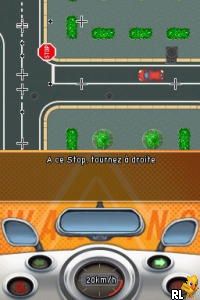
The visuals are minimal but functional, with clear text and simple icons that keep the focus on learning. The interface mimics a classroom setting, with questions on the top screen and answer options below, giving a familiar look for players used to quiz games. The difficulty increases gradually based on your performance, which helps encourage steady progress.
Replay value comes from the variety of question pools and different test modes. You can take practice exams repeatedly to improve your knowledge or try full simulated tests to see how ready you are. Since it runs right in your browser on this site, it’s accessible anytime without needing to install anything.
Strategy and Tips
Try to understand traffic signs and rules rather than just memorize answers. Practice often to reinforce what you learn and to get quicker. Pay attention to explanations after each question to learn from mistakes. If you’re unsure about a question, review related traffic signs or rules in the menu before trying again. Use practice mode to focus on weak spots, and don’t rush—accuracy is more important than speed for passing the real exam. Keep doing mock tests until your scores are consistently high to feel confident on exam day.
- Look at incorrect answers to understand where you went wrong and avoid making the same mistake again.
- Set specific goals for each session, like mastering a particular topic or question type.
- If available, use the timer to improve your response speed over time.
- Take breaks to stay fresh and keep your focus sharp during practice.
Quick Questions
How do I get started with Warning – Code de la Route?
Just pick your preferred mode from the main menu—practice or simulated exam—and start answering questions right away.
What’s a common mistake beginners make?
Many focus on memorizing answers instead of understanding traffic rules, which can cause trouble with tricky questions.
Can I play Warning – Code de la Route on mobile or touch devices?
Yes, since it runs in your browser, it works on phones and tablets with touch screens, making it easy to study on the go.
Warning – Code de la Route gives a practical way to prepare for the French driving test. Its straightforward design and accessibility make it a helpful tool for anyone wanting to brush up on traffic rules without any fuss, directly playable in your browser for free.
Related games: you can also try Mummi og den Store Hoestfesten (Europe) (Sv,No,Da,Fi) and Pokemon – Weisse Edition (Germany) (NDSi Enhanced), or browse all other games in the Nintendo DS category.
How to Play Warning – Code de la Route (France)?
Answer multiple-choice questions about traffic signs and rules to improve your knowledge and prepare for the driving exam. Play practice, revision, or full mock tests to track your progress and learn from mistakes.
Game Controls
Arrow keys navigate; Enter selects answers; other keys may confirm or move through menus.
You may be interested in:
-
 Nintendo DS
♥ 1
Casper’s Scare School – Classroom Capers (USA)
Nintendo DS
♥ 1
Casper’s Scare School – Classroom Capers (USA) -
 Nintendo DS
♥ 1
Zunou Nouryoku Koujou Machine – Touch de Zunoo DS (Japan)
Nintendo DS
♥ 1
Zunou Nouryoku Koujou Machine – Touch de Zunoo DS (Japan) -
 Nintendo DS
♥ 1
Zunou ni Asekaku Game Series! Vol. 1 – Cool 104 Joker & Setline (Japan)
Nintendo DS
♥ 1
Zunou ni Asekaku Game Series! Vol. 1 – Cool 104 Joker & Setline (Japan) -
 Nintendo DS
♥ 9
Zuma’s Revenge (USA)
Nintendo DS
♥ 9
Zuma’s Revenge (USA) -
 Nintendo DS
♥ 1
Zubo (USA) (En,Fr,Es)
Nintendo DS
♥ 1
Zubo (USA) (En,Fr,Es) -
 Nintendo DS
♥ 1
Zubo (Europe) (En,Fr,De,Es,It,Nl,Sv)
Nintendo DS
♥ 1
Zubo (Europe) (En,Fr,De,Es,It,Nl,Sv) -
 Nintendo DS
♥ 1
Zorro – Quest for Justice (USA) (En,Fr,De,Es,It)
Nintendo DS
♥ 1
Zorro – Quest for Justice (USA) (En,Fr,De,Es,It) -
 Nintendo DS
♥ 1
Zorro – Quest for Justice (Europe) (En,Fr,De,Es,It)
Nintendo DS
♥ 1
Zorro – Quest for Justice (Europe) (En,Fr,De,Es,It)
Comments (0)
No comments yet. Be the first to comment!