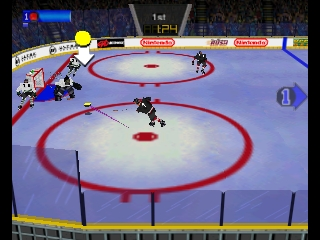
Wayne Gretzky’s 3D Hockey ’98 (Europe) (En,Fr,De,Es)
0 1 0
Wayne Gretzky’s 3D Hockey ’98 (Europe) (En,Fr,De,Es) is a classic Nintendo 64 sports game that brings arcade-style ice hockey straight to your browser. Its simple gameplay and easy controls make it perfect for newcomers or anyone wanting quick, enjoyable matches without complication. This title brings back the feel of late ’90s sports games, offering a familiar vibe for fans of that era’s gaming.
What Is Wayne Gretzky’s 3D Hockey ’98?
This game offers a 3D hockey simulation with fast-paced, arcade-style action. You can pick from different teams and jump into quick matches or tournaments, aiming to outscore your opponents. It focuses on fun and accessibility rather than realism, making it suitable for players of all skill levels.
The gameplay involves controlling players, passing, shooting, and goalkeeping, all within a straightforward but engaging hockey environment. Its controls are easy to learn, and the game’s quick pace encourages fast thinking and smart shot placement, making it great for casual play.
What Keeps You Coming Back
One of the main draws is the variety of game modes, like exhibition matches and tournaments. The quick load times and instant gameplay keep matches lively, perfect for short gaming sessions. The cartoonish visuals and exaggerated animations add charm, making each game lively and fun.
Replay value comes from how easy it is to jump right in, the competitive feel of matches, and the chance to try different teams or strategies. Multiplayer options, even in a browser, promote friendly rivalry, and simple mechanics make it easy to pick up but hard to master, encouraging players to get better over time.
Handy Tips
Start with the default controls to get a feel for puck handling and shooting. Focus on positioning your players well to block opponents and create scoring chances. Use quick passes to avoid defenders and maintain possession. Keep an eye on the shot clock to time your shots well. Practice your goalie movements to improve shot blocking.
- Adjust your team’s difficulty if that option is available, so it matches your skill level and keeps things fun.
- Try different teams or formations to see what suits your style best.
- Use quick passes to throw off defenders and set up better scoring opportunities.
- Position your goalie carefully for shots from odd angles and keep them active.
- Take advantage of power plays when opponents are penalized to increase your chances of scoring.
Player FAQ
Is Wayne Gretzky’s 3D Hockey ’98 easy for beginners?
Yes, with its simple controls and arcade feel, it’s accessible for newcomers and casual players. You can pick it up quickly and start enjoying the game right away.
Can I play Wayne Gretzky’s 3D Hockey ’98 with kids?
Definitely. Its cartoonish look and straightforward mechanics make it suitable for younger players, especially those interested in sports or hockey. It’s a fun intro to the sport without complicated rules.
Do I need an internet connection to play Wayne Gretzky’s 3D Hockey ’98?
No, the game runs directly in your browser without needing to download anything. You can play instantly online, which works well for quick sessions or casual play, even without an internet connection after it loads.
Overall, Wayne Gretzky’s 3D Hockey ’98 is a lively, easy-to-play hockey game you can enjoy right in your browser. Its simple mechanics and playful style make it a good choice for casual players or anyone looking for a quick hockey match.
Related games: you can also try Paper Mario – Toadette and Mace – The Dark Age (USA), or browse all other games in the Nintendo 64 category.
How to Play Wayne Gretzky’s 3D Hockey ’98 (Europe) (En,Fr,De,Es)?
Choose a team, control players to pass, shoot, and defend, aiming to score more goals than your opponent within the match time. Play quick matches or tournaments for fun and practice.
Game Controls
Arrow keys for movement; spacebar for passing/shooting; other keys for actions as shown on screen.
You may be interested in:
-
 Nintendo 64
♥ 3
Whisper The Wolf 64
Nintendo 64
♥ 3
Whisper The Wolf 64 -
 Nintendo 64
♥ 1
Wetter Slope Soap
Nintendo 64
♥ 1
Wetter Slope Soap -
 Nintendo 64
♥ 1
Wetrix (USA) (En,Fr,De,Es,It,Nl)
Nintendo 64
♥ 1
Wetrix (USA) (En,Fr,De,Es,It,Nl) -
 Nintendo 64
♥ 1
Wetrix (Japan)
Nintendo 64
♥ 1
Wetrix (Japan) -
 Nintendo 64
♥ 1
Wetrix (Europe) (En,Fr,De,Es,It,Nl)
Nintendo 64
♥ 1
Wetrix (Europe) (En,Fr,De,Es,It,Nl) -
 Nintendo 64
♥ 1
Weird Snake Dimension
Nintendo 64
♥ 1
Weird Snake Dimension -
 Nintendo 64
♥ 21
WCW-nWo Revenge (USA)
Nintendo 64
♥ 21
WCW-nWo Revenge (USA) -
 Nintendo 64
♥ 8
WCW-nWo Revenge (Europe)
Nintendo 64
♥ 8
WCW-nWo Revenge (Europe)
Comments (0)
No comments yet. Be the first to comment!