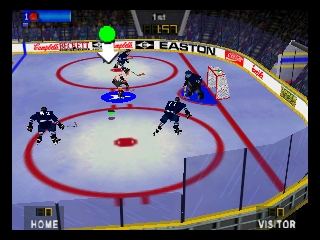
Wayne Gretzky’s 3D Hockey (Japan)
0 1 0
Wayne Gretzky’s 3D Hockey (Japan) is a classic Nintendo 64 sports game that puts the fast-paced action of hockey right in your browser. Originally made for the Nintendo 64 console, it captures the arcade-style gameplay and competitive spirit of ice hockey, appealing to fans of sports games and retro gaming alike. Its simple mechanics and focus on fun over realism make it easy for newcomers, while offering enough challenge for seasoned players to enjoy quick matches.
Getting Into Wayne Gretzky’s 3D Hockey
The main gameplay of Wayne Gretzky’s 3D Hockey centers on fast-paced, arcade-style hockey matches. Players control a team of skaters and try to score more goals than the other team within a set time. Matches usually play out in a straightforward way, with players skating, passing, and shooting to outsmart their opponents. The game relies on quick reflexes and good positioning, keeping each game lively and competitive.
Most modes focus on single matches or quick tournaments, so you can jump right into the action without complicated setups. The controls are simple—move your characters around the ice, pass to teammates, and shoot on goal. The pace is quick, encouraging fast decision-making and constant engagement. It’s easy to pick up but takes practice to master, especially when playing against the computer or a friend.
Standout Features
Visually, Wayne Gretzky’s 3D Hockey boasts a colorful, cartoon-like look typical of late 90s sports games. The character models are exaggerated but easy to recognize, and the animations are smooth enough to keep the action flowing without lag. While it doesn’t aim for realism, it captures the energetic spirit of hockey with lively crowd animations and dynamic puck movement.
Your progress builds through matches and tournaments, giving chances to sharpen your skills and refine your tactics. The replay value stays high thanks to multiplayer options and quick match setups, letting you jump into a new game instantly. Its simple gameplay makes it easy to keep trying—whether to beat a friend’s high score or improve your own reflexes.
Strategy and Tips
Getting the most out of Wayne Gretzky’s 3D Hockey comes down to quick thinking and smart positioning. Here are some tips to help you improve:
- Keep control of the puck; accurate passing opens up scoring chances.
- Use quick sprints to chase down opponents or cut off passes.
- Watch your goalie’s position to prevent easy goals.
- Practice timing your shots when the goalie is out of position.
- Use body checks to steal the puck and regain control.
- Adjust your defensive stance to block shots and passing lanes better.
Quick Questions
How do I start a game in Wayne Gretzky’s 3D Hockey?
Just pick a match or tournament mode from the main menu, choose your team, and start playing. The game loads instantly in your browser, so you can jump into a game anytime.
What is a common mistake for beginners?
Many new players go all out on offense, leaving their zone open for counterattacks. Try to stay balanced—defend well and look for scoring chances.
Can I play Wayne Gretzky’s 3D Hockey on mobile or touch devices?
This version runs in your browser on a PC or laptop. It might work on mobile browsers, but the controls and gameplay are best with a keyboard and mouse.
Wayne Gretzky’s 3D Hockey offers a fun, easy way to enjoy classic sports gameplay. Its simple mechanics and lively visuals make it worth trying, especially if you’re into retro titles and arcade hockey action. Playing it in your browser lets you experience a piece of Nintendo 64 history without needing to download or install anything.
Related games: you can also try Playable Bowser in Mario Party 3 and Gauntlet Legends (Japan), or browse all other games in the Nintendo 64 category.
How to Play Wayne Gretzky’s 3D Hockey (Japan)?
Control your hockey team to score more goals than the opponent within a set time. Move players, pass, and shoot quickly to outplay your rival and win matches.
Game Controls
Arrow keys for movement; action buttons mapped to keyboard keys for passing and shooting.
You may be interested in:
-
 Nintendo 64
♥ 3
Whisper The Wolf 64
Nintendo 64
♥ 3
Whisper The Wolf 64 -
 Nintendo 64
♥ 1
Wetter Slope Soap
Nintendo 64
♥ 1
Wetter Slope Soap -
 Nintendo 64
♥ 1
Wetrix (USA) (En,Fr,De,Es,It,Nl)
Nintendo 64
♥ 1
Wetrix (USA) (En,Fr,De,Es,It,Nl) -
 Nintendo 64
♥ 1
Wetrix (Japan)
Nintendo 64
♥ 1
Wetrix (Japan) -
 Nintendo 64
♥ 1
Wetrix (Europe) (En,Fr,De,Es,It,Nl)
Nintendo 64
♥ 1
Wetrix (Europe) (En,Fr,De,Es,It,Nl) -
 Nintendo 64
♥ 1
Weird Snake Dimension
Nintendo 64
♥ 1
Weird Snake Dimension -
 Nintendo 64
♥ 21
WCW-nWo Revenge (USA)
Nintendo 64
♥ 21
WCW-nWo Revenge (USA) -
 Nintendo 64
♥ 8
WCW-nWo Revenge (Europe)
Nintendo 64
♥ 8
WCW-nWo Revenge (Europe)
Comments (0)
No comments yet. Be the first to comment!