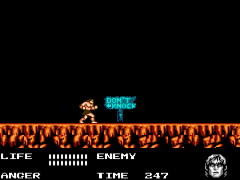
Werewolf – The Last Warrior (Europe)
0 2 1
Werewolf – The Last Warrior (Europe) is a classic NES action-platformer that challenges players to navigate a dangerous world filled with enemies and obstacles. As a well-loved title from the NES era, it offers a straightforward yet demanding experience that appeals to fans of retro gaming and those seeking a tough platform adventure. This game runs directly in your browser, so you can enjoy its pixelated action without any downloads or setup, making it easy to jump in and play quickly.
Getting Into Werewolf – The Last Warrior
The gameplay centers on controlling a lone hero through multiple levels filled with enemies, hazards, and platforming sections. The main idea is to run, jump, and defeat enemies using different attack methods, all while avoiding damage and navigating tricky stage layouts. Each time you start a level, your goal is to clear enemies, dodge traps, and reach the exit within a set time or limited lives.
This NES classic emphasizes precise movement and timing. As you progress, the difficulty increases with tougher foes and more complex platforming. The game follows a mostly linear path, with each level introducing new environments and challenges. While it doesn’t have modern save features, its simple design encourages repeated tries and learning each stage’s layout and enemy patterns.
Standout Features
Visually, Werewolf – The Last Warrior features colorful pixel art typical of its time, with backgrounds and character sprites that help tell enemies and environments apart. Its design supports fast-paced action, with visual cues for danger and item pickups. The level design gradually gets more complex, keeping players engaged and adding to the replay value.
Replaying the game depends on mastering tough sections and improving timing. The short levels and straightforward mechanics make it accessible for casual players, but the challenge is still high enough to reward persistence. Its simplicity makes it easy to jump back after a failure, encouraging multiple attempts to beat levels more efficiently or find hidden secrets.
Strategy and Tips
Practicing patience and getting familiar with enemy patterns can help improve your results. Focus on timing your jumps carefully to avoid unnecessary damage.
- Pick up power-ups and health items whenever you can to stay alive longer.
- Use the environment to your advantage, such as hiding behind objects or luring enemies into traps.
- Take your time with levels; observe enemy movements and plan your attacks.
- Revisit difficult sections repeatedly to memorize enemy positions and platforming challenges.
- Save your special attacks for tougher enemies or boss fights when they show up.
Quick Questions
How do I get started with Werewolf – The Last Warrior?
Just press start on this browser-based emulation, and you’re ready to control the hero and begin exploring the levels.
What’s a common mistake beginners make?
Many rush through levels without paying attention to enemy patterns, which can lead to unnecessary damage. Take your time to learn enemy behaviors first.
Can I play Werewolf – The Last Warrior on mobile or touch devices?
Yes, since it runs in your browser, you can play on mobile devices with touch controls, although precise movements might be a bit tricky compared to a keyboard or gamepad.
Werewolf – The Last Warrior remains a solid pick for fans of classic NES action and platformers. Its accessible gameplay and nostalgic pixel art make it a fun challenge for anyone interested in testing their skills in a browser-based game.
Related games: you can also try Columbus – Ougon no Yoake (Japan) and Dai Meiro – Meikyuu no Tatsujin (Japan), or browse all other games in the NES category.
How to Play Werewolf – The Last Warrior (Europe)?
Navigate through levels by running, jumping, and defeating enemies. Avoid hazards, collect power-ups, and reach the exit before time runs out or lives are lost.
Game Controls
Arrow keys control movement; action buttons are mapped to other keys for attacking and jumping.
You may be interested in:
-
![Zombie Hunter (Japan) [En by KingMike v1.01]](https://www.playf2p.com/wp-content/uploads/zombie-hunter-japan-en-by-kingmike-v1-01-200x120.png) NES
♥ 2
Zombie Hunter (Japan) [En by KingMike v1.01]
NES
♥ 2
Zombie Hunter (Japan) [En by KingMike v1.01] -
 NES
♥ 1
Zombie Hunter (Japan)
NES
♥ 1
Zombie Hunter (Japan) -
 NES
♥ 1
Zoids Mokushiroku (Japan)
NES
♥ 1
Zoids Mokushiroku (Japan) -
 NES
♥ 2
Zoids 2 – Zenebas no Gyakushuu (Japan)
NES
♥ 2
Zoids 2 – Zenebas no Gyakushuu (Japan) -
 NES
♥ 1
Zoids – Chuuou Tairiku no Tatakai (Japan)
NES
♥ 1
Zoids – Chuuou Tairiku no Tatakai (Japan) -
 NES
♥ 11
Zippy Race (Japan)
NES
♥ 11
Zippy Race (Japan) -
 NES
♥ 1
Zhen Ben Xi You Ji (Asia) (Unl)
NES
♥ 1
Zhen Ben Xi You Ji (Asia) (Unl) -
 NES
♥ 1
Zenbei!! Pro Basket (Japan)
NES
♥ 1
Zenbei!! Pro Basket (Japan)
Comments (0)
No comments yet. Be the first to comment!