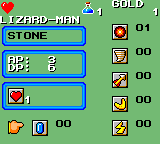
Wonder Boy III – The Dragon’s Trap (USA, Europe) (Beta)
0 2 0
Wonder Boy III – The Dragon’s Trap (USA, Europe) (Beta) is a classic Game Gear game that’s been recreated here for browser play. If you like action-platformers with pixel art that brings back memories and a sense of discovery, this game offers a satisfying experience. It stays true to the Game Gear style with simple mechanics and charming visuals, making it a good choice for fans of retro gaming.
Getting Into Wonder Boy III – The Dragon’s Trap
The main gameplay involves exploring a large world filled with enemies and platform challenges. You control a character who can change into different creatures, each with special abilities needed to move through various areas. The game mixes combat, jumping, and puzzles. Usually, players explore new zones, fight bosses, and gather items that help with transformations and progress.
This game is meant for solo play, focusing on exploring and overcoming obstacles. Your goal is to move through interconnected levels, defeat bosses, and unlock new skills. The difficulty gradually increases, so careful timing and smart use of transformations are key. As a classic from the Game Gear era, it has simple controls that rely on timing and recognizing patterns, making it accessible but still challenging for newcomers.
Standout Features
One of the most noticeable parts of Wonder Boy III is its smooth pixel art, which still looks good today and clearly shows different creature forms and environments. The game’s system centers on transforming into various creatures, each with abilities like flying, swimming, or attacking. This keeps gameplay interesting and encourages trying different forms. It also adds replay value, since players can revisit earlier areas with new forms to find secrets or reach hidden spots.
Playing again and again is encouraged by multiple endings and the satisfaction of mastering each transformation. The soundtrack and sound effects match the pixel visuals, creating a nostalgic feel. As you learn new abilities, you might go back to earlier levels to explore areas you couldn’t access before, making the game feel more expansive despite its simple core mechanics.
Strategy and Tips
Having a plan for exploring different zones can help progress go more smoothly. Focus on mastering each transformation to solve puzzles and fight enemies efficiently.
- Try out different creature forms early to learn what works best in each environment.
- Keep an eye on color cues and visual hints that show where transformations or items are hidden.
- Explore thoroughly—return to earlier levels with new abilities to find secrets and unlock new paths.
- Save your game often, especially after beating bosses or gaining new forms.
- Keep an eye on your health by collecting food or health pickups scattered around levels to avoid game overs.
Quick Questions
How do I switch between character forms?
You change by finding specific items or locations that transform you, unlocking new abilities needed to move forward. Try different forms to see what helps most in each situation.
What’s a common mistake for beginners?
Jumping into tough sections without exploring and getting the right transformations first can be frustrating. Take your time to find the right form for each challenge.
Can I play Wonder Boy III on mobile or touch devices?
This browser version works well on both desktop and mobile devices with touch support, so you can start playing directly in your browser without downloads or installs.
Wonder Boy III – The Dragon’s Trap is a well-made platformer that rewards exploration and smart use of transformations. Playing it here lets you enjoy this classic from the Game Gear era without any hassle—just straightforward, nostalgic action at your fingertips.
Related games: you can also try Sonic The Hedgehog (World) (Proto) and J.League Soccer – Dream Eleven (Japan), or browse all other games in the Game Gear category.
How to Play Wonder Boy III – The Dragon’s Trap (USA, Europe) (Beta)?
Explore the world, defeat enemies, and transform into different creatures to overcome obstacles and solve puzzles. Progress through levels, defeat bosses, and unlock new skills to reach the final goal.
Game Controls
Arrow keys control movement; action buttons are mapped to keyboard keys for jumping, attacking, and transforming.
You may be interested in:
-
 Game Gear
♥ 2
Zoop (USA)
Game Gear
♥ 2
Zoop (USA) -
 Game Gear
♥ 1
Zoop (Europe)
Game Gear
♥ 1
Zoop (Europe) -
 Game Gear
♥ 1
Zool no Yume Bouken (Japan)
Game Gear
♥ 1
Zool no Yume Bouken (Japan) -
 Game Gear
♥ 1
Zan Gear (Japan)
Game Gear
♥ 1
Zan Gear (Japan) -
![Yu Yu Hakusho 2 – Gekitou! Nanakyou no Tatakai (Japan) [En by Gaijin v1.0]](https://www.playf2p.com/wp-content/uploads/yu-yu-hakusho-2-gekitou-nanakyou-no-tatakai-japan-en-by-gaijin-v1-0-160x120.png) Game Gear
♥ 2
Yu Yu Hakusho 2 – Gekitou! Nanakyou no Tatakai (Japan) [En by Gaijin v1.0]
Game Gear
♥ 2
Yu Yu Hakusho 2 – Gekitou! Nanakyou no Tatakai (Japan) [En by Gaijin v1.0] -
 Game Gear
♥ 1
Yu Yu Hakusho 2 – Gekitou! Nanakyou no Tatakai (Japan)
Game Gear
♥ 1
Yu Yu Hakusho 2 – Gekitou! Nanakyou no Tatakai (Japan) -
 Game Gear
♥ 1
Yu Yu Hakusho – Horobishimono no Gyakushuu (Japan)
Game Gear
♥ 1
Yu Yu Hakusho – Horobishimono no Gyakushuu (Japan) -
 Game Gear
♥ 3
Yogi Bear in Yogi Bear’s Goldrush (Proto)
Game Gear
♥ 3
Yogi Bear in Yogi Bear’s Goldrush (Proto)
Comments (0)
No comments yet. Be the first to comment!