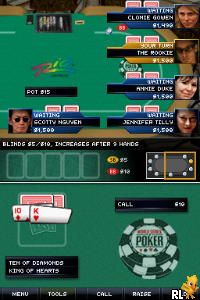
World Series of Poker 2008 – The Official Video Game – Battle for the Bracelets (USA)
0 1 0
World Series of Poker 2008 – The Official Video Game – Battle for the Bracelets (USA) is a classic Nintendo DS title that captures the tense, strategic atmosphere of high-stakes poker tournaments. As a digital take on the official series, it gives players a chance to experience the excitement of competitive poker without leaving home or visiting a casino. Designed for fans of card games and competitive play, this game translates the core elements of poker into a portable format that’s surprisingly accessible and engaging.
Why World Series of Poker 2008 – The Official Video Game – Battle for the Bracelets Is Worth Playing
This Nintendo DS classic shines through its simple presentation and authentic tournament feel. The visuals are minimal but clear, emphasizing ease of understanding over flashy graphics. The interface mimics the real-world poker experience, with familiar betting, folding, and raising mechanics that keep the game moving briskly. It appeals to both casual players looking for a quick game and dedicated fans who want a realistic simulation of tournament play. The sound design features straightforward cues that increase tension during key betting rounds, making each decision feel significant. The AI opponents are challenging enough to test your skills but predictable enough to learn from, creating a good learning curve for newcomers and experienced players alike. Playing on the DS makes it easy to fit in quick sessions or longer tournament runs.
Tips to Get Ahead
Getting comfortable early can really help in this game. Here are some practical tips:
- Watch your opponents’ betting patterns—they can tell you a lot about their hands.
- Manage your chips wisely—avoid going all-in unless you’re confident or desperate.
- Use the game’s timing to your advantage; sometimes waiting before betting can throw off your rivals.
- Practice patience—don’t feel pressured to play every hand; folding weak ones saves chips.
- Pay attention to the tournament structure—knowing when to shift strategies can help you last longer.
- Learn the game’s controls and interface thoroughly—familiarity helps you react quickly during critical moments.
Things to Know Before You Start
Before jumping in, keep these points in mind:
Is World Series of Poker 2008 – The Official Video Game – Battle for the Bracelets good for casual players?
Yes, its simple mechanics make it easy to pick up, but playing against the AI and managing strategies can challenge more dedicated players.
How long does a typical session last?
Sessions can range from quick 10-minute rounds to longer tournaments lasting half an hour or more, depending on your pace and skill level.
Is this game tough for newcomers?
The rules are straightforward, but the AI can be tough, especially in later stages, so beginners might need some practice to stay competitive.
Can I play World Series of Poker 2008 – The Official Video Game – Battle for the Bracelets offline?
Yes, once loaded, the game runs directly in your browser, giving a smooth experience without needing internet after the initial setup.
Try out this version of the World Series of Poker 2008 – the official video game – battle for the bracelets to test your poker skills and see if you can outplay the competition. Its straightforward style makes it accessible for players of all levels, offering a real taste of tournament poker right in your browser.
Related games: you can also try New Horizon – English Course 3 DS (Japan) and Sims 2, The – Pets (USA) (En,Fr,De,Es,It,Nl), or browse all other games in the Nintendo DS category.
How to Play World Series of Poker 2008 – The Official Video Game – Battle for the Bracelets (USA)?
Play poker by betting, folding, and raising to outlast opponents and win chips. The goal is to have the best hand or bluff your way to victory in tournament-style rounds.
Game Controls
Arrow keys move; Enter confirms actions; other keys handle betting and folding.
You may be interested in:
-
 Nintendo DS
♥ 1
Casper’s Scare School – Classroom Capers (USA)
Nintendo DS
♥ 1
Casper’s Scare School – Classroom Capers (USA) -
 Nintendo DS
♥ 1
Zunou Nouryoku Koujou Machine – Touch de Zunoo DS (Japan)
Nintendo DS
♥ 1
Zunou Nouryoku Koujou Machine – Touch de Zunoo DS (Japan) -
 Nintendo DS
♥ 1
Zunou ni Asekaku Game Series! Vol. 1 – Cool 104 Joker & Setline (Japan)
Nintendo DS
♥ 1
Zunou ni Asekaku Game Series! Vol. 1 – Cool 104 Joker & Setline (Japan) -
 Nintendo DS
♥ 9
Zuma’s Revenge (USA)
Nintendo DS
♥ 9
Zuma’s Revenge (USA) -
 Nintendo DS
♥ 1
Zubo (USA) (En,Fr,Es)
Nintendo DS
♥ 1
Zubo (USA) (En,Fr,Es) -
 Nintendo DS
♥ 1
Zubo (Europe) (En,Fr,De,Es,It,Nl,Sv)
Nintendo DS
♥ 1
Zubo (Europe) (En,Fr,De,Es,It,Nl,Sv) -
 Nintendo DS
♥ 1
Zorro – Quest for Justice (USA) (En,Fr,De,Es,It)
Nintendo DS
♥ 1
Zorro – Quest for Justice (USA) (En,Fr,De,Es,It) -
 Nintendo DS
♥ 1
Zorro – Quest for Justice (Europe) (En,Fr,De,Es,It)
Nintendo DS
♥ 1
Zorro – Quest for Justice (Europe) (En,Fr,De,Es,It)
Comments (0)
No comments yet. Be the first to comment!