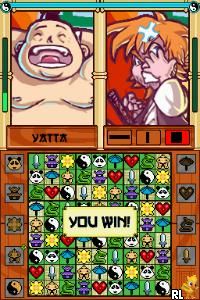
Zendoku (USA) (En,Fr,De,Es,It)
0 1 0
Zendoku (USA) (En,Fr,De,Es,It) is a puzzle game for the Nintendo DS that mixes Sudoku with a lively, competitive spirit. A familiar title from the Nintendo DS era, it offers a fresh take on the logic puzzle genre, appealing to players who enjoy brain teasers with a bit of flair. If you like solving puzzles with a strategic edge and a sense of style, Zendoku provides an experience that’s easy to pick up but still offers a challenge, whether you have a few minutes or want to spend longer working through puzzles.
Getting Into Zendoku
This Nintendo DS classic focuses on solving Sudoku puzzles, but it’s presented with a fast-paced, arcade-like feel. The game shows you a grid filled with numbers, and your task is to fill in the missing digits following standard Sudoku rules. The gameplay involves selecting numbers and placing them in the grid, all while managing a timer that adds some pressure. The mechanics are simple, but the difficulty ramps up with more complex puzzles, and there are multiplayer modes for competing against friends.
You start by choosing a difficulty level, from easy to expert, which affects the size of the grid and how much time you have. During play, quick analysis and decision-making are key—spotting conflicts and making moves under time constraints. There’s a single-player mode for practicing and improving, along with local multiplayer options to challenge others. The touch controls on the DS make selecting and placing numbers quick and intuitive, encouraging rapid gameplay suitable for short sessions or longer puzzles.
Standout Features
Zendoku’s visuals are clean and colorful, keeping the focus on the puzzle grid. Bright colors help differentiate numbers and highlight conflicts, making errors easier to spot. As you progress, you unlock new puzzle packs and visual themes, giving a sense of progression. The game’s replayability comes from the challenge of solving increasingly tough puzzles and competing in multiplayer matches against friends or AI. Different modes and difficulty levels mean it can be played repeatedly, with each session bringing new challenges.
Playing against others adds a competitive element, testing your speed and accuracy. The variety of puzzles and themes helps keep the experience fresh. Its straightforward mechanics make it accessible for newcomers and Sudoku fans alike. Overall, Zendoku offers enough depth and replay value for puzzle enthusiasts looking for a lively, engaging challenge.
Strategy and Tips
Starting with easier puzzles helps build confidence before moving on to harder grids. Managing your time effectively is important, especially in timed modes—don’t spend too long stuck on tricky sections. Pay attention to the visual cues highlighting conflicts to avoid mistakes. Practicing common Sudoku patterns can make solving faster and reduce errors. In multiplayer, focus on speed and accuracy to beat your opponent. Use hints sparingly, as relying on them too much can lessen the challenge.
- Fill in the easiest numbers first to clear out uncertain spots and make room for more complex parts.
- Use visual highlights to quickly identify conflicts or mistakes in your current placement.
- Keep an eye on the timer, but don’t rush so much that you make careless errors.
- Practice scanning rows, columns, and boxes for missing numbers to improve your solving skills.
- Switch between puzzles of different difficulties to boost both speed and precision over time.
Quick Questions
How do I get started with Zendoku?
Just pick a difficulty level and start filling in the grid with touch controls—no complicated setup needed.
What’s a common mistake beginners make?
Trying to solve the whole grid without checking conflicts often leads to errors; focus on careful placement and using visual clues.
Can I comfortably play Zendoku on a mobile device or touchscreen?
Yes, since it’s playable through your browser with touch controls, it adapts well for mobile use, making quick gameplay easy.
Zendoku offers a lively way to enjoy Sudoku on your Nintendo DS. Its simple mechanics combined with competitive features make it a solid pick for puzzle fans looking for a fun, fast-paced challenge. Playing this classic puzzle game in your browser is a convenient way to sharpen your logic skills and have some casual fun whenever you like.
Related games: you can also try 4 Elements (Europe) (Fr,De) and Tetris DS (Korea), or browse all other games in the Nintendo DS category.
How to Play Zendoku (USA) (En,Fr,De,Es,It)?
Fill the Sudoku grid by selecting numbers and placing them in empty cells, following standard rules. Complete puzzles as quickly and accurately as possible, managing time and competing in multiplayer modes.
Game Controls
Arrow keys move the cursor; Enter selects and places numbers; other keys handle menu navigation.
You may be interested in:
-
 Nintendo DS
♥ 1
Casper’s Scare School – Classroom Capers (USA)
Nintendo DS
♥ 1
Casper’s Scare School – Classroom Capers (USA) -
 Nintendo DS
♥ 1
Zunou Nouryoku Koujou Machine – Touch de Zunoo DS (Japan)
Nintendo DS
♥ 1
Zunou Nouryoku Koujou Machine – Touch de Zunoo DS (Japan) -
 Nintendo DS
♥ 1
Zunou ni Asekaku Game Series! Vol. 1 – Cool 104 Joker & Setline (Japan)
Nintendo DS
♥ 1
Zunou ni Asekaku Game Series! Vol. 1 – Cool 104 Joker & Setline (Japan) -
 Nintendo DS
♥ 9
Zuma’s Revenge (USA)
Nintendo DS
♥ 9
Zuma’s Revenge (USA) -
 Nintendo DS
♥ 1
Zubo (USA) (En,Fr,Es)
Nintendo DS
♥ 1
Zubo (USA) (En,Fr,Es) -
 Nintendo DS
♥ 1
Zubo (Europe) (En,Fr,De,Es,It,Nl,Sv)
Nintendo DS
♥ 1
Zubo (Europe) (En,Fr,De,Es,It,Nl,Sv) -
 Nintendo DS
♥ 1
Zorro – Quest for Justice (USA) (En,Fr,De,Es,It)
Nintendo DS
♥ 1
Zorro – Quest for Justice (USA) (En,Fr,De,Es,It) -
 Nintendo DS
♥ 1
Zorro – Quest for Justice (Europe) (En,Fr,De,Es,It)
Nintendo DS
♥ 1
Zorro – Quest for Justice (Europe) (En,Fr,De,Es,It)
Comments (0)
No comments yet. Be the first to comment!