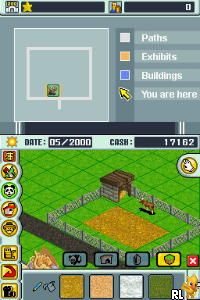
Zoo Tycoon 2 DS (USA)
0 3 2
Zoo Tycoon 2 DS (USA) is a fun Nintendo DS game that puts you in charge of running a zoo. Its simple gameplay means it’s easy for newcomers to pick up, even if you’ve never played a tycoon-style game before. The interface is familiar, and the goals are clear, so you can start building your dream zoo right away without a steep learning curve.
This game offers a relaxed yet engaging experience where you create, manage, and expand your own zoo. It’s a good pick for players who enjoy simulation games that focus on creativity and organization. The design fits well with the portable nature of the Nintendo DS, offering bite-sized tasks and quick sessions that work well during short breaks or busy days.
What Is Zoo Tycoon 2 DS?
Zoo Tycoon 2 DS is a simulation game where you’re responsible for running a zoo. Your main tasks include designing habitats, caring for different animals, and attracting visitors to boost your zoo’s reputation and income. The game encourages strategic thinking, balancing the needs of animals with visitor satisfaction, and managing your resources wisely.
You can select from various zoo locations and customize your exhibits with a wide range of animals and decorations. The gameplay centers on building and maintaining a lively zoo while keeping animals happy and visitors entertained. The controls are designed for the Nintendo DS, making it easy to navigate and manage on the go.
What Keeps You Coming Back
The game offers many animals, habitats, and customization options that inspire experimentation. As you unlock new species and decorative items, your zoo can grow more detailed, giving you fresh goals and visual appeal. The challenge of keeping animals healthy while attracting visitors adds depth and strategic choices to the experience.
Replay value comes from designing different zoo layouts and trying out various management approaches. The progression system rewards planning and long-term thinking. Many players enjoy returning to see how their zoo develops over time. Its straightforward mechanics make it easy to pause and resume, fitting well into casual gaming routines.
Handy Tips
Start small, with a manageable zoo, so you can learn how animals and visitors interact before expanding. Focus on keeping animals happy to ensure smooth operations and good reviews.
- If available, use the tutorial mode to get familiar with the basics quickly.
- Try unlocking new animals gradually so you can create suitable habitats and care for them properly.
- Keep an eye on visitor preferences and adjust exhibits to attract more guests.
- Manage your spending carefully—invest in new habitats only when your income allows.
- Experiment with different layouts and decorations to find what appeals most to visitors and animals alike.
Player FAQ
Is Zoo Tycoon 2 DS suitable for kids or new players?
Yes, the game has a simple interface and clear goals, making it accessible for younger players and those new to simulation games.
Can I play Zoo Tycoon 2 DS without an internet connection?
Absolutely. The game runs entirely offline on your Nintendo DS, so no internet connection is needed.
Is Zoo Tycoon 2 DS accessible for players with limited controls or disabilities?
The controls are straightforward, mainly using the touch screen and buttons, which makes it accessible for many players, though it does require the standard inputs of the Nintendo DS.
Overall, Zoo Tycoon 2 DS offers a friendly, approachable zoo management experience that works well for casual players. Its simple mechanics and creative options keep it interesting over multiple play sessions, making it a good choice for anyone who enjoys simulation games on the go.
Related games: you can also try Motto Hayaku! Seikaku ni! – Kazu Sense, Keisanryoku Up Training – Suutore (Japan) and Tak – The Great Juju Challenge (Europe) (En,Fr,De,Nl), or browse all other games in the Nintendo DS category.
How to Play Zoo Tycoon 2 DS (USA)?
Build and manage your zoo by creating habitats, caring for animals, and attracting visitors to grow your zoo and earn income.
Game Controls
Arrow keys move the cursor; other keys perform actions like selecting and placing items.
You may be interested in:
-
 Nintendo DS
♥ 1
Casper’s Scare School – Classroom Capers (USA)
Nintendo DS
♥ 1
Casper’s Scare School – Classroom Capers (USA) -
 Nintendo DS
♥ 1
Zunou Nouryoku Koujou Machine – Touch de Zunoo DS (Japan)
Nintendo DS
♥ 1
Zunou Nouryoku Koujou Machine – Touch de Zunoo DS (Japan) -
 Nintendo DS
♥ 1
Zunou ni Asekaku Game Series! Vol. 1 – Cool 104 Joker & Setline (Japan)
Nintendo DS
♥ 1
Zunou ni Asekaku Game Series! Vol. 1 – Cool 104 Joker & Setline (Japan) -
 Nintendo DS
♥ 9
Zuma’s Revenge (USA)
Nintendo DS
♥ 9
Zuma’s Revenge (USA) -
 Nintendo DS
♥ 1
Zubo (USA) (En,Fr,Es)
Nintendo DS
♥ 1
Zubo (USA) (En,Fr,Es) -
 Nintendo DS
♥ 1
Zubo (Europe) (En,Fr,De,Es,It,Nl,Sv)
Nintendo DS
♥ 1
Zubo (Europe) (En,Fr,De,Es,It,Nl,Sv) -
 Nintendo DS
♥ 1
Zorro – Quest for Justice (USA) (En,Fr,De,Es,It)
Nintendo DS
♥ 1
Zorro – Quest for Justice (USA) (En,Fr,De,Es,It) -
 Nintendo DS
♥ 1
Zorro – Quest for Justice (Europe) (En,Fr,De,Es,It)
Nintendo DS
♥ 1
Zorro – Quest for Justice (Europe) (En,Fr,De,Es,It)
Comments (0)
No comments yet. Be the first to comment!