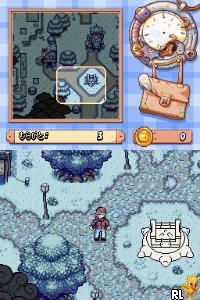
Drawn to Life – Kamisama no Marionette (Japan)
0 1 0
Drawn to Life – Kamisama no Marionette (Japan) is a Nintendo DS game that mixes drawing with platforming. It offers a different kind of experience for those who enjoy combining creativity with action. If you like artistic gameplay and nostalgic handheld titles, especially fans of the Nintendo DS, this one might catch your interest. Keep in mind, the Japanese version could have language barriers for non-Japanese speakers, so it’s best for players comfortable with some language immersion or who enjoy exploring games in their original language.
Getting Into Drawn to Life – Kamisama no Marionette
The game centers around drawing your own characters, backgrounds, and objects, which then come to life within the levels. You explore stages, overcome obstacles, and fight enemies, with drawing as both a creative outlet and a tool for gameplay. You’ll spend time sketching new elements, testing them out, and refining your designs based on how they perform.
As you progress, you’ll move through levels that test your drawing skills and platforming reflexes. The game encourages trying different ideas—if a drawing doesn’t work well, you can erase and redraw it. Progress depends on completing levels, opening new areas, and improving your drawing skills. Its pacing is steady, making it suitable for quick sessions or longer creative play. Objectives are clear, and the difficulty is gentle enough for casual players.
Standout Features
The visual style is simple but charming. The drawings you create are pixel-perfect and blend smoothly into the colorful backgrounds. This handcrafted look highlights creativity and makes each player’s experience feel personal. The game also introduces new tools and drawing options as you go, encouraging you to keep experimenting and developing your skills.
Replaying levels is rewarding because you can try designing different characters and objects, and improve your drawings to tackle challenges more effectively. Its mix of artistic expression and platforming makes it appealing to those who want a creative twist on traditional gameplay.
Strategy and Tips
Start with basic shapes for your drawings; complex designs can be tricky to execute during gameplay. Focus on clear outlines so your creations work well in levels. Don’t be afraid to erase and redraw—refining sketches can make a big difference in how well they perform.
- Save your drawings often to avoid losing progress after mistakes or crashes.
- Pay attention to how different drawings interact with obstacles—some work better than others.
- Use tutorials or practice levels to get comfortable with drawing controls and mechanics.
- Notice the level layout; some parts need specific tools or designs to move forward smoothly.
- If available, try using colors and shading to make your designs more visible and creative.
Quick Questions
How do I start drawing in the game?
Pick a simple object or character in the drawing menu, then test it out in a level to see how it interacts with gameplay.
What’s a common mistake for beginners?
Trying to create overly complicated drawings that are hard to execute quickly; starting with simple sketches can help.
Can I play this game on mobile or touch devices?
The game can run in your browser here, but drawing is optimized for the DS stylus. Touch controls can work but might be less precise for detailed drawings.
Drawn to Life – Kamisama no Marionette offers a creative platforming experience with easy controls and a focus on drawing. Its combination of artistic freedom and level exploration makes for an engaging challenge, all playable directly in your browser for free.
Related games: you can also try Are You Smarter than a 5th Grader – Game Time (USA) and Build-A-Bear Workshop – Welcome to Hugsville (USA) (En,Fr,Es), or browse all other games in the Nintendo DS category.
How to Play Drawn to Life – Kamisama no Marionette (Japan)?
Draw and design characters and objects, then use them to explore levels, overcome obstacles, and defeat enemies. Improve your drawings through trial and error to progress through the game.
Game Controls
Arrow keys for movement; space or Enter for actions; drawing with mouse or keyboard input.
You may be interested in:
-
 Nintendo DS
♥ 1
Casper’s Scare School – Classroom Capers (USA)
Nintendo DS
♥ 1
Casper’s Scare School – Classroom Capers (USA) -
 Nintendo DS
♥ 1
Zunou Nouryoku Koujou Machine – Touch de Zunoo DS (Japan)
Nintendo DS
♥ 1
Zunou Nouryoku Koujou Machine – Touch de Zunoo DS (Japan) -
 Nintendo DS
♥ 1
Zunou ni Asekaku Game Series! Vol. 1 – Cool 104 Joker & Setline (Japan)
Nintendo DS
♥ 1
Zunou ni Asekaku Game Series! Vol. 1 – Cool 104 Joker & Setline (Japan) -
 Nintendo DS
♥ 9
Zuma’s Revenge (USA)
Nintendo DS
♥ 9
Zuma’s Revenge (USA) -
 Nintendo DS
♥ 1
Zubo (USA) (En,Fr,Es)
Nintendo DS
♥ 1
Zubo (USA) (En,Fr,Es) -
 Nintendo DS
♥ 1
Zubo (Europe) (En,Fr,De,Es,It,Nl,Sv)
Nintendo DS
♥ 1
Zubo (Europe) (En,Fr,De,Es,It,Nl,Sv) -
 Nintendo DS
♥ 1
Zorro – Quest for Justice (USA) (En,Fr,De,Es,It)
Nintendo DS
♥ 1
Zorro – Quest for Justice (USA) (En,Fr,De,Es,It) -
 Nintendo DS
♥ 1
Zorro – Quest for Justice (Europe) (En,Fr,De,Es,It)
Nintendo DS
♥ 1
Zorro – Quest for Justice (Europe) (En,Fr,De,Es,It)
Comments (0)
No comments yet. Be the first to comment!