Batman (World)
0 24 1
Batman (World) is a classic Game Boy action game that offers a straightforward yet engaging experience for fans of early handheld titles. Designed for the original Game Boy’s monochrome screen, it challenges players to navigate levels, confront enemies, and complete objectives as the Dark Knight. This game appeals to those who enjoy retro gameplay and simple mechanics, providing a nostalgic taste of the Game Boy era right in your browser.
Getting Into Batman
The main gameplay involves controlling Batman through side-scrolling action sequences. The game mostly focuses on moving from left to right, avoiding obstacles, defeating enemies, and reaching the end of each level. You’ll face different enemy types that require timing and strategic movement to get past. There’s no complicated story; instead, it relies on quick reflexes and pattern recognition. Each playthrough usually involves going through multiple levels, with the goal of completing objectives before your lives run out.
Since it’s a simple action platformer, there aren’t many mode options or branching paths. It’s a linear experience—if you fail, you try again, aiming for better times or higher scores. The difficulty gradually increases, testing your timing and precision as you learn enemy patterns and level layouts. It’s great for quick sessions or longer ones if you’re after some classic handheld action.
Standout Features
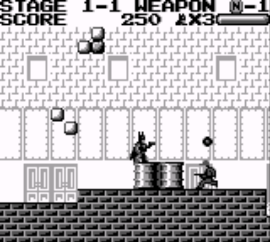
The visuals match the classic Game Boy style, with simple monochrome sprites and backgrounds. While not fancy, the design clearly shows characters and environments, making the gameplay easy to follow. The progression system is straightforward—advance through levels, defeat enemies, and avoid hazards—giving a sense of achievement with each stage. Replay value comes from mastering levels, improving scores, or beating your previous times.
As a game from the Game Boy era, its challenge encourages multiple attempts. The lack of complex storylines or unlockables keeps the focus on playing well. Its simplicity makes it easy for newcomers, while experienced players can aim for high scores or perfect runs. Playing it straight in your browser means you can jump in anytime without extra setup or downloads.
Strategy and Tips
To get the most out of Batman, spend some time learning enemy attack patterns and timing your moves carefully. Practice helps, so familiarize yourself with each level’s layout and enemy placements to make runs smoother.
- Memorize enemy attack patterns to avoid taking damage.
- Save lives early on by avoiding risky moves until you know the level well.
- Be cautious crossing tricky platforms or hazards to prevent losing multiple lives.
- Defeat enemies quickly to clear the way without damage.
- Look for background clues that might show safe routes or hidden dangers.
- Replaying levels to improve your score or time sharpens your reflexes and awareness of level design.
Quick Questions
How do I get started with Batman?
The game loads directly in your browser—just press start and you’re ready to go. No extra setup needed.
What’s a common mistake for new players?
Many rush into levels without taking time to learn enemy patterns, which can lead to damage and early game overs. Taking it slow helps you figure out the best approach.
Can I play Batman on my mobile or touch device?
Yes, since it runs in a browser, you can enjoy it on mobile devices with touch controls, without needing downloads or emulators.
This classic Game Boy action game offers a no-fuss way to enjoy Batman’s adventures right in your browser. Its simple design and challenging gameplay make it a good pick for fans of retro handheld titles. Whether you’re just playing for fun or trying to beat your best score, it captures the feel of early portable gaming with its straightforward yet enjoyable mechanics.
Related games: you can also try America Oudan Ultra Quiz Part 3 – Champion Taikai (Japan) and Atomic Punk (USA), or browse all other games in the Game Boy category.
How to Play Batman (World)?
Move Batman left and right, jump over obstacles, and defeat enemies to reach the end of each level. Avoid hazards and learn enemy patterns to improve your score and complete levels faster.
Game Controls
Arrow keys control movement; other keys handle jumping and attacking.








Comments (0)
No comments yet. Be the first to comment!