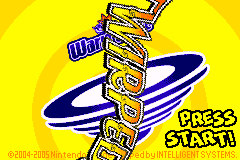
Wario Ware – Twisted! (No Gyro Fix)
0 4 7
Wario Ware – Twisted! (No Gyro Fix) is a quirky, fast-paced collection of microgames originally released for the Game Boy Advance. This classic from the GBA era combines frantic gameplay with inventive mechanics, challenging players to think and act quickly. Its focus on short, intense bursts of gameplay makes it perfect for quick sessions or quick breaks between other games, all while bringing back memories of the handheld’s heyday. The game’s unique twist is in how it uses the GBA’s rotation sensor, which, despite the “No Gyro Fix” label, still offers a distinctive experience that sets it apart from other microgame compilations.
Why Wario Ware – Twisted! Is Worth Playing
This game stands out because of how it uses the GBA’s rotation sensor, asking players to tilt or twist their device to succeed in certain microgames. This mechanic adds a fresh physical element that feels natural once you get used to it. Visually, the game keeps the colorful, cartoonish style expected from the Wario Ware series, with simple but expressive sprites that look great on the small screen. The quick pace demands sharp reflexes and fast thinking. Its soundtrack features catchy, upbeat tunes that match the chaos of the gameplay and keep your energy up as you race to complete each microgame in just a few seconds. Thanks to the variety of mini-challenges, players often find themselves laughing or groaning at the absurdity of some tasks, which is part of what makes it so fun. If you enjoy bite-sized gameplay, this collection offers countless microgames that can be finished in under a minute, making it great for short sessions or trying to beat your high score over longer playthroughs.
Tips to Get Ahead
Getting the most out of Wario Ware – Twisted! calls for quick thinking and flexibility. Here are some helpful tips:
- Pay attention to the microgame instructions; knowing what to do before acting saves time.
- Practice tilting the GBA emulator gently to get comfortable with the rotation-based microgames, since the game relies on physical motion.
- Stay calm during hectic moments; panicking can lead to mistakes instead of quick reactions.
- Focus on microgames that give you trouble; repeating them helps build muscle memory for the tilt controls.
- If there’s a pause option, use it to review instructions or regain focus during tough microgames.
- Keep your gaming sessions short if you’re aiming for high scores; exhaustion can slow you down and hurt your performance.
Things to Know Before You Start
Question?
Is Wario Ware – Twisted! tough for new players?
It can be tricky at first, especially mastering the tilt controls, but its short microgames are accessible for casual players willing to learn the mechanics.
Question?
How long does a typical session last?
Since each microgame is very brief, often just a few seconds, you can enjoy quick bursts or longer sessions if you’re trying to beat a high score.
Question?
Is this version suitable for all ages?
Yes, with simple visuals and humorous microgames, it works for players of all ages. Younger children might need some help with the tilt controls at first.
Question?
Can I play Wario Ware – Twisted! here without downloading anything?
Definitely. The game runs directly in your browser via an emulator, so you can start playing right away without any hassle.
This game offers a fun dose of chaos that rewards quick reactions and adaptability. The twist on the microgame format, along with the vintage GBA charm, makes Wario Ware – Twisted! worth trying for fans of fast, quirky challenges. Whether you’re just looking for a quick challenge or aiming for a high score, there’s plenty to enjoy. Jump into this browser version and see how well you can handle the microgame frenzy of Wario Ware – Twisted!
Related games: you can also try Lara Croft Tomb Raider – The Prophecy (J)(Mugs) and Pokemon Clover v1.3, or browse all other games in the Game Boy Advance category.
How to Play Wario Ware – Twisted! (No Gyro Fix)?
Complete each microgame quickly by following on-screen instructions, often tilting or twisting your device to succeed. React fast and stay calm to beat your high score in this fast-paced collection.
Game Controls
Arrow keys act as the D-pad; Enter is Start; on-screen mapped keys handle the action buttons
You may be interested in:
-
 Game Boy Advance
♥ 19
Wolfenstein 3D (U)(Mode7)
Game Boy Advance
♥ 19
Wolfenstein 3D (U)(Mode7) -
 Game Boy Advance
♥ 10
Wolfenstein 3D (E)(wC)
Game Boy Advance
♥ 10
Wolfenstein 3D (E)(wC) -
 Game Boy Advance
♥ 1
Wizardry Summoner (J)(Lord Moyne)
Game Boy Advance
♥ 1
Wizardry Summoner (J)(Lord Moyne) -
 Game Boy Advance
♥ 11
Winx Club (U)(Trashman)
Game Boy Advance
♥ 11
Winx Club (U)(Trashman) -
 Game Boy Advance
♥ 31
WinX Club (E)(sUppLeX)
Game Boy Advance
♥ 31
WinX Club (E)(sUppLeX) -
 Game Boy Advance
♥ 1
Winx Club – Quest For The Codex (U)(Rising Sun)
Game Boy Advance
♥ 1
Winx Club – Quest For The Codex (U)(Rising Sun) -
 Game Boy Advance
♥ 8
Winx Club – Quest For The Codex (E)(Rising Sun)
Game Boy Advance
♥ 8
Winx Club – Quest For The Codex (E)(Rising Sun) -
 Game Boy Advance
♥ 2
Winter Sports (E)(sUppLeX)
Game Boy Advance
♥ 2
Winter Sports (E)(sUppLeX)
Comments (0)
No comments yet. Be the first to comment!