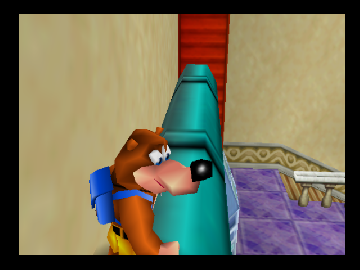
Banjo Kazooie Nostalgia 64 v1.1
0 4 1
Banjo Kazooie Nostalgia 64 v1.1 is a browser-based version of a classic Nintendo 64 platformer that many gamers fondly remember from childhood. If you enjoy 3D platformers, this game takes you through colorful worlds filled with puzzles, collectibles, and a bit of humor. Playing in your browser means no downloads or setup, so it’s easy to jump in and enjoy, no matter your age or experience with retro gaming.
Getting Into Banjo Kazooie Nostalgia 64 v1.1
The game mainly involves exploring large levels, collecting items, and solving simple puzzles to move forward. You’ll navigate vibrant environments, jump across platforms, and gather items that unlock new areas or upgrades. Most sessions start with choosing a level or hub world, then moving through stages that test your timing and exploration skills. The controls are straightforward, making it easy for newcomers to pick up and play without much hassle.
As you progress, completing objectives like gathering a set number of items or defeating certain enemies unlocks new areas. The game doesn’t focus heavily on combat but emphasizes exploration and collection. Since it runs right in your browser, you can play quick sessions or spend more time uncovering secrets. Many players enjoy revisiting levels to find hidden items or improve their times, which keeps the game interesting over time.
Standout Features
This game has colorful, cartoon-style visuals that reflect the playful spirit of the Nintendo 64 era. Each level offers different themes and challenges, keeping exploration fresh. As you go further, you’ll unlock new abilities and items that help you navigate levels more easily or find hidden spots, adding more layers to the gameplay.
There’s good replay value thanks to the focus on collections and exploration. Many levels hide secrets and pathways, rewarding players who return to explore everything. The progression system, combined with charming visuals and simple mechanics, encourages trying to complete everything 100%. Since it runs in your browser, you can jump back in whenever you want a quick nostalgic visit.
Strategy and Tips
When you start, explore each level thoroughly to find hidden items. Collectibles tend to be tucked away in tricky spots, so patience helps. Upgrading abilities early can make later sections easier.
- Complete main objectives first, then go back for optional collectibles to make progress smoother.
- Use upgrades or abilities to access new areas or solve puzzles more easily.
- Pay attention to level layouts; secrets are often behind doors or behind breakable objects.
- Manage your health and special items to avoid getting stuck on tough sections.
- After unlocking new abilities, revisit levels to find secrets or shortcuts you couldn’t reach before.
Quick Questions
How do I start playing Banjo Kazooie Nostalgia 64 v1.1?
The game loads right in your browser. Just click to start, then choose a level or begin a new game. No downloads needed.
What’s a common mistake for new players?
Many overlook exploring every part of a level, missing hidden collectibles or shortcuts that could make progress easier.
Can I play Banjo Kazooie Nostalgia 64 v1.1 on my phone or tablet?
Yes, since it runs directly in the browser, it works on mobile devices with a touch interface. Gameplay might be smoother on a computer, though.
Banjo Kazooie Nostalgia 64 v1.1 offers a simple, friendly way to enjoy a classic Nintendo 64 platformer right in your browser. Whether you’re after quick fun or longer trips down memory lane, its accessible gameplay and charming visuals make it a nice pick for fans wanting to revisit this beloved era of gaming.
Related games: you can also try Armorines – Project S.W.A.R.M. (Europe) and Play 007 – GoldenEye (Japan), or browse all other games in the Nintendo 64 category.
How to Play Banjo Kazooie Nostalgia 64 v1.1?
Explore colorful levels, collect items, and solve puzzles to unlock new areas and upgrades in this nostalgic 3D platformer.
Game Controls
Arrow keys move, jump with a designated key, and other actions are mapped to keyboard keys.
You may be interested in:
-
 Nintendo 64
♥ 4
Banjo-Kazooie Levels in Donkey Kong 64
Nintendo 64
♥ 4
Banjo-Kazooie Levels in Donkey Kong 64 -
 Nintendo 64
♥ 3
Banjo-Kazooie Legend of the Crystal Jiggy
Nintendo 64
♥ 3
Banjo-Kazooie Legend of the Crystal Jiggy -
 Nintendo 64
♥ 5
Banjo-Kazooie Gruntilda’s Mask
Nintendo 64
♥ 5
Banjo-Kazooie Gruntilda’s Mask -
 Nintendo 64
♥ 1
Banjo-Kazooie FortFun v5.0
Nintendo 64
♥ 1
Banjo-Kazooie FortFun v5.0 -
 Nintendo 64
♥ 3
Banjo-Kazooie Fort Fun V4.0
Nintendo 64
♥ 3
Banjo-Kazooie Fort Fun V4.0 -
 Nintendo 64
♥ 2
Banjo-Kazooie Fort Adventure
Nintendo 64
♥ 2
Banjo-Kazooie Fort Adventure -
 Nintendo 64
♥ 1
Banjo-Kazooie Cheato’s Challenges v1.0
Nintendo 64
♥ 1
Banjo-Kazooie Cheato’s Challenges v1.0 -
 Nintendo 64
♥ 2
Banjo-Kazooie Bob-Omb Battlefield
Nintendo 64
♥ 2
Banjo-Kazooie Bob-Omb Battlefield
Comments (0)
No comments yet. Be the first to comment!