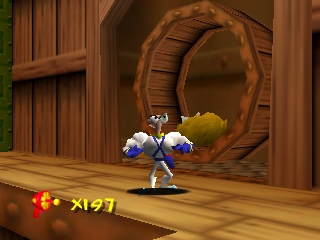
Earthworm Jim 3D (USA)
0 15 2
Earthworm Jim 3D (USA) is a classic Nintendo 64 game that brings the quirky platforming adventures of the beloved character into a three-dimensional space. Originally released on the Nintendo 64, this game offers a blend of action and humor that appeals to both nostalgic fans and new players interested in platformers from the late ’90s. Playing it in your browser provides instant access to a well-remembered title, all without any downloads or setup, making it easy to jump straight into Jim’s bizarre universe.
Getting Into Earthworm Jim 3D
The core gameplay in Earthworm Jim 3D revolves around guiding Jim through various levels filled with enemies, obstacles, and collectibles. The game combines third-person platforming with combat, requiring players to navigate tricky terrain while fighting off foes using a variety of weapons and gadgets. Levels are often linear but include enough exploration to find hidden areas or secrets, keeping the session engaging from start to finish.
A typical play session involves jumping into a level, defeating enemies, avoiding traps, and collecting items to progress. The game’s controls are straightforward, focusing on movement, jumping, and attacking, with some levels emphasizing puzzle-solving or timed challenges. Since the game was designed with the Nintendo 64 era in mind, it balances challenge with accessible gameplay, making it suitable for players of different skill levels.
Standout Features
Earthworm Jim 3D features colorful, cartoony visuals that, despite their age, still capture the playful tone of the original series. The character models and environments are designed with a sense of humor and exaggeration, giving the game a distinctive look that stands out among other platformers of its time. The game’s progression is straightforward, with each level building on the last in complexity, encouraging players to improve their skills as they go.
Replay value comes from discovering hidden areas, mastering the combat mechanics, and completing levels under specific conditions to unlock secrets. The game’s variety of enemies and levels also keeps players engaged, while the quirky humor and oddball enemies contribute to its charm. Since it’s emulated in your browser, players can revisit levels easily, aiming for higher scores or trying to find all hidden items without the hassle of installing anything.
Strategy and Tips
If you’re new to Earthworm Jim 3D, here are some tips to help you get started and avoid common pitfalls:
- Take your time exploring each level; hidden items and secrets are often tucked away in corners.
- Practice your jumps and attacks to handle enemy encounters more efficiently.
- Use the environment to your advantage, such as jumping on enemies from above or avoiding hazards by timing your movements.
- Pay attention to level objectives; some challenges require specific weapons or tactics to complete quickly.
- Save or replay levels to improve your scores and discover hidden paths you might have missed initially.
- Don’t rush through levels; patience often leads to better outcomes and fewer mistakes.
Quick Questions
How do I get started playing Earthworm Jim 3D in my browser?
You simply click to load the game on this page, and it runs instantly without any downloads or setup. It’s designed for easy access and quick gameplay sessions.
What is the most common mistake beginners make?
Many new players rush through levels without exploring thoroughly, missing out on hidden items or making unnecessary mistakes that cost lives or progress.
Can I play Earthworm Jim 3D on mobile or touch devices?
Since it runs in your browser, it’s playable on mobile devices with a touchscreen, though controls may be less precise than on a keyboard or controller, which can affect gameplay experience.
Earthworm Jim 3D keeps its charm as a colorful, quirky platformer with simple mechanics and a memorable sense of humor. Playing it in your browser makes it easy to enjoy this classic from the Nintendo 64 era, whether you’re revisiting old favorites or discovering it for the first time.
Related games: you can also try Chao Bandstand and All-Star Baseball 99 (Europe), or browse all other games in the Nintendo 64 category.
How to Play Earthworm Jim 3D (USA)?
Guide Jim through levels by jumping, fighting enemies, and collecting items. Clear obstacles and defeat bosses to progress, using simple movement and attack actions to complete each stage.
Game Controls
Arrow keys for movement; space or Z for jump and attack; other keys for actions.
You may be interested in:
-
 Nintendo 64
♥ 12
F-1 World Grand Prix (USA)
Nintendo 64
♥ 12
F-1 World Grand Prix (USA) -
 Nintendo 64
♥ 2
F-1 World Grand Prix (Japan)
Nintendo 64
♥ 2
F-1 World Grand Prix (Japan) -
 Nintendo 64
♥ 2
F-1 World Grand Prix (Germany)
Nintendo 64
♥ 2
F-1 World Grand Prix (Germany) -
 Nintendo 64
♥ 3
F-1 World Grand Prix (France)
Nintendo 64
♥ 3
F-1 World Grand Prix (France) -
 Nintendo 64
♥ 6
F-1 World Grand Prix (Europe)
Nintendo 64
♥ 6
F-1 World Grand Prix (Europe) -
 Nintendo 64
♥ 5
Extreme-G XG2 (USA)
Nintendo 64
♥ 5
Extreme-G XG2 (USA) -
 Nintendo 64
♥ 1
Extreme-G XG2 (Japan)
Nintendo 64
♥ 1
Extreme-G XG2 (Japan) -
 Nintendo 64
♥ 1
Extreme-G XG2 (Europe) (En,Fr,De,Es,It)
Nintendo 64
♥ 1
Extreme-G XG2 (Europe) (En,Fr,De,Es,It)
Comments (0)
No comments yet. Be the first to comment!