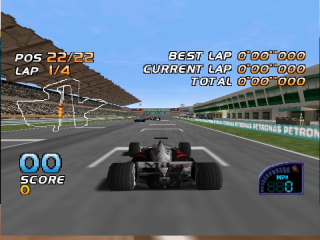
F1 Racing Championship (Brazil) (En,Fr)
0 4 1
F1 Racing Championship (Brazil) (En,Fr) is a classic Nintendo 64 racing game that captures the thrill of Formula 1 racing from the late ’90s. It’s a straightforward game suited for fans of motorsport who want to race on iconic tracks without complicated mechanics or story modes. Running directly in your browser, this emulated version makes it easy to get into the action without any downloads or setup. If you enjoy fast-paced racing focused on skillful driving and track mastery, this game offers a good amount of competitive fun.
Getting Into F1 Racing Championship
The main gameplay involves racing through a series of circuits, including the well-known Brazilian Grand Prix track. You pick your car and try to beat other drivers in quick races, relying on precision and timing. The handling aims for realism for its time, so players need to brake at the right moments and navigate corners smoothly. Races are usually short but intense, testing your consistency and quick reflexes.
Modes are simple, mainly involving single races or time trials. During a session, you choose your car, select a track, and race against AI opponents. The game doesn’t feature complex career modes or extensive customization, but it rewards players who learn each circuit’s nuances. As you improve, you’ll get better at anticipating turns and managing your speed, which helps you set better times and climb the standings.
Standout Features
This Nintendo 64 classic has 3D visuals that, while modest by today’s standards, effectively convey the sense of speed and atmosphere of Formula 1 racing. The tracks are detailed enough to recognize key corners and landmarks, giving players a familiar feeling with each circuit. Effects like motion blur and weather are minimal but help make the high-speed sections feel more immersive.
Progression in the game mainly involves improving lap times and mastering each track. Since it features a limited number of circuits, replay value depends on refining your skills and competing for the best times. Its simple design makes it accessible to newcomers but still offers enough challenge for experienced racers to improve. The in-browser version makes it easy to start playing right away, encouraging quick retries and consistent practice.
Strategy and Tips
Focusing on smooth driving and precise braking is key to doing well. Here are some tips:
- Brake before entering corners; late braking can lead to control issues and lost time.
- Stick to the racing line to keep your speed steady through turns.
- Ease into acceleration out of corners to avoid spinning or losing grip.
- Practice each track to memorize sharp turns and tricky spots.
- If weather affects gameplay, adapt your approach accordingly.
- Don’t push your car too hard; controlled speed often beats aggressive driving.
Quick Questions
How do I get started if I’ve never played F1 Racing Championship before?
Choose your race mode and track, then start practicing to get a feel for the controls and layout.
What is a common mistake beginners make?
Many tend to brake too late or too early, which wastes time or causes spins. Focus on smooth, early braking and learning each corner.
Can I play F1 Racing Championship on a mobile device or touch screen?
This browser version works best on desktop, but it might run on mobile browsers with some difficulty. For better control, a keyboard or gamepad is recommended if supported.
F1 Racing Championship offers quick, skill-based racing that rewards practice and precision. It’s a straightforward way to enjoy the essence of Formula 1 racing without fuss. Playing it directly in your browser makes it easy to jump into the fun whenever you want, no downloads needed.
Related games: you can also try Bokujou Monogatari 2 (Japan) (Rev A) and Chester the Otter, or browse all other games in the Nintendo 64 category.
How to Play F1 Racing Championship (Brazil) (En,Fr)?
Choose your car and race on Brazilian circuits, aiming to beat AI opponents by mastering turns and maintaining speed through skillful driving and precise braking.
Game Controls
Arrow keys control the car; other keys handle acceleration, braking, and gear shifts.
You may be interested in:
-
 Nintendo 64
♥ 28
Mega Man 64 (USA)
Nintendo 64
♥ 28
Mega Man 64 (USA) -
 Nintendo 64
♥ 3
Matrix Mario
Nintendo 64
♥ 3
Matrix Mario -
 Nintendo 64
♥ 4
Maro Kart 64 – Lakitu Pride Flag Mod
Nintendo 64
♥ 4
Maro Kart 64 – Lakitu Pride Flag Mod -
 Nintendo 64
♥ 1
Maro Kart 64 – Fly Cam Mod
Nintendo 64
♥ 1
Maro Kart 64 – Fly Cam Mod -
 Nintendo 64
♥ 2
MarioVania: Simpleny of the Night
Nintendo 64
♥ 2
MarioVania: Simpleny of the Night -
 Nintendo 64
♥ 1
Mario’s Typhoon Folly
Nintendo 64
♥ 1
Mario’s Typhoon Folly -
 Nintendo 64
♥ 8
Mario’s Nightmare 64 (v1.1) (English)
Nintendo 64
♥ 8
Mario’s Nightmare 64 (v1.1) (English) -
 Nintendo 64
♥ 1
Mario’s Mafia Misadventure
Nintendo 64
♥ 1
Mario’s Mafia Misadventure
Comments (0)
No comments yet. Be the first to comment!