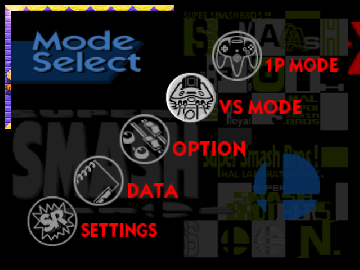
Smash Remix 1.2.1
0 36 4
Smash Remix 1.2.1 is a classic Nintendo 64 fighting game that you can play directly in your browser. If you enjoy competitive battles with simple yet strategic gameplay, this version offers a nostalgic multiplayer experience. It’s great for fans of old-school console fighters who want to enjoy familiar mechanics without downloading anything or dealing with complex setup. Playing online makes it easy to jump into quick matches or longer sessions without leaving your browser window.
Getting Into Smash Remix 1.2.1
The main idea behind Smash Remix 1.2.1 is one-on-one battles where players control characters to fight until their opponent’s health runs out. Matches are quick and focus on timing, positioning, and choosing the right moves. The game has a straightforward combat system, making it easy for newcomers but still offering enough depth for experienced players. You pick a character, then fight in a small arena, trying to reduce your opponent’s health to win. You can do quick matches just for fun or keep playing to sharpen your skills.
The game supports multiplayer, so you can challenge a friend locally or test your skills against the computer. The controls are simple—mostly a few buttons for attacks, jumps, or defenses. Rounds are usually just a few minutes long, which is perfect for a quick break or playing multiple times in a row. It runs smoothly right in your browser, with no extra software needed, making it accessible for fans of the genre.
Standout Features
The pixel art style of Smash Remix 1.2.1 stays true to the Nintendo 64 days, with colorful arenas and clear character sprites. While it doesn’t push modern graphics, the visuals give a nostalgic feel that many players enjoy. The design emphasizes clarity, so recognizing moves during a fight is easy. Its simple presentation helps you focus on the gameplay, without getting distracted by complicated menus or mechanics.
There’s plenty of replay value thanks to the variety of characters and arenas, plus the fast, competitive fights. Since matches are quick and intense, players often come back to improve their skills or try out new strategies. Playing against friends or AI keeps the game fresh. Its simplicity makes it suitable for casual play, but mastering timing and tactics adds layers of challenge that keep things interesting over time.
Strategy and Tips
Getting the most out of Smash Remix 1.2.1 means timing your attacks and defenses well. Pay attention to your opponent’s moves to avoid unnecessary damage.
- Start by trying basic attacks to learn each character’s strengths and weaknesses before moving on to more advanced combos.
- Use jumps and defensive moves to dodge strong attacks and create chances for counterattacks.
- Stick to small arenas so it’s easier to control the distance between you and your opponent.
- Practice timing your hits to land when opponents are recovering or vulnerable.
- Try out different characters and arena layouts to find what suits your style and keep things fresh.
Quick Questions
How do I get started with Smash Remix 1.2.1?
Just load the game in your browser, pick your character and arena, and start fighting. No downloads needed.
What’s a common mistake beginners make?
Many players spam basic attacks without paying attention to timing or defense. Focus on reading your opponent’s moves and reacting accordingly.
Can I play Smash Remix 1.2.1 on a mobile device?
Yes, it runs smoothly in your browser on mobile devices with touch controls, so you can enjoy it anywhere without extra apps.
Smash Remix 1.2.1 offers a simple but engaging fighting experience based on the Nintendo 64 classic. Its accessible gameplay and browser format make it easy to enjoy quick multiplayer matches or practice your skills whenever you like.
Related games: you can also try Bowser's Dank Rave 3 (Chaos Edition) and Low Poly Promo Models (Mario), or browse all other games in the Nintendo 64 category.
How to Play Smash Remix 1.2.1?
Choose a character and fight against an opponent, aiming to reduce their health to win. Use timing, positioning, and moves to outplay your opponent in quick, strategic battles.
Game Controls
Arrow keys control movement; action buttons are mapped to keyboard keys for attacks, jumps, and defenses.
You may be interested in:
-
 Nintendo 64
♥ 3
Zool – Majuu Tsukai Densetsu (Japan)
Nintendo 64
♥ 3
Zool – Majuu Tsukai Densetsu (Japan) -
 Nintendo 64
♥ 3
Zero The Jackal 64
Nintendo 64
♥ 3
Zero The Jackal 64 -
 Nintendo 64
♥ 5
Zelda’s Birthday
Nintendo 64
♥ 5
Zelda’s Birthday -
 Nintendo 64
♥ 5
Zelda: The Sealed Palace 1.3
Nintendo 64
♥ 5
Zelda: The Sealed Palace 1.3 -
 Nintendo 64
♥ 6
Zelda Revival
Nintendo 64
♥ 6
Zelda Revival -
 Nintendo 64
♥ 3
Zelda Ocarina Of Time Indigo v0.1.10
Nintendo 64
♥ 3
Zelda Ocarina Of Time Indigo v0.1.10 -
 Nintendo 64
♥ 17
Zelda Ocarina Of Time Indigo v0.1.0
Nintendo 64
♥ 17
Zelda Ocarina Of Time Indigo v0.1.0 -
 Nintendo 64
♥ 10
Zelda Ocarina Of Time Indigo Chapter 2
Nintendo 64
♥ 10
Zelda Ocarina Of Time Indigo Chapter 2
Comments (0)
No comments yet. Be the first to comment!