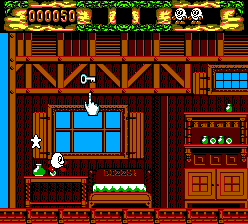
Fantastic Dizzy (Europe) (En,Fr,De,Es,It)
0 1 0
Fantastic Dizzy (Europe) (En, Fr, De, Es, It) is a memorable Master System game that combines action, adventure, and platforming into a charming puzzle-platformer experience. Released during the console’s heyday, this game draws players into a colorful world full of quirky characters and creative challenges. Its mix of exploration and light puzzles makes it appealing for those who enjoy a nostalgic yet engaging journey through a familiar 8-bit landscape.
Playing Fantastic Dizzy on this browser emulator offers a chance to experience a piece of Master System history without needing extra hardware or software. The sprite-based visuals are bright and inviting, with a simple soundtrack that adds to the whimsical mood. Its controls are straightforward, and the gameplay mechanics are accessible, making it suitable for newcomers. Hidden secrets and optional puzzles encourage replaying, and the pacing balances puzzle-solving with traditional platforming, keeping things interesting from start to finish.
Why You Might Enjoy Playing Fantastic Dizzy
The cheerful, cartoon-like art style stands out and captures the playful spirit of the series. The game’s world is full of vibrant backgrounds, amusing character designs, and inventive environments that make each area feel fresh. The soundtrack is simple but memorable, reinforcing the lighthearted tone without overpowering the gameplay.
The core appeal lies in the mix of exploration and puzzle-solving. Players move through levels, collecting items, solving puzzles, and dodging obstacles, all while searching for secrets. The platforming doesn’t require super fast reflexes, but timing and patience are key, especially with some of the trickier puzzles. The variety of tasks and whimsical story encourage replay, whether to find hidden items or improve previous runs.
Despite being an older game, Fantastic Dizzy still feels polished and rewards curiosity and experimentation. Its accessible difficulty makes it welcoming for casual players, yet it offers enough depth for fans of more complex platformers. The light puzzles and exploration encourage a more relaxed, thoughtful approach, making it a good choice for those looking for a laid-back but satisfying gaming session.
Tips to Get Started
Focus on collecting items, as they often unlock secrets or help with puzzles later on.
- Pay attention to clues in the environment; some puzzles call for specific items or actions.
- If possible, save your progress regularly, especially before challenging platform sections.
- Explore every corner of each level; secrets and alternative routes are common.
- Manage your inventory carefully—some items are essential for progressing.
- Observe enemy movements to avoid unnecessary damage or setbacks.
- Take your time with puzzles; rushing can lead to mistakes or missed details.
What to Keep in Mind Before Playing
Is Fantastic Dizzy a good choice for casual players?
Yes, its gentle difficulty and forgiving mechanics make it accessible for those looking for a light adventure.
How long does a typical session last?
Depending on how much exploring and puzzle-solving you do, sessions can last around 30 minutes to an hour.
Is it a challenging game?
It offers some puzzles and platforming challenges, but overall, it stays approachable, especially if you’re familiar with classic platformers.
Jump into this fun Dizzy adventure and explore a bright, engaging world that rewards curiosity and patience. Its simple yet charming gameplay makes it a good pick for fans of classic Master System titles—play it free in your browser and see if you can uncover all its secrets.
Related games: you can also try Astro Warrior (Japan, USA) and F-16 Fighting Falcon (USA), or browse all other games in the Master System category.
How to Play Fantastic Dizzy (Europe) (En,Fr,De,Es,It)?
Move Dizzy through levels, collect items, solve puzzles, and avoid obstacles to progress and discover secrets in this platform adventure.
Game Controls
Arrow keys control movement; action buttons are mapped to on-screen keys for jumping and interacting.
You may be interested in:
-
 Master System
♥ 6
Zool – Ninja of the ‘Nth’ Dimension (Europe)
Master System
♥ 6
Zool – Ninja of the ‘Nth’ Dimension (Europe) -
 Master System
♥ 2
Zillion II – The Tri Formation (World)
Master System
♥ 2
Zillion II – The Tri Formation (World) -
 Master System
♥ 3
Zillion (USA) (v1.1)
Master System
♥ 3
Zillion (USA) (v1.1) -
 Master System
♥ 1
Zillion (Japan, Europe) (En,Ja)
Master System
♥ 1
Zillion (Japan, Europe) (En,Ja) -
 Master System
♥ 1
Zillion (Europe) (v1.2)
Master System
♥ 1
Zillion (Europe) (v1.2) -
 Master System
♥ 1
Zaxxon 3-D (World) (Beta)
Master System
♥ 1
Zaxxon 3-D (World) (Beta) -
 Master System
♥ 1
Zaxxon 3-D (World)
Master System
♥ 1
Zaxxon 3-D (World) -
 Master System
♥ 1
Xenon 2 – Megablast (Europe) (Virgin)
Master System
♥ 1
Xenon 2 – Megablast (Europe) (Virgin)
Comments (0)
No comments yet. Be the first to comment!