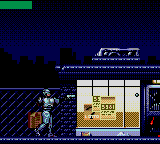
RoboCop versus The Terminator (USA, Europe)
0 2 0
RoboCop versus The Terminator (USA, Europe) is a classic Game Gear game emulated in your browser, making it easy to enjoy a piece of retro action gaming without any setup. This game captures the essence of 90s handheld gaming, offering straightforward, pick-up-and-play fun that’s great for short sessions or longer replay runs. Its familiar interface and direct gameplay style make it accessible for new players while providing enough challenge for seasoned fans of action titles.
What Is RoboCop versus The Terminator?
This game from the Game Gear era is an action title where players control a hero fighting against relentless enemies. The goal is to move through different levels, defeating foes and avoiding hazards, all within a side-scrolling environment. It emphasizes quick reflexes and strategic shooting, with the character able to move, jump, and fire to clear each stage.
RoboCop versus The Terminator offers a straightforward, arcade-style experience. The gameplay focuses on defeating enemies, dodging attacks, and moving through levels that get tougher as you go. While it doesn’t have complex storylines or intricate mechanics, it delivers solid action and a sense of progression that keeps players engaged through its challenge and pacing.
What Keeps You Coming Back
The game’s simple yet addictive gameplay loop is its main appeal. Each level introduces new enemies and obstacles, requiring players to stay alert and adapt quickly. The variety of enemy types and the increasing difficulty ensure no two runs are exactly the same. Mastering the timing of your shots and movement provides a satisfying sense of control over the game’s mechanics.
Replayability also comes from trying to beat your high scores and finish levels faster. The design encourages repeated attempts, whether to improve your performance or find the best routes through the stages. Its pixel art and sound effects evoke the authentic Game Gear feel, making it a fun choice for fans of retro action games looking for a quick, rewarding challenge.
Handy Tips
Getting the most out of RoboCop versus The Terminator is simple with these tips:
- Time your shots carefully to save ammo and deal more damage to tough enemies.
- Use jumps wisely to dodge enemy fire and reach higher platforms or safe spots.
- Observe enemy patterns to anticipate their attacks and react accordingly.
- Try to finish each level quickly to boost your score and unlock extra gameplay benefits.
- Keep moving to avoid being overwhelmed by enemies or projectiles.
- Identify the most dangerous areas and plan your route to stay safe.
Player FAQ
Is RoboCop versus The Terminator easy for new players to pick up?
Yes, its simple controls and mechanics make it accessible to players of all skill levels, including those new to retro action games.
Can I play RoboCop versus The Terminator on my phone or tablet without an app?
This browser version runs instantly on your device, so no downloads or installations are needed, making it perfect for quick gaming sessions on mobile devices.
Is RoboCop versus The Terminator suitable for younger players?
While it involves shooting and action, the pixel art and simple gameplay make it appropriate for older children. Parental discretion is advised for very young players due to mild violence.
Playing RoboCop versus The Terminator in your browser offers a neat slice of retro action that’s easy to enjoy and hard to put down. Its straightforward challenge and nostalgic design make it a good pick for fans of classic handheld titles looking for quick, satisfying gameplay.
Related games: you can also try Castle of Illusion Starring Mickey Mouse (USA, Europe) and Asterix and the Great Rescue (USA), or browse all other games in the Game Gear category.
How to Play RoboCop versus The Terminator (USA, Europe)?
Move through levels, shoot enemies, and avoid hazards to clear stages and beat your high score. Use quick reflexes and strategic shooting to progress and improve your performance.
Game Controls
Arrow keys control movement; a designated key fires; Start and Select are on-screen or mapped keys.
You may be interested in:
-
 Game Gear
♥ 1
Royal Stone – Hirakareshi Toki no Tobira (Japan)
Game Gear
♥ 1
Royal Stone – Hirakareshi Toki no Tobira (Japan) -
 Game Gear
♥ 8
Roll-chan: Mini World
Game Gear
♥ 8
Roll-chan: Mini World -
 Game Gear
♥ 2
RoboCop 3 (USA, Europe)
Game Gear
♥ 2
RoboCop 3 (USA, Europe) -
 Game Gear
♥ 15
Ristar – The Shooting Star (USA, Europe)
Game Gear
♥ 15
Ristar – The Shooting Star (USA, Europe) -
 Game Gear
♥ 1
Rise of the Robots (USA, Europe)
Game Gear
♥ 1
Rise of the Robots (USA, Europe) -
 Game Gear
♥ 1
Revenge of Drancon (USA)
Game Gear
♥ 1
Revenge of Drancon (USA) -
 Game Gear
♥ 1
Rastan Saga (Japan)
Game Gear
♥ 1
Rastan Saga (Japan) -
 Game Gear
♥ 1
R.B.I. Baseball ’94 (USA, Europe)
Game Gear
♥ 1
R.B.I. Baseball ’94 (USA, Europe)
Comments (0)
No comments yet. Be the first to comment!