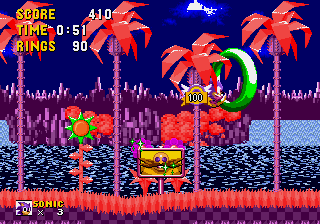
Sonic 1 – Galaxy Edition
0 4 2
Sonic 1 – Galaxy Edition is a browser-based version of the classic Genesis game that introduced Sonic the Hedgehog to players around the world. It keeps the gameplay straightforward, so you can jump in and enjoy the fast-paced action right from your browser—no downloads or installations needed. Whether you’re familiar with Sonic or trying it for the first time, this version offers a simple way to experience a piece of gaming history.
Getting Into Sonic 1 – Galaxy Edition
The game is centered around guiding Sonic through colorful levels filled with obstacles, enemies, and rings. The goal is to reach the end of each stage while collecting rings, avoiding hazards, and dealing with enemies. Speed is a core part of the experience, and getting comfortable with running and jumping smoothly makes a big difference. Each level is designed to be completed in one session, blending platforming challenges with hidden areas to find.
Most gameplay starts by choosing a level and then controlling Sonic through side-scrolling stages. Quick reflexes help you dodge spikes, pits, and enemy attacks. The core loop is simple: run, jump, gather rings, and either defeat or avoid enemies. Losing all your rings or hitting an obstacle results in losing rings or dying, but you’ll restart from the last checkpoint. The difficulty ramps up with your skill and familiarity, giving a satisfying challenge for both new players and veterans.
Standout Features
The graphics stay true to the original’s bright, pixel art style. Levels combine open spaces with narrow corridors, encouraging fast movement and exploration. The visuals are clear enough to keep track of Sonic’s position, which is crucial given how much the game emphasizes speed. The soundtrack, although not included in this browser version, captures the energetic feel of the original and boosts the sense of momentum.
The game is easy to pick up: finish levels to move forward, or replay stages to improve your score or find hidden secrets. Thanks to its quick gameplay loop and level design, it encourages multiple attempts and skill mastery. Hidden paths and shortcut opportunities reward players who want to push their skills further or hunt for every ring and collectible. Since it works directly in your browser, you can try different levels or beat your best time whenever you like.
Strategy and Tips
When starting out, focus on keeping your speed while staying alert for hazards. Learning each stage’s layout helps you avoid mistakes and find shortcuts. Timing your jumps right is key to landing on platforms and dodging obstacles.
- Watch the timer, as levels are meant to be finished quickly.
- Use Sonic’s momentum to clear long gaps without unnecessary jumps.
- Remember where power-ups and rings are to boost your score and stay safe.
- Practicing jumps and enemy avoidance in tricky sections can help you finish levels faster.
- Explore hidden areas if you want to find extra rings or bonus points.
Quick Questions
How do I start playing Sonic 1 – Galaxy Edition?
Just load the game in your browser, and it starts right away—no downloads needed. Use your keyboard or device controls to play.
What’s a common mistake beginners make?
Many rush through levels without paying attention to hazards or lose rings early on. Take your time to learn each stage’s layout and enemy positions.
Can I play Sonic 1 – Galaxy Edition on mobile or touch devices?
Yes, it runs in your browser on any device with a compatible browser, so you can play on mobile or tablets without extra setup.
Sonic 1 – Galaxy Edition makes it easy to enjoy a classic Sonic experience right in your browser. Its faithful recreation of the original platformer makes it perfect for quick sessions or nostalgic trips. Give it a try and see how fast you can run through the levels with Sonic’s signature speed.
Related games: you can also try Dungeons & Dragons – Warriors of the Eternal Sun (USA, Europe) and Mortal Kombat II Unlimited Dark Edition, or browse all other games in the Genesis category.
How to Play Sonic 1 – Galaxy Edition?
Guide Sonic through colorful levels by running, jumping, and collecting rings while avoiding obstacles and enemies to reach the end of each stage.
Game Controls
Arrow keys move Sonic; specific keys handle jumping and actions.






Comments (0)
No comments yet. Be the first to comment!