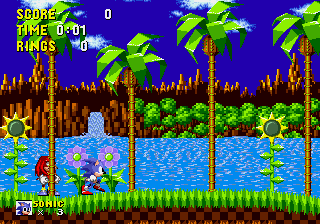
Sonic 1 Co-op
0 30 13
Sonic 1 Co-op is a classic Genesis game played directly in your browser, capturing the spirit of Sega’s famous platformer. Its pixel art landscapes and chiptune melodies bring back a sense of nostalgia, inviting players to relive the early days of side-scrolling action with a cooperative twist. The game offers a simple but engaging experience, perfect for quick sessions or longer play, all without downloads or setup—just press play and start.
Step Into the World of Sonic 1 Co-op
From the moment you begin Sonic 1 Co-op, you’re greeted with lively, colorful environments reminiscent of the original Genesis look. The visuals are sharp, with the classic sprite work that fans enjoy, set against backgrounds that range from lush green hills to mechanical factories. The soundtrack features energetic, catchy tunes that match the fast pace of gameplay, creating an atmosphere that’s both exciting and familiar.
Sound effects highlight every jump and spin dash, pulling players into a world full of adrenaline and nostalgia. The design emphasizes clear visuals so hazards, enemies, and collectibles are easy to spot. Playing on this browser emulator keeps the experience authentic, with quick responsiveness that captures the precise timing and controls of the Genesis era.
How the Gameplay Hooks You
Sonic 1 Co-op keeps players engaged with its straightforward loop of running, jumping, and dodging, driven by rhythm and pace. The progression is marked by a series of levels that test your reflexes and timing, each introducing new platforming mechanics and challenges. The cooperative element allows two players to team up, adding a layer of coordination that can turn a simple run into a shared adventure.
The game’s quick pace encourages maintaining momentum while collecting rings and avoiding enemies. Levels are designed to reward skillful navigation and quick thinking, with hidden paths and secrets encouraging exploration. The difficulty ramps up gradually, making it accessible for newcomers but still offering a satisfying challenge for experienced players. Sessions are usually short, but the game’s design invites multiple plays, especially with a friend by your side.
Pro Tips for Sonic 1 Co-op
Getting the most out of Sonic 1 Co-op involves teamwork and precision—here are some tips to help you and your partner succeed:
- Coordinate your movements to avoid blocking each other; staying close can help cover more ground.
- Use the spin dash to clear groups of enemies quickly, saving time and rings.
- Pay attention to the level layout; some routes offer shortcuts or secret zones with extra rings.
- Communicate about hazards ahead—calling out enemies or obstacles can prevent surprises.
- Keep an eye on each other’s rings; sharing or protecting them can prevent game-ending losses.
- Practice timing jumps and attacks to improve your reaction speed and level traversal.
Frequently Asked Questions
Can I play Sonic 1 Co-op for short sessions?
Yes, levels are built for quick runs, so you can jump in and out without losing momentum.
Does the game become repetitive after a while?
The variety of levels and the cooperative mechanics help keep things interesting, even if the core gameplay is simple.
Is Sonic 1 Co-op suitable for all ages?
Its simple controls and bright visuals make it accessible, though the fast pace might be challenging for very young players or beginners.
Sonic 1 Co-op offers a faithful way to enjoy a beloved classic, now available right in your browser. Its straightforward design and cooperative mode make it great for quick fun or sharing a nostalgic challenge with a friend, all without leaving the browser window.
Related games: you can also try Megaman – The Wily Wars (USA) and Brian Lara Cricket 96 (Europe) (March 1996), or browse all other games in the Genesis category.
How to Play Sonic 1 Co-op?
Run, jump, and collect rings through levels while avoiding enemies. Play cooperatively with a friend to complete stages quickly and discover secrets in this fast-paced platformer.
Game Controls
Arrow keys control movement; specific keys handle jumping and actions.







Comments (0)
No comments yet. Be the first to comment!